# 3D isosurface view
**URL:** https://discourse.paraview.org/t/3d-isosurface-view/4481
**Category:** ParaView Support
**Created:** [June 3, 2020, 4:01am UTC](https://discourse.paraview.org/t/3d-isosurface-view/4481 "2020-06-03T04:01:14Z")
**Posts on this page:** 5
**Page:** 1
### Author:  [@mfloyd](https://discourse.paraview.org/u/mfloyd)
#### Post date: [June 3, 2020, 4:01am UTC](https://discourse.paraview.org/t/3d-isosurface-view/4481/1 "2020-06-03T04:01:14Z")
Hi all,
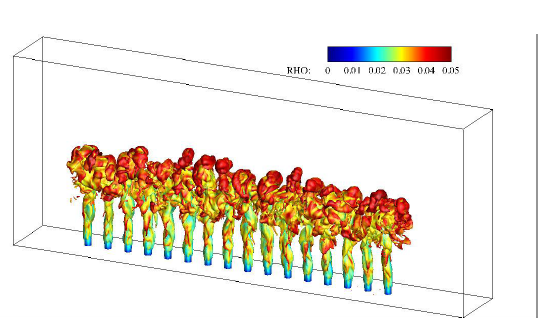
I would like to obtain a 3D isosurface from my simulation, and am looking for a similar view in the attached file which I got from the literature.
Just wondered if it is possible to get such a view from ParaView.
I appreciate your time and help.
Regards
Matt
---
### Author:  [@mwestphal](https://discourse.paraview.org/u/mwestphal)
#### Post date: [June 3, 2020, 4:16am UTC](https://discourse.paraview.org/t/3d-isosurface-view/4481/2 "2020-06-03T04:16:54Z")
Filters -\> Contour
---
### Author:  [@mfloyd](https://discourse.paraview.org/u/mfloyd)
#### Post date: [June 3, 2020, 4:40am UTC](https://discourse.paraview.org/t/3d-isosurface-view/4481/3 "2020-06-03T04:40:57Z")
Hi Mathieu,
Thank you for your quick reply.
I use those commands, however, before that I extract the block and get “CellDatatoPoint”.
Then I used to get the slice and then contour.
However, I suspect, I should not use slicing.
Now, I have realized that the issue is the boundary, which I need to make it transparent to visualize what is inside. As in the attached image in previous message, the rectangular box is transparent.
I even tried not to include the wall boundary, but in this case it does not show the flow dynamics since I deactivate the wall.
Is there any way of making the boundary transparent?
Thanks
Matt
---
### Author:  [@mwestphal](https://discourse.paraview.org/u/mwestphal)
#### Post date: [June 3, 2020, 4:49am UTC](https://discourse.paraview.org/t/3d-isosurface-view/4481/4 "2020-06-03T04:49:15Z")
The boundary is probably your initial dataset that is still visible. Just hide it by clicking on the eye in the pipeline browser.
---
### Author:  [@mfloyd](https://discourse.paraview.org/u/mfloyd)
#### Post date: [June 3, 2020, 5:05am UTC](https://discourse.paraview.org/t/3d-isosurface-view/4481/5 "2020-06-03T05:05:37Z")
I understand.
Since I use ParaView over HPCC it takes some time to show the results.
My internet connection deactivated the access.
I will try the way you suggested.
Thank you!