# 3D Navigation gizmo
**URL:** https://discourse.paraview.org/t/3d-navigation-gizmo/5743
**Category:** Development
**Tags:** proposal, vtk
**Created:** [November 7, 2020, 12:59pm UTC](https://discourse.paraview.org/t/3d-navigation-gizmo/5743 "2020-11-07T12:59:14Z")
**Posts on this page:** 4
**Page:** 1
### Author:  [@jaswantp](https://discourse.paraview.org/u/jaswantp)
#### Post date: [November 7, 2020, 12:59pm UTC](https://discourse.paraview.org/t/3d-navigation-gizmo/5743/1 "2020-11-07T12:59:14Z")
This is inspired from a comment on [this](https://discourse.paraview.org/t/paraview-animation-proposal/5440/4) proposal thread and coming from Blender.
Is there ongoing development for a camera gizmo in Paraview/VTK much like the one in Blender?
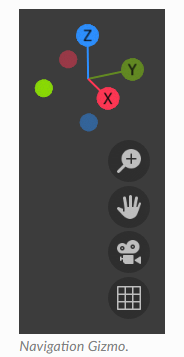
I think such a feature would boost the UX part of Paraview. (Not to mention how often I mess up the camera when I present something in Paraview to someone)
If there’s no development in that direction, I’d be happy to start it. An initial idea is to derive a vtkWidgetRepresentation and work it out from there. All the inventory (camera, interaction, representation) already exists, its just a matter of creatively glueing them together.
This proposal might be better of in VTK forums, but I figured I’d get improved feedback here on the UI/UX.
Edit: Tags
---
### Author:  [@mwestphal](https://discourse.paraview.org/u/mwestphal)
#### Post date: [November 9, 2020, 9:52am UTC](https://discourse.paraview.org/t/3d-navigation-gizmo/5743/2 "2020-11-09T09:52:13Z")
Yes please ! I wish ParaView had a gizmo like this.
Afaik, there is no ongoing development for this. If you want to give it a go, you are very much welcome.
@utkarsh.ayachit @cory.quammen : FYI.
---
### Author:  [@jaswantp](https://discourse.paraview.org/u/jaswantp)
#### Post date: [November 9, 2020, 10:19am UTC](https://discourse.paraview.org/t/3d-navigation-gizmo/5743/3 "2020-11-09T10:19:55Z")
Great! I’ll post updates to this thread.
---
### Author:  [@jaswantp](https://discourse.paraview.org/u/jaswantp)
#### Post date: [June 25, 2021, 10:48am UTC](https://discourse.paraview.org/t/3d-navigation-gizmo/5743/4 "2021-06-25T10:48:49Z")
Initially started with embedding QWidget within pqQVTKWidget but it was difficult to implement event handling. So I went ahead with 2nd gen VTK widgets framework.
I have a start on this. The work is in progress. [MR](https://gitlab.kitware.com/paraview/paraview/-/merge_requests/4995)
These were the things I needed to set it up.
1. A gizmo actor with shafts and spheres with text on it. The shafts are unit-length oriented x-y-z in right-handed coordinate system. Use vtkFreeTypeTools to render text into an image data.
ImageData-\>Texture-\>EllipticalButtonSource-\> 
1. A little renderer (LAYER=1) overlaid on top of ParaView’s render view to house our gizmo actor at the origin.
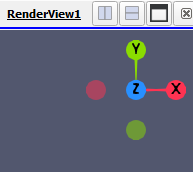
2. Rotation, highlight mechanism for the gizmo. This will process mouse movements over the little renderer and rotate the gizmo actor.
_When rotated, it looks like this:_
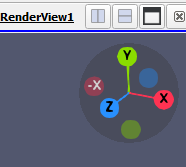
3. Control mechanism for the gizmo. Basically link gizmo’s rotation transform to ParaView’s render view’s active camera. This is proving to be harder than I thought. I tried to apply the inverse of the gizmo’s rotation transform to the camera, it rotates but not as expected.
What’s remaining:
1. Link gizmo transform to renderview’s camera transform. (Like trackball-camera)
2. Use Quaternions to lerp the renderview’s camera’s orientation to selected sphere’s direction.