# Access to multi block dataset
**URL:** https://discourse.paraview.org/t/access-to-multi-block-dataset/8606
**Category:** ParaView Support
**Created:** [December 10, 2021, 2:20pm UTC](https://discourse.paraview.org/t/access-to-multi-block-dataset/8606 "2021-12-10T14:20:02Z")
**Posts on this page:** 4
**Page:** 1
### Author:  [@Captain\_Convergence](https://discourse.paraview.org/u/Captain_Convergence)
#### Post date: [December 10, 2021, 2:20pm UTC](https://discourse.paraview.org/t/access-to-multi-block-dataset/8606/1 "2021-12-10T14:20:02Z")
Dear Support,
I am trying to pass the arrays data from a PlotOnSortedLines1 filter (where I applied previously a **Merge Blocks** filter) to python using the following approach:
FindSource1 = FindSource(‘PlotOnSortedLines1’)
data = paraview.servermanager.Fetch(FindSource1).GetBlock(0)
rc\_length\_vect[0] = block.GetPointData().GetArray(‘arc\_length’).GetValue(0)
But I get the following error:
**AttributeError: ‘vtkmodules.vtkCommonDataModel.vtkMultiBlockDataSet’ object has no attribute 'GetPointData’**
About the variable types:
**FindSource1**
\
**data**
(vtkmodules.vtkCommonDataModel.vtkMultiBlockDataSet)0x7efd96723f40
How could I pass the data from a MultiBlockDataSet to python?
Regards!
---
### Author:  [@pavel](https://discourse.paraview.org/u/pavel)
#### Post date: [December 28, 2021, 2:34pm UTC](https://discourse.paraview.org/t/access-to-multi-block-dataset/8606/2 "2021-12-28T14:34:33Z")
Hello!
Could you please clarify what is ‘block’ in your code? If it is vtkMultiBlockDataSet, you can try:
```
block.GetBlock(0).GetPointData().GetNumberOfArrays()
```
or
```
block.GetBlock(0).GetPointData().GetArray('arc_length').GetValue(0)
```
Or do you mix ‘data’ and ‘block’ variables in your code?
Best Regards,
Pavel
---
### Author:  [@Captain\_Convergence](https://discourse.paraview.org/u/Captain_Convergence)
#### Post date: [January 10, 2022, 5:09pm UTC](https://discourse.paraview.org/t/access-to-multi-block-dataset/8606/3 "2022-01-10T17:09:23Z")
Hi! Thanks for your answer!
I have spotted when the problem exactly takes place: **when running the script in parallel**.
I will try to explain it better. I have the following situation in Paraview:
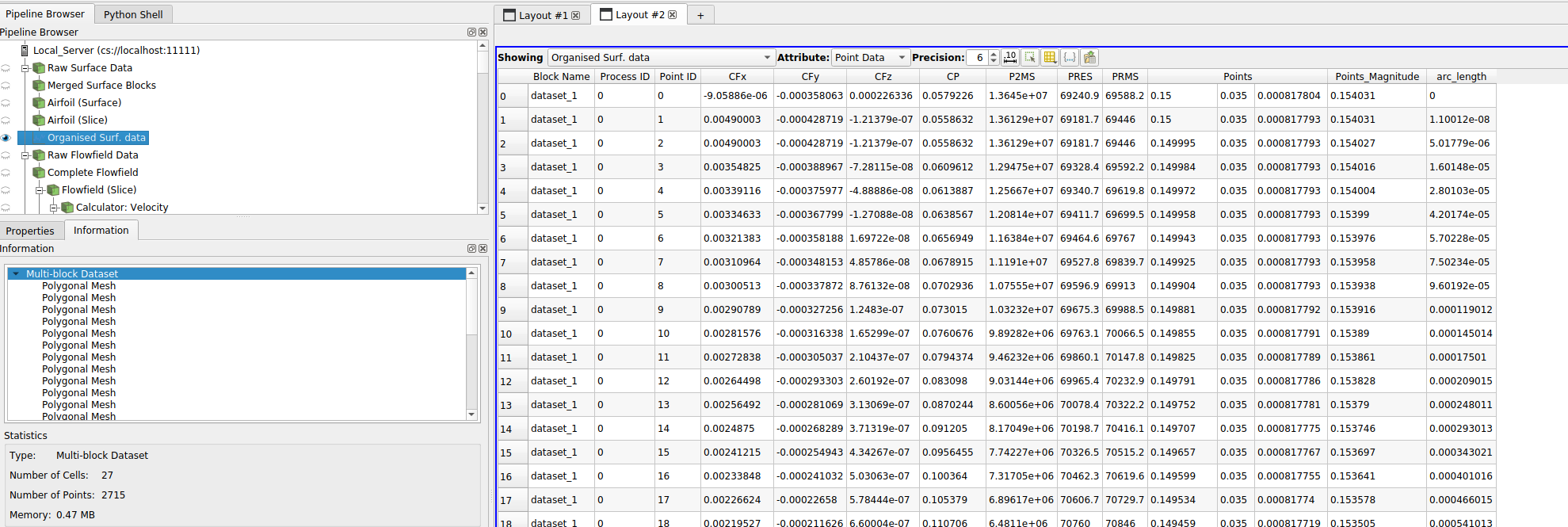
So I am trying to access to a Multi-block Dataset in my code, which looks like the following:
```auto
data = paraview.servermanager.Fetch(organised_surf_data) #*
block = data.GetBlock(0)
for i in range(npoints):
arc_length_vect[i] = block.GetPointData().GetArray('arc_length').GetValue(i)
data_pnt_idx = block.GetPoint(i)
```
#\* Note that the filter “Organised Surf. data” from the pipeline that I want to access is called “organised\_surf\_data” in my python code.
So when I execute the above code in parallel (with multiple CPUs) I get the following error :
**AttributeError: ‘vtkmodules.vtkCommonDataModel.vtkMultiBlockDataSet’ object has no attribute 'GetPointData’**
How could I avoid this problem when running the script in parallel? (it works perfectly in serial)
Thank you in advance!
---
### Author:  [@pavel](https://discourse.paraview.org/u/pavel)
#### Post date: [January 26, 2022, 9:30am UTC](https://discourse.paraview.org/t/access-to-multi-block-dataset/8606/4 "2022-01-26T09:30:22Z")
Hello!
I’m sorry for the delay with reply. If it is still actual, could you please print out the type of `block` object. Something like this:
```
data = paraview.servermanager.Fetch(organised_surf_data) #*
block = data.GetBlock(0)
print(type(block)) # <<<
for i in range(npoints):
arc_length_vect[i] = block.GetPointData().GetArray('arc_length').GetValue(i)
data_pnt_idx = block.GetPoint(i)
```
And then check the ‘Output Messages’ window in PV client and check the output in remote terminal with pvserver. Thanks.
Best Regards,
Pavel