# Add Structured indexes to unstructured grid format(vtu)
**URL:** https://discourse.paraview.org/t/add-structured-indexes-to-unstructured-grid-format-vtu/2120
**Category:** ParaView Support
**Created:** [June 26, 2019, 3:11pm UTC](https://discourse.paraview.org/t/add-structured-indexes-to-unstructured-grid-format-vtu/2120 "2019-06-26T15:11:01Z")
**Posts on this page:** 5
**Page:** 1
### Author:  [@Toorall](https://discourse.paraview.org/u/Toorall)
#### Post date: [June 26, 2019, 3:11pm UTC](https://discourse.paraview.org/t/add-structured-indexes-to-unstructured-grid-format-vtu/2120/1 "2019-06-26T15:11:01Z")
Hello everyone,
I have a structured grid, but in unstructured file format(.vtu).
It can be converted to structured format (.vts), but there are some reasons I want it to stay in unstructured form.
But I still want to use structured ijk coordinates.The grid has id values, which can be easily converted into structured ijk coordinates.
So I used calculator to add to Cell Data scalar i, j, k values, so it allows me to use “iso Volume” to slice over them. but “extract subset” does not work.
Is here any better way to add ijk indexes to unstructured grid?
Thanks in advance
Tural
---
### Author:  [@mwestphal](https://discourse.paraview.org/u/mwestphal)
#### Post date: [June 27, 2019, 11:48am UTC](https://discourse.paraview.org/t/add-structured-indexes-to-unstructured-grid-format-vtu/2120/2 "2019-06-27T11:48:47Z")
> Is here any better way to add ijk indexes to unstructured grid?
Not really.
> there are some reasons I want it to stay in unstructured form.
What are these reasons ?
---
### Author:  [@Toorall](https://discourse.paraview.org/u/Toorall)
#### Post date: [June 27, 2019, 12:53pm UTC](https://discourse.paraview.org/t/add-structured-indexes-to-unstructured-grid-format-vtu/2120/3 "2019-06-27T12:53:35Z")
I work with petroleum reservoir models, they are structured, so I can actually use vts, but some times they may have faults (offset between neighboring cells) ([PictureOfFault](https://yadi.sk/i/syLubDsMyIWU4g))
So the main reason are faults,
The second reason is that “Extract Selection” does not work properly on structured models. (Of course I can use other options like “Extract Subset” for these reasons, so, it is not the main reason, but still for extraction “Extract Selection” is much more convenient), I still need “Extract Subset” for visualization of different layers.
---
### Author:  [@mwestphal](https://discourse.paraview.org/u/mwestphal)
#### Post date: [June 27, 2019, 12:57pm UTC](https://discourse.paraview.org/t/add-structured-indexes-to-unstructured-grid-format-vtu/2120/4 "2019-06-27T12:57:41Z")
This is exactly a usecase for using vtkExplicitStructuredGrid that is basically made for reservoirs.
[https://vtk.org/doc/nightly/html/classvtkExplicitStructuredGrid.html#details](https://vtk.org/doc/nightly/html/classvtkExplicitStructuredGrid.html#details)
You can get structured grid that looks like that and have indexing.
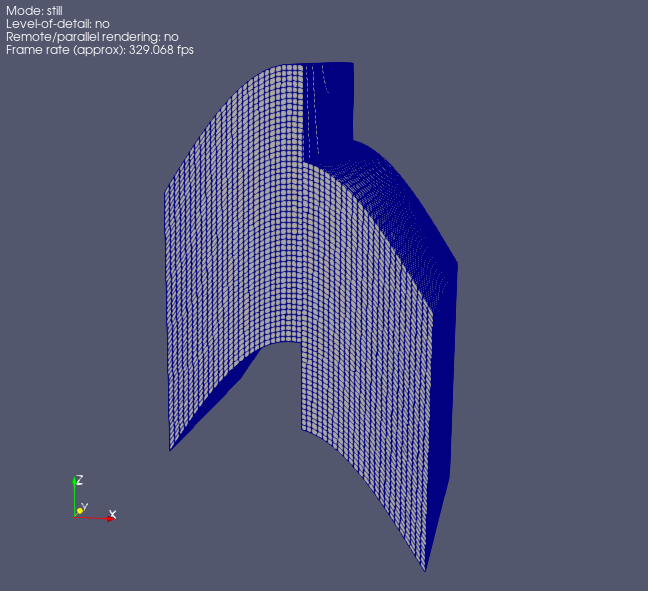
This is available in ParaView trough a plugin called “ExplicitStructuredGrid” in Tools -\> ManagePlugin.
---
### Author:  [@Toorall](https://discourse.paraview.org/u/Toorall)
#### Post date: [June 27, 2019, 1:06pm UTC](https://discourse.paraview.org/t/add-structured-indexes-to-unstructured-grid-format-vtu/2120/5 "2019-06-27T13:06:16Z")
Thank you Mathieu!
This is what I was looking for.