# Adding Nvidia Index into paraview 5.6.0 in Ubuntu
**URL:** https://discourse.paraview.org/t/adding-nvidia-index-into-paraview-5-6-0-in-ubuntu/2706
**Category:** ParaView Support
**Created:** [October 7, 2019, 1:50am UTC](https://discourse.paraview.org/t/adding-nvidia-index-into-paraview-5-6-0-in-ubuntu/2706 "2019-10-07T01:50:30Z")
**Posts on this page:** 7
**Page:** 1
### Author:  [@kit607](https://discourse.paraview.org/u/kit607)
#### Post date: [October 7, 2019, 1:50am UTC](https://discourse.paraview.org/t/adding-nvidia-index-into-paraview-5-6-0-in-ubuntu/2706/1 "2019-10-07T01:50:30Z")
Hi there. I have paraview56 installed together when installing openfoam. I have a problem with set LD\_LIBRARY\_PATH to the folder containing NVIDIA IndeX libraries. My NVIDIA IndeX libraries are in my Downloads folder and so the command is `export LD_LIBRARY_PATH=/home/keith/Downloads/nvidia-index-paraview-plugin-5.1/l/lib/`, however, when I start paraview and load the plugin, the paraview lib folder does not contain the libpvNVIDIAIndeX.so. I tried to copy the file into paraview lib folder and load the plugin but it shows an error.
May I know what is the mistake I made?
Thank you
---
### Author:  [@mwestphal](https://discourse.paraview.org/u/mwestphal)
#### Post date: [October 7, 2019, 2:07am UTC](https://discourse.paraview.org/t/adding-nvidia-index-into-paraview-5-6-0-in-ubuntu/2706/2 "2019-10-07T02:07:32Z")
That probably means that your nvidia index lib is not compatible.
Where did you download the `libpvNVIDIAIndeX.so` ?
Are you looking to use the parallel version or the single desktop version ?
FYI, you can use the single desktop version from our official release direclty :
[https://www.paraview.org/download/](https://www.paraview.org/download/)
---
### Author:  [@kit607](https://discourse.paraview.org/u/kit607)
#### Post date: [October 7, 2019, 2:21am UTC](https://discourse.paraview.org/t/adding-nvidia-index-into-paraview-5-6-0-in-ubuntu/2706/3 "2019-10-07T02:21:10Z")
Hi Mathieu,
I downloaded the nvidia index from the link requested from nvidia website and the version is for 5.1 but my paraview version is 5.6. I am looking single desktop version . May I know is the parallel version is for server usage or rendering using multiple cores?
Thank you
---
### Author:  [@mwestphal](https://discourse.paraview.org/u/mwestphal)
#### Post date: [October 7, 2019, 2:24am UTC](https://discourse.paraview.org/t/adding-nvidia-index-into-paraview-5-6-0-in-ubuntu/2706/4 "2019-10-07T02:24:21Z")
The parallel version is for server usage and requires to be paid.
nvidia does not distribute the nvidiaIndex plugin anymore, as this page can tell you :
> **[NVIDIA IndeX Plug in for ParaView](https://www.nvidia.com/en-us/data-center/index-paraview-plugin/)**
>
> IndeX takes advantage of the computational horsepower of GPUs to deliver real-time performance on large datasets by distributing visualization workloads across a GPU-accelerated cluster.
It is now packaged in ParaView release directly.
Please download our official release :
[https://www.paraview.org/download/](https://www.paraview.org/download/)
---
### Author:  [@kit607](https://discourse.paraview.org/u/kit607)
#### Post date: [October 7, 2019, 2:25pm UTC](https://discourse.paraview.org/t/adding-nvidia-index-into-paraview-5-6-0-in-ubuntu/2706/5 "2019-10-07T14:25:46Z")
Hi there. I have download the Nvidia Index plugin (nvidia-index-libs-2.3.20190820-linux.tar.bz2) from paraview website [https://www.paraview.org/files/dependencies/](https://www.paraview.org/files/dependencies/). However, when I update my LD\_LIBRARY\_PATH environment to the uncompressed Nvidia Index folder, and added `LD_LIBRARY_PATH="$LD_LIBRARY_PATH:/home/k3ith/Downloads/nvidia-index-libs-2.3.20190820-linux/lib"` to the bashrc file, I got the error.
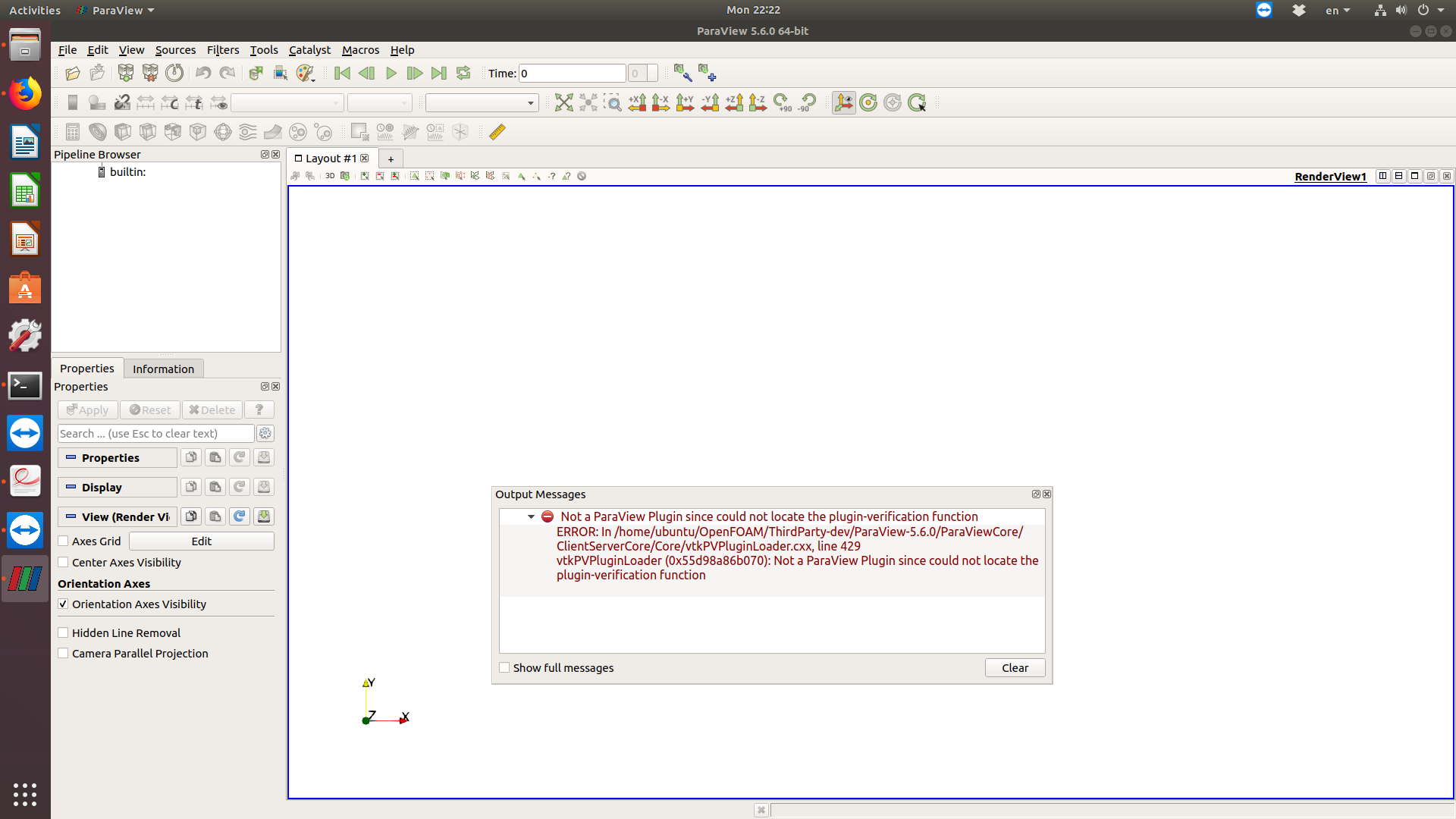
I have try to install paraview-5.6.1/ 5.6.2 but I got error core dumped. May I know how to update the library as I do not know how to do that and above command is from Google.
Thank you.
---
### Author:  [@mwestphal](https://discourse.paraview.org/u/mwestphal)
#### Post date: [October 8, 2019, 2:50am UTC](https://discourse.paraview.org/t/adding-nvidia-index-into-paraview-5-6-0-in-ubuntu/2706/6 "2019-10-08T02:50:33Z")
You do not seem to follow. the plugin is packaged within the ParaView binary release.
Please do the following steps :
- Download ParaView 5.7.0 : [https://www.paraview.org/paraview-downloads/download.php?submit=Download&version=v5.7&type=binary&os=Linux&downloadFile=ParaView-5.7.0-MPI-Linux-Python3.7-64bit.tar.gz](https://www.paraview.org/paraview-downloads/download.php?submit=Download&version=v5.7&type=binary&os=Linux&downloadFile=ParaView-5.7.0-MPI-Linux-Python3.7-64bit.tar.gz)
- Extract it somewhere
- run ./bin/paraview
- Tools-\>Manage Plugin -\> pNvidiaIndex -\> Load
- Create new view
- Source -\> Wavelet
- Representation -\> NVIDIA Index
---
### Author:  [@kit607](https://discourse.paraview.org/u/kit607)
#### Post date: [October 8, 2019, 10:48am UTC](https://discourse.paraview.org/t/adding-nvidia-index-into-paraview-5-6-0-in-ubuntu/2706/7 "2019-10-08T10:48:55Z")
Hi there. Thank you for the assistance. Finally, I got it works. Unfortunately, I got error when rendering. I will start another post to show the problem.
Thank you.