# After make a slice animation, export data from specific time step
**URL:** https://discourse.paraview.org/t/after-make-a-slice-animation-export-data-from-specific-time-step/16290
**Category:** ParaView Support
**Created:** [March 11, 2025, 1:39am UTC](https://discourse.paraview.org/t/after-make-a-slice-animation-export-data-from-specific-time-step/16290 "2025-03-11T01:39:42Z")
**Posts on this page:** 7
**Page:** 1
### Author:  [@tjwldhks79](https://discourse.paraview.org/u/tjwldhks79)
#### Post date: [March 11, 2025, 1:39am UTC](https://discourse.paraview.org/t/after-make-a-slice-animation-export-data-from-specific-time-step/16290/1 "2025-03-11T01:39:42Z")
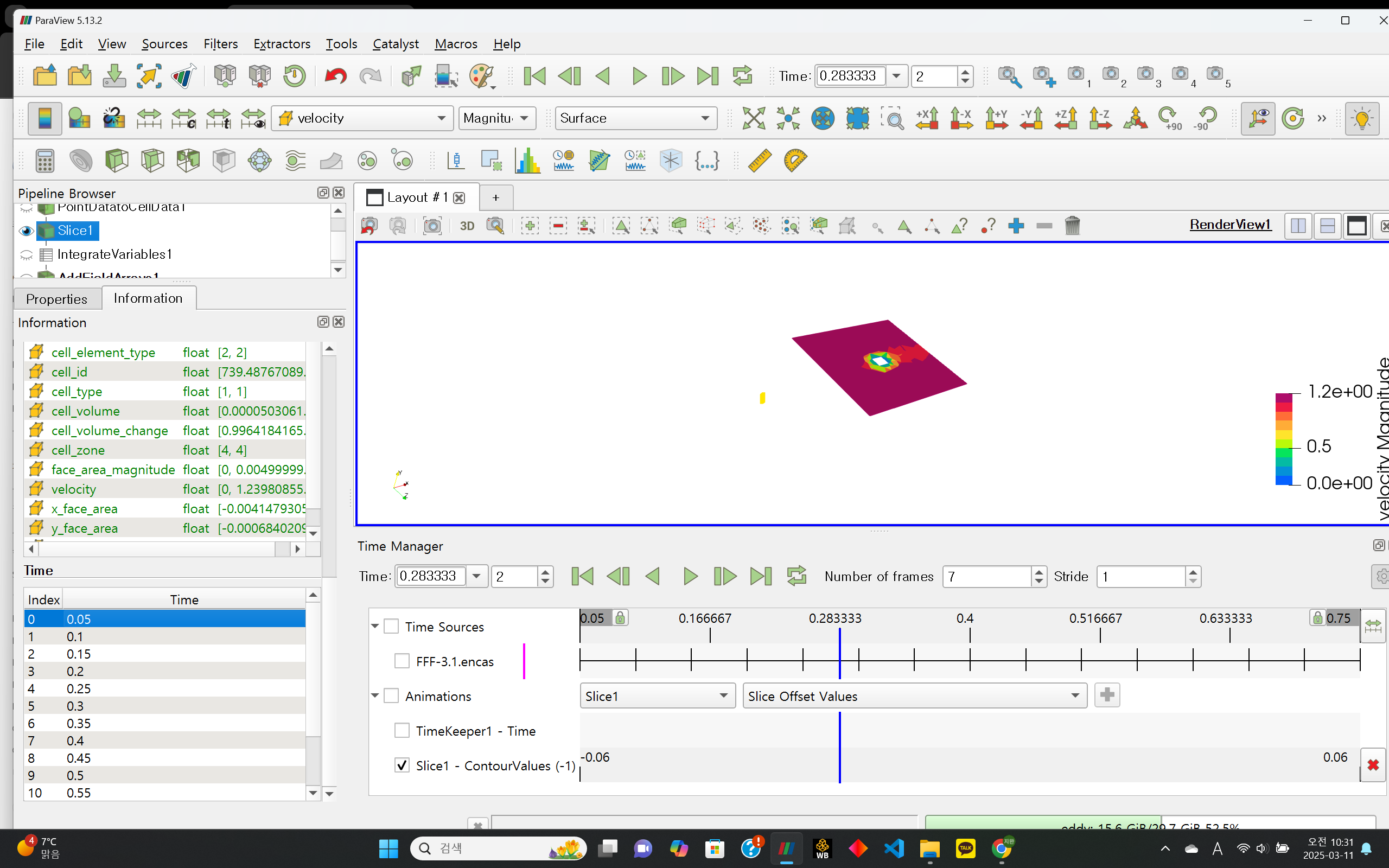
I have set up a movie to follow the y-axis at a specific time step. (I have a transient result)
With this setup, instead of following the time index in the bottom left corner, the movie follows the number of frames I specified. (To make the slice move within the specified range for the final time step result. Each step no longer represents time but rather the index of a cross-section sliced at regular intervals.)
As a result, a movie with a total of seven steps is generated based on the fixed time step and the specified number of frames.
So far, everything works as expected. However, when I try to extract data from each section while maintaining this setup, the saved data still follows the original time step settings.
Manually extracting the sheet for each step is too cumbersome.
Is there a way to export the data according to my custom settings without following the default time step configuration?
Thanks.
---
### Author:  [@mwestphal](https://discourse.paraview.org/u/mwestphal)
#### Post date: [March 11, 2025, 11:24am UTC](https://discourse.paraview.org/t/after-make-a-slice-animation-export-data-from-specific-time-step/16290/2 "2025-03-11T11:24:28Z")
> [@tjwldhks79](#):
>
> However, when I try to extract data from each section while maintaining this setup, the saved data still follows the original time step settings.
What do you mean by that ? Which action are you taking to save the data ?
---
### Author:  [@tjwldhks79](https://discourse.paraview.org/u/tjwldhks79)
#### Post date: [March 11, 2025, 12:09pm UTC](https://discourse.paraview.org/t/after-make-a-slice-animation-export-data-from-specific-time-step/16290/3 "2025-03-11T12:09:22Z")
Thanks.
I will explain in detail.
I performed a transient flow simulation in a 3D domain.
From the simulation results, I extracted a slice at a specific time and location that I wanted to examine.
At this point, I used the time-manager to visualize the flow while moving the slice along the y-axis from 0 to 1 at a fixed time.
Using this method, I was able to set the range of the slice at a specific time and move it accordingly.
For each slide, I aim to calculate and extract the area of the region where the velocity is below a certain threshold.
I have successfully applied the necessary filters to extract the area.
Now, I just need to save the data for each slide.
However, when I save the data, the results are extracted based on the original simulation time instead of the intended slice movement
---
### Author:  [@mwestphal](https://discourse.paraview.org/u/mwestphal)
#### Post date: [March 11, 2025, 1:54pm UTC](https://discourse.paraview.org/t/after-make-a-slice-animation-export-data-from-specific-time-step/16290/4 "2025-03-11T13:54:14Z")
> [@tjwldhks79](#):
>
> when I save the data,
What do you mean by that ?
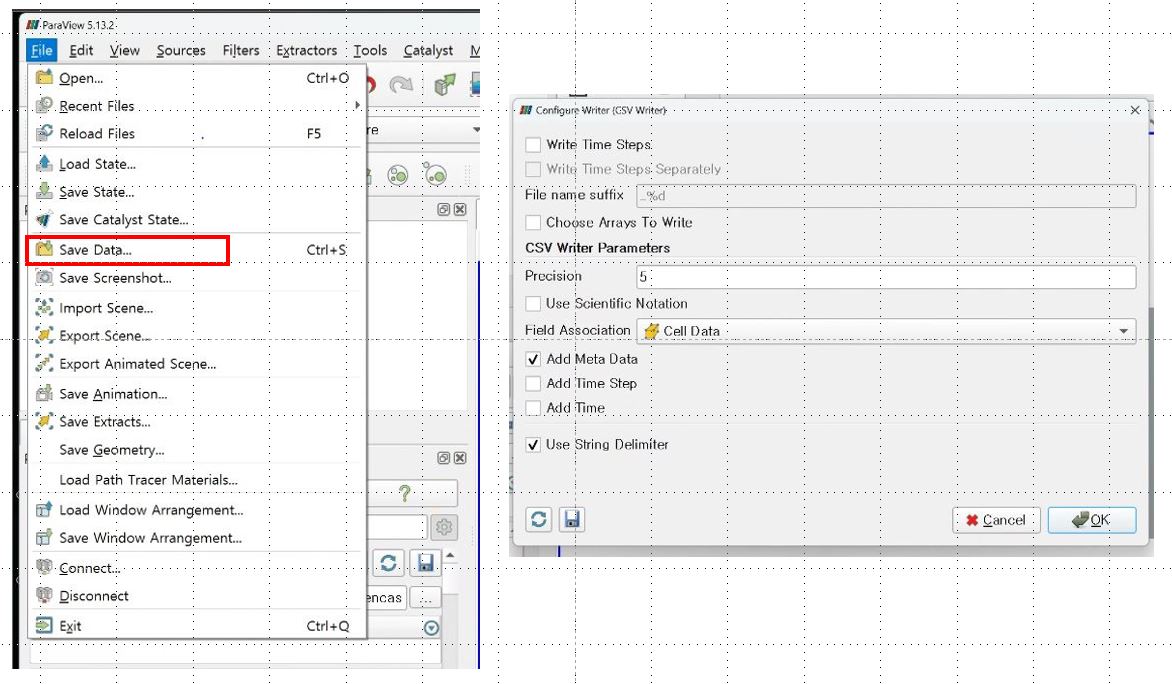
File → Save Data ?
Which format do you use to save ?
---
### Author:  [@tjwldhks79](https://discourse.paraview.org/u/tjwldhks79)
#### Post date: [March 11, 2025, 2:04pm UTC](https://discourse.paraview.org/t/after-make-a-slice-animation-export-data-from-specific-time-step/16290/5 "2025-03-11T14:04:03Z")
> [@mwestphal](#):
>
> File → Save Data ?
Yes, right.
I’m sorry for not explaining well.
---
### Author:  [@mwestphal](https://discourse.paraview.org/u/mwestphal)
#### Post date: [March 12, 2025, 1:43pm UTC](https://discourse.paraview.org/t/after-make-a-slice-animation-export-data-from-specific-time-step/16290/6 "2025-03-12T13:43:05Z")
Indeed, File → SaveData does not care about the time manager settings.
However, if you add an “Extractor” and then use File → SaveExtracts with the right frame window, you can get exactyl what you want.
---
### Author:  [@tjwldhks79](https://discourse.paraview.org/u/tjwldhks79)
#### Post date: [March 13, 2025, 1:45am UTC](https://discourse.paraview.org/t/after-make-a-slice-animation-export-data-from-specific-time-step/16290/7 "2025-03-13T01:45:11Z")
Thanks.
I’ll try it and tell you a result.