# Animating 3D Volume
**URL:** https://discourse.paraview.org/t/animating-3d-volume/4067
**Category:** ParaView Support
**Created:** [April 14, 2020, 6:20pm UTC](https://discourse.paraview.org/t/animating-3d-volume/4067 "2020-04-14T18:20:12Z")
**Posts on this page:** 20
**Page:** 1
### Author:  [@ep513140](https://discourse.paraview.org/u/ep513140)
#### Post date: [April 14, 2020, 6:20pm UTC](https://discourse.paraview.org/t/animating-3d-volume/4067/1 "2020-04-14T18:20:12Z")
I loaded a 3D volume which has 61 time steps and 47 Z-slices per time step. However, when this is loaded it is just loaded as a really long rectangular prism with all of the data displayed and no time steps are found. Is there a way that I can animate this by dividing the volume rendering into 61 sections? The volume is a tiff file.
---
### Author:  [@Yoshino](https://discourse.paraview.org/u/Yoshino)
#### Post date: [April 15, 2020, 1:02am UTC](https://discourse.paraview.org/t/animating-3d-volume/4067/2 "2020-04-15T01:02:37Z")
To load data with multiple timesteps, you need to transform the file into a “time series”, each piece of which represents a single timestep. You may refer to [ParaViewGuide](https://www.paraview.org/paraview-downloads/download.php?submit=Download&version=v5.8&type=data&os=Sources&downloadFile=ParaViewGuide-5.8.0.pdf) chapter 2.1.2 (Handling temporal file series) for details.
---
### Author:  [@ep513140](https://discourse.paraview.org/u/ep513140)
#### Post date: [April 20, 2020, 12:51am UTC](https://discourse.paraview.org/t/animating-3d-volume/4067/3 "2020-04-20T00:51:30Z")
Thanks for pointing me to that guide. I tried uploading the data as a folder of tiff files of the format s\_C002Z046T006.tif where the numbers following the C change depending on the file. When I tried loading the data I got the following error:
ERROR: In /Users/kitware/dashboards/buildbot-slave/8275bd07/build/superbuild/paraview/src/VTK/Common/ExecutionModel/vtkExecutive.cxx, line 782
vtkPVCompositeDataPipeline (0x600003d24d20): Algorithm vtkAMReXParticlesReader(0x600003d6f8e0) returned failure for request: vtkInformation (0x600001dee980)
Debug: Off
Modified Time: 275921
Reference Count: 1
Registered Events: (none)
Request: REQUEST\_INFORMATION
ALGORITHM\_AFTER\_FORWARD: 1
FORWARD\_DIRECTION: 0
---
### Author:  [@Yoshino](https://discourse.paraview.org/u/Yoshino)
#### Post date: [April 20, 2020, 1:43am UTC](https://discourse.paraview.org/t/animating-3d-volume/4067/4 "2020-04-20T01:43:41Z")
Try to load just one piece of your data. If nothing goes wrong, post a screenshot of your files series here. And how the 47 Z-slices are organized in your tiff file?
---
### Author:  [@ep513140](https://discourse.paraview.org/u/ep513140)
#### Post date: [April 20, 2020, 1:53am UTC](https://discourse.paraview.org/t/animating-3d-volume/4067/5 "2020-04-20T01:53:03Z")
I was able to load the single tiff file and view it. This data was given to me without much information except the following:
Vanc rate= There are 61 time points and 47 Z-slices per time point Each slice is 2 microns.
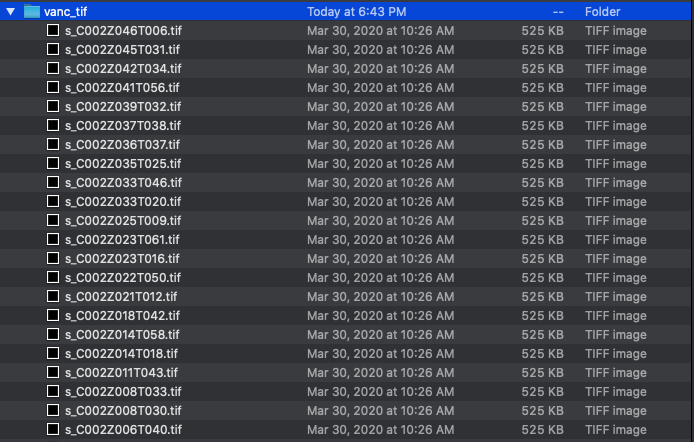
When I inspected the folder vnc\_tif it had 51 files. Here is how the file is set up.
---
### Author:  [@Yoshino](https://discourse.paraview.org/u/Yoshino)
#### Post date: [April 20, 2020, 3:15am UTC](https://discourse.paraview.org/t/animating-3d-volume/4067/6 "2020-04-20T03:15:17Z")
Considering your file name, my assumption is that the number follows _T_ specifies _timestep_, _Z_ specifies _slices_(z-depth, 2 microns as you were told). Therefore, a single .tif file is merely a 2D Image, other than 3D volume, which should consist of 47 Z-slices in this case.
Since there’re only 51 files in the folder, make it clear about your data structure, then convert your .tif data series that is with the same timestep to volume(see [file-format](https://lorensen.github.io/VTKExamples/site/VTKFileFormats/#dataset-format)).
---
### Author:  [@ep513140](https://discourse.paraview.org/u/ep513140)
#### Post date: [April 20, 2020, 6:44am UTC](https://discourse.paraview.org/t/animating-3d-volume/4067/7 "2020-04-20T06:44:53Z")
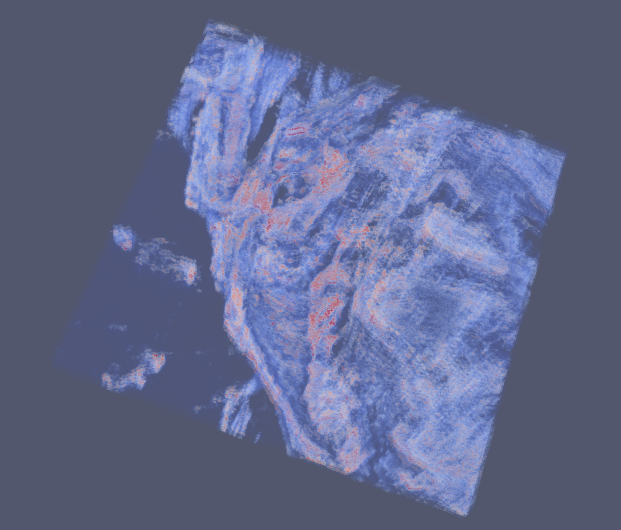
I changed the file names to be of format T#C#Z#.tif, loaded them into ImageJ, converted to a single Nrrd file and loaded it into paraview. The data is looking a lot better but I am still unable to animate the data. Did I misunderstand your advice? Thanks again 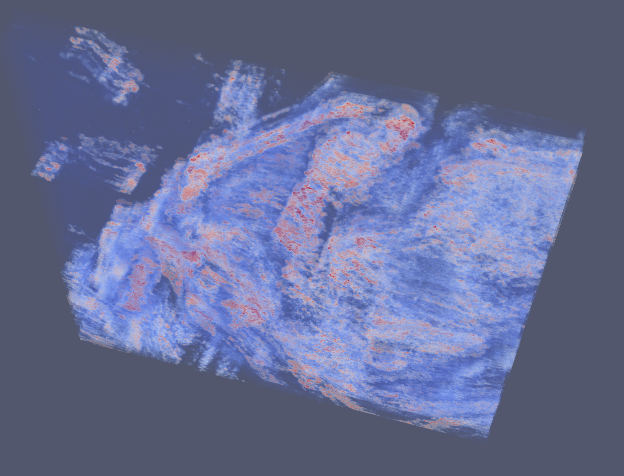 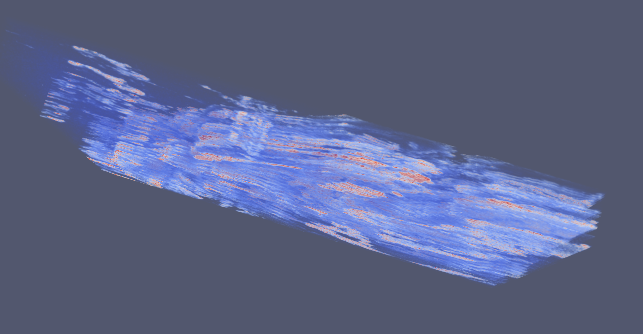
---
### Author:  [@Yoshino](https://discourse.paraview.org/u/Yoshino)
#### Post date: [April 20, 2020, 9:12am UTC](https://discourse.paraview.org/t/animating-3d-volume/4067/8 "2020-04-20T09:12:10Z")
No, you just did the right thing. To animate the data, you need a series of data file instead of single one. Provided that we have following data files:
_T01C02Z01.tif T01C02Z02.tif T01C02Z03.tif_
_T02C02Z01.tif T02C02Z02.tif T02C02Z03.tif_
_T03C02Z01.tif T03C02Z02.tif T03C02Z03.tif_
As we can see, there’re 3 timesteps, each contains 3 Z-slices. In order to be loaded as temporal data into paraview, we need to convert the data above to:
_C02.nrrd.0_
_C02.nrrd.1_
_C02.nrrd.2_
where the last figure represents the timestep(T). Paraview will group these three files automatically as _C02.nrrd._\*
---
### Author:  [@ep513140](https://discourse.paraview.org/u/ep513140)
#### Post date: [April 21, 2020, 4:06am UTC](https://discourse.paraview.org/t/animating-3d-volume/4067/9 "2020-04-21T04:06:57Z")
I was able to do this but because there are C01 and C02 files, ParaView found C01.nrrdd\* and C02.nrrd\* so there are now two files. Should I convert C02 files to be C01 files where the z-slice is higher? So if the highest z-slice for C01 is 46 right now(C01Z46) then I would convert C02Z01 to be C01Z47? Thank you
---
### Author:  [@Yoshino](https://discourse.paraview.org/u/Yoshino)
#### Post date: [April 21, 2020, 4:21am UTC](https://discourse.paraview.org/t/animating-3d-volume/4067/10 "2020-04-21T04:21:10Z")
It is feasible if you convert _C02_ to _C01_ because paraview doesn’t care how the data is organized as long as valid. The result will be a higher volume since it contains Z-slices of double _C_. It’s actually about how you want your data to be displayed(_i.e._ what the figure following _C_ exactly represents), which is technically unrelated to paraview. 🙃
---
### Author:  [@ep513140](https://discourse.paraview.org/u/ep513140)
#### Post date: [April 21, 2020, 3:28pm UTC](https://discourse.paraview.org/t/animating-3d-volume/4067/11 "2020-04-21T15:28:40Z")
I had to convert the time steps instead of the z-slices so that it could be loaded as a single dataset. However, I am still not able to animate. I have tried Snap to Timesteps, Real Time, and Sequence for all of the Data VOIs and Visibility and Opacity. When I click on Filters\>Temporal, all of the options are not clickable so it seems to have a hard time finding the time steps.
---
### Author:  [@Yoshino](https://discourse.paraview.org/u/Yoshino)
#### Post date: [April 22, 2020, 12:50am UTC](https://discourse.paraview.org/t/animating-3d-volume/4067/12 "2020-04-22T00:50:34Z")
What happened after you click the VCR play button?
---
### Author:  [@ep513140](https://discourse.paraview.org/u/ep513140)
#### Post date: [April 22, 2020, 11:40pm UTC](https://discourse.paraview.org/t/animating-3d-volume/4067/13 "2020-04-22T23:40:01Z")
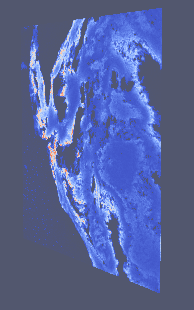
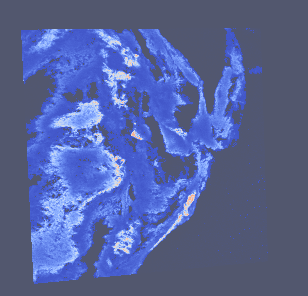
Nothing happens when I play the VCR play button, nothing is animated or changes. Also, when I load my data as a volume it is essentially a slice as seen below, but this should be 3D data with time steps as well. Is something happened when I delete the Z numbers or convert to nrrd?
---
### Author:  [@Yoshino](https://discourse.paraview.org/u/Yoshino)
#### Post date: [April 23, 2020, 4:05am UTC](https://discourse.paraview.org/t/animating-3d-volume/4067/14 "2020-04-23T04:05:51Z")
Will you post some of your nrrd data here? This may be about the data structure.
---
### Author:  [@ep513140](https://discourse.paraview.org/u/ep513140)
#### Post date: [April 23, 2020, 4:58am UTC](https://discourse.paraview.org/t/animating-3d-volume/4067/15 "2020-04-23T04:58:13Z")
Here are 3 nrrd files and then 3 tif files which is what I was given
[s\_C001.nrrd.001.nrrd](https://discourse.paraview.org/uploads/short-url/9rS2kB16AJkdACjw2jsomynuWgs.nrrd) (1.0 MB) [s\_C001.nrrd.002.nrrd](https://discourse.paraview.org/uploads/short-url/6S50O2G4ElB4zbVHaS3MU8Rzsx6.nrrd) (1.0 MB) [s\_C001.nrrd.003.nrrd](https://discourse.paraview.org/uploads/short-url/w54Q0j1ogQec4ckYOPcSEPHfICt.nrrd) (512.2 KB)
[s\_T003C001Z028.tif](https://discourse.paraview.org/uploads/short-url/lQ3G12ZRPscuQd9RoYeezPXcJTG.tif) (512.4 KB) [s\_T019C001Z038.tif](https://discourse.paraview.org/uploads/short-url/dpo4XJ5v2Zhabe5OfJ3bTAex0ne.tif) (512.4 KB) [s\_T012C002Z021.tif](https://discourse.paraview.org/uploads/short-url/euwh20IGnx82DmWOMWPzXdiwQgP.tif) (512.4 KB)
---
### Author:  [@Yoshino](https://discourse.paraview.org/u/Yoshino)
#### Post date: [April 24, 2020, 2:44am UTC](https://discourse.paraview.org/t/animating-3d-volume/4067/16 "2020-04-24T02:44:23Z")
Ok, I find that the problem turns out to be that paraview just won’t read _.nrrd_ files as temporal(maybe by default, that requires further exploring). However, we can still have our data animated anyway by saving the .nrrd file as _.vtk_(a legacy file format in paraview). Simply read one and click _File-\>save data_ as _.vtk_, then the _nrrd_ becomes _vtk_. Reload _vtk_ files and play the animation.
When you change representation to volume, the object appears to be almost transparent, which depends on dataset and could be improved by editing the colormap. And make sure all files in one series have same dimensions(e.g. the third nrrd file you just uploaded has only one Z slices thus could not be properly animated).
---
### Author:  [@ep513140](https://discourse.paraview.org/u/ep513140)
#### Post date: [April 27, 2020, 5:37pm UTC](https://discourse.paraview.org/t/animating-3d-volume/4067/17 "2020-04-27T17:37:00Z")
I’m sorry to drag this on but I’m still running into issues. First of all, most of these time steps only have one Z slice, there are only a few with 2 Z-slices. Can I load all of the time steps with only one Z-slice? Secondly, when I load the first nrrd and select save data, I cannot select any of my data because it is not of type:
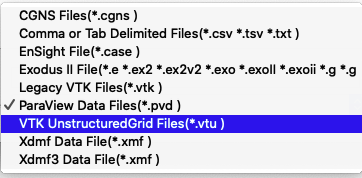
I can do Save State, select a file and manually change the nrrd to vtk, but when I load the data nothing loads and Array Name : is displayed.
---
### Author:  [@Yoshino](https://discourse.paraview.org/u/Yoshino)
#### Post date: [April 28, 2020, 3:44am UTC](https://discourse.paraview.org/t/animating-3d-volume/4067/18 "2020-04-28T03:44:38Z")
> [@ep513140](#):
>
> Can I load all of the time steps with only one Z-slice?
Yes, make sure data files with only one slice are properly named while others not.
> [@ep513140](#):
>
> I cannot select any of my data because it is not of type:
If the type you want somehow doesn’t appear on the _Files of type_ list, I’m not sure what causes this since it works fine on my machine. I guess it’s about data format.
Feel free to keep this going or creating another topic on this, I have been working on this recently.
---
### Author:  [@ep513140](https://discourse.paraview.org/u/ep513140)
#### Post date: [April 28, 2020, 4:09am UTC](https://discourse.paraview.org/t/animating-3d-volume/4067/19 "2020-04-28T04:09:59Z")
Which version of ParaView are you running with? I am using 5.6.0. Also for naming the files with one slice, do you mean I should only use the files with one slice so I should name them differently? I want to make sure I can still animate with only one z-slice per tilmestep
---
### Author:  [@Yoshino](https://discourse.paraview.org/u/Yoshino)
#### Post date: [April 28, 2020, 5:20am UTC](https://discourse.paraview.org/t/animating-3d-volume/4067/20 "2020-04-28T05:20:05Z")
I use ParaView 5.7.0 binaries.
> [@ep513140](#):
>
> do you mean I should only use the files with one slice so I should name them differently?
Only name files with one slice a time series(e.g. _Z01.nrrd.0 Z01.nrrd.1 Z01.nrrd.2_, leaving _Z02.nrrd_ aside) which excludes those with two slices so that they are not grouped.
[Next page](https://discourse.paraview.org/t/animating-3d-volume/4067.md?page=2)