# Animating 3D Volume
**URL:** https://discourse.paraview.org/t/animating-3d-volume/4067
**Category:** ParaView Support
**Created:** [April 14, 2020, 6:20pm UTC](https://discourse.paraview.org/t/animating-3d-volume/4067 "2020-04-14T18:20:12Z")
**Posts on this page:** 4
**Page:** 2
### Author:  [@ep513140](https://discourse.paraview.org/u/ep513140)
#### Post date: [April 28, 2020, 6:24am UTC](https://discourse.paraview.org/t/animating-3d-volume/4067/21 "2020-04-28T06:24:48Z")
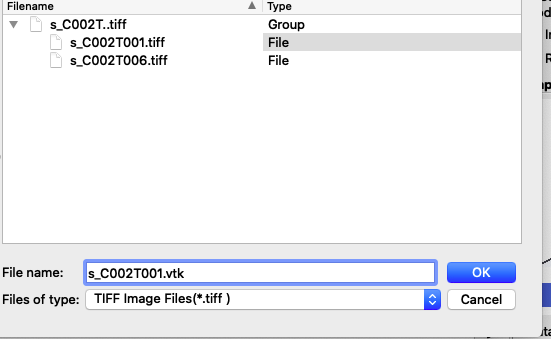
I originally was given the files in tif format which I can convert to tiff which I can select under Save Data. When I save as vtk, do I just changed the file name to have .vtk? I don’t see an option to “save as” or “convert to” so I just deleted tiff and replaced it with vtk. Should this be done for every file or for s\_C002T…tiff \> s\_C002T…vtk? Thank you
---
### Author:  [@Yoshino](https://discourse.paraview.org/u/Yoshino)
#### Post date: [April 28, 2020, 10:24am UTC](https://discourse.paraview.org/t/animating-3d-volume/4067/22 "2020-04-28T10:24:21Z")
> [@ep513140](#):
>
> which I can select under Save Data
Did you select files from the _save data dialog_? The selection in _save data dialog_ does nothing indeed. Simply load the data to be converted and save as the type you want with a proper name.
Here is my _Files of type_ list when saving data:
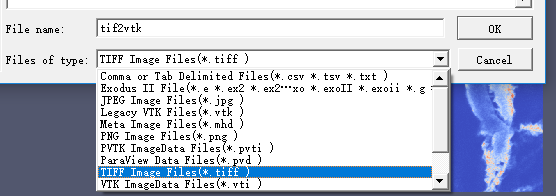
You can see that there’re **.vtk .vti** etc, just choose the type you want and name it. I use windows10 OS.
> [@ep513140](#):
>
> Should this be done for every file
Yes.
---
### Author:  [@ep513140](https://discourse.paraview.org/u/ep513140)
#### Post date: [April 28, 2020, 3:47pm UTC](https://discourse.paraview.org/t/animating-3d-volume/4067/23 "2020-04-28T15:47:30Z")
Thank you so much, I am now able to animate my data as a Slice. However, I was told that this should be 4D data, when I load the vtk folder and select volume I can see nothing, no matter which color map I use or how I edit the color map. When saving the data I selected “Write timestep as file series”, I thought this was correct but maybe it is not.
---
### Author:  [@Yoshino](https://discourse.paraview.org/u/Yoshino)
#### Post date: [April 29, 2020, 12:42am UTC](https://discourse.paraview.org/t/animating-3d-volume/4067/24 "2020-04-29T00:42:46Z")
Since you were only given .tiff slices which are generally 3D data(2D+time), then you have to figure out which slices consist of a volume to gain 4D data(i.e. how to organize the dataset).
> [@ep513140](#):
>
> when I load the vtk folder and select volume I can see nothing
This happens because the data does not suit a volume representation, which depends on dataset.
> [@ep513140](#):
>
> When saving the data I selected “Write timestep as file series”
This option is to save each timestep of a temporal dataset as a new file series(otherwise only current timestep gets converted). To get 4D data, you need to gather all slices with same T to get a volume(via paraview or manually), then name every volume in proper order.
[Previous page](https://discourse.paraview.org/t/animating-3d-volume/4067.md?page=1)