# Animation KeyTime integer error
**URL:** https://discourse.paraview.org/t/animation-keytime-integer-error/10454
**Category:** ParaView Support
**Tags:** python
**Created:** [October 5, 2022, 11:19pm UTC](https://discourse.paraview.org/t/animation-keytime-integer-error/10454 "2022-10-05T23:19:48Z")
**Posts on this page:** 2
**Page:** 1
### Author:  [@Devin\_Richard\_Bayly](https://discourse.paraview.org/u/Devin_Richard_Bayly)
#### Post date: [October 5, 2022, 11:19pm UTC](https://discourse.paraview.org/t/animation-keytime-integer-error/10454/1 "2022-10-05T23:19:48Z")
I haven’t been able to figure out whether this issue is the same thing as what I’m experiencing [I am having issues with the clipping animation track KeyTime values?](https://discourse.paraview.org/t/i-am-having-issues-with-the-clipping-animation-track-keytime-values/2787)
I’m building a macro to make it easier to generate interpolated camera keyframes for my animations. I have an issue where in a simple scene with a cone geometry my macro works correctly and assigns the camera’s information to the keyframe time that is selected in the animation viewer. See the ~40 sec video link here
[cone success](https://drive.google.com/open?id=13mGqgIrHQQecIEy_DxPZmGbJQ5KmBnl3)
But when I use my actual with a programmable source the exact same behavior yields a time value that is wildly off from the value the animation player shows under the play head. Here’s my other video showing the error
[programmable source fail](https://drive.google.com/open?id=1w5FqIAugqHjvVM42AKBSnhT49K_pmivr)
To summarize in a single image I would have expected the time value in the third row to match 205 not 149445
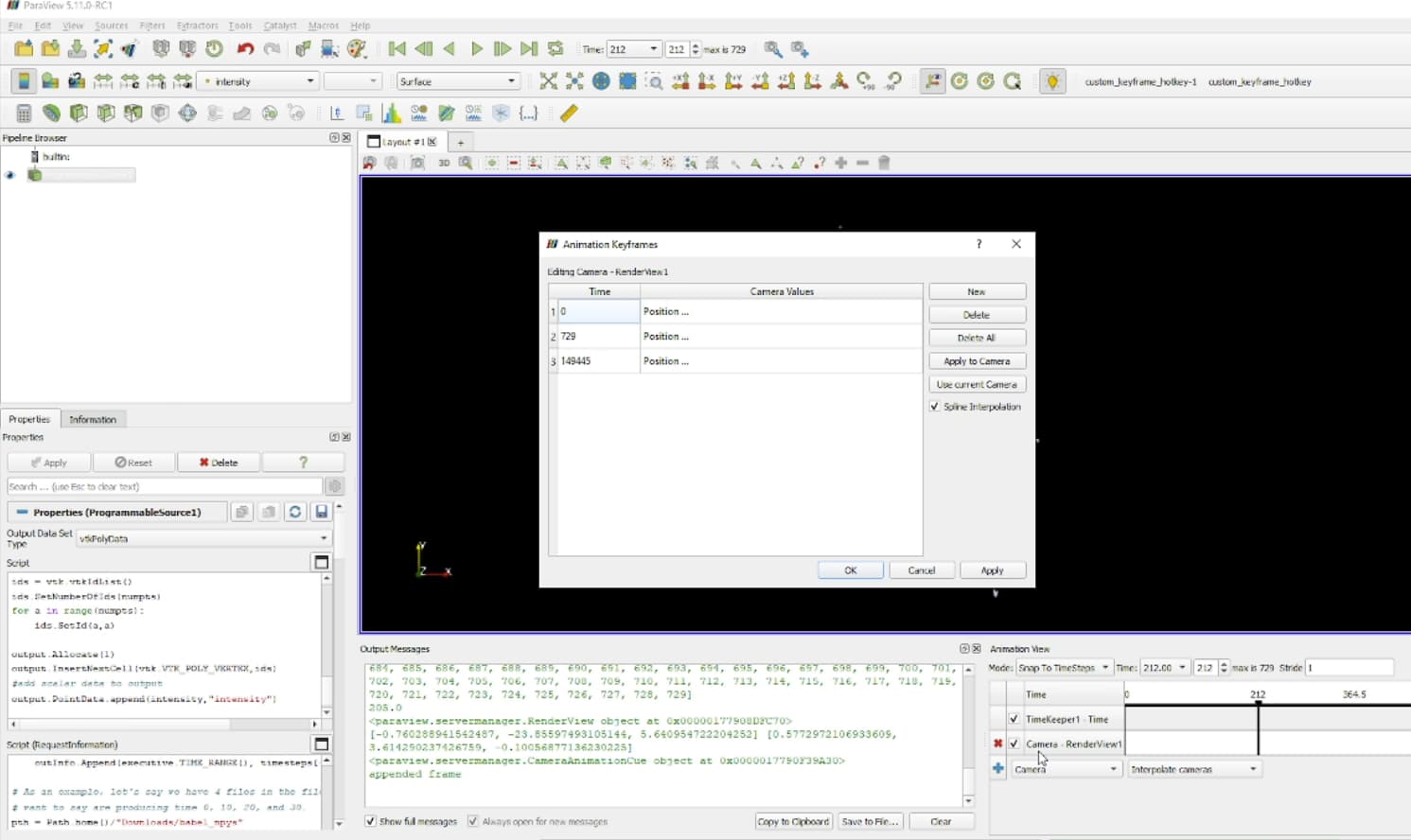
Where the 149445 is creeping in is really unclear to me.
Here are the scripts that are involved
macro
```auto
from paraview.simple import *
kf = CameraKeyFrame()
anim = GetAnimationScene()
kf.KeyTime = anim.AnimationTime
print(kf.KeyTime)
rv = GetActiveViewOrCreate("RenderView")
print(rv)
campos = rv.CameraPosition
camfoc = rv.CameraFocalPoint
up = rv.CameraViewUp
kf.Position = campos
kf.FocalPoint = camfoc
kf.ViewUp =up
print(campos,camfoc)
pscale = rv.CameraParallelScale
# typically the camera will have been added after the default one
# todo figure out a better way to select by name Camera
cue = anim.Cues[1]
print(cue)
cue.KeyFrames.append(kf)
print("appended frame")
```
programmable source script
```auto
def GetUpdateTimestep(algorithm):
"""Returns the requested time value, or None if not present"""
executive = algorithm.GetExecutive()
outInfo = executive.GetOutputInformation(0)
return outInfo.Get(executive.UPDATE_TIME_STEP()) \
if outInfo.Has(executive.UPDATE_TIME_STEP()) else None
# This is the requested time-step. This may not be exactly equal to the
# timesteps published in RequestInformation(). Your code must handle that
# correctly.
req_time = GetUpdateTimestep(self)
#print(req_time)
from pathlib import Path
import numpy as np
from vtk.numpy_interface import algorithms as algs
from vtk.numpy_interface import dataset_adapter as dsa
pth = Path.home()/"Downloads/lidar_data"
npy_pcls = list(Path(pth).rglob("*.npy"))
npy_pcl = [npy for npy in npy_pcls if req_time == float(f"{npy.stem}")][0]
all_data = np.load(npy_pcl)
data = all_data[:,:3]
intensity = all_data[:,3]
#print(data)
# make vtk points
pts = vtk.vtkPoints()
pts.SetData(dsa.numpyTovtkDataArray(data,"Points"))
output.SetPoints(pts)
#make single cell
numpts = pts.GetNumberOfPoints()
ids = vtk.vtkIdList()
ids.SetNumberOfIds(numpts)
for a in range(numpts):
ids.SetId(a,a)
output.Allocate(1)
output.InsertNextCell(vtk.VTK_POLY_VERTEX,ids)
#add scalar data to output
output.PointData.append(intensity,"intensity")
```
request info script
```auto
# Code for 'RequestInformation Script'.
from pathlib import Path
def setOutputTimesteps(algorithm, timesteps):
"helper routine to set timestep information"
executive = algorithm.GetExecutive()
outInfo = executive.GetOutputInformation(0)
outInfo.Remove(executive.TIME_STEPS())
for timestep in timesteps:
outInfo.Append(executive.TIME_STEPS(), timestep)
outInfo.Remove(executive.TIME_RANGE())
outInfo.Append(executive.TIME_RANGE(), timesteps[0])
outInfo.Append(executive.TIME_RANGE(), timesteps[-1])
# As an example, let's say we have 4 files in the file series that we
# want to say are producing time 0, 10, 20, and 30.
pth = Path.home()/"Downloads/lidar_data"
npy_pcls = list(Path(pth).rglob("*.npy"))
times = [float(f.stem) for f in npy_pcls]
print("times are",times)
setOutputTimesteps(self, times)
```
i’ve narrowed down the issue to a a python state file that others can try also.
[debugging\_macro.py](https://discourse.paraview.org/uploads/short-url/jrKNAijTCEs3uCZXoH99Xp7Y0ci.py) (5.7 KB)
---
### Author:  [@Devin\_Richard\_Bayly](https://discourse.paraview.org/u/Devin_Richard_Bayly)
#### Post date: [October 6, 2022, 12:08am UTC](https://discourse.paraview.org/t/animation-keytime-integer-error/10454/2 "2022-10-06T00:08:24Z")
Woops, never mind! Yes the other thread seems to have resolved my issue.
**the keyframe wants values normalized**
My macro can be fixed with this code
```auto
from paraview.simple import *
kf = CameraKeyFrame()
anim = GetAnimationScene()
## change below by dividing by total
kf.KeyTime = anim.AnimationTime/anim.EndTime
print(kf.KeyTime)
rv = GetActiveViewOrCreate("RenderView")
print(rv)
campos = rv.CameraPosition
camfoc = rv.CameraFocalPoint
up = rv.CameraViewUp
kf.Position = campos
kf.FocalPoint = camfoc
kf.ViewUp =up
print(campos,camfoc)
pscale = rv.CameraParallelScale
# typically the camera will have been added after the default one
# todo figure out a better way to select by name Camera
cue = anim.Cues[1]
print(cue)
cue.KeyFrames.append(kf)
print("appended frame")
```