# Animation View - rotation around coordinates axis at an angle
**URL:** https://discourse.paraview.org/t/animation-view-rotation-around-coordinates-axis-at-an-angle/1605
**Category:** ParaView Support
**Created:** [April 5, 2019, 1:17pm UTC](https://discourse.paraview.org/t/animation-view-rotation-around-coordinates-axis-at-an-angle/1605 "2019-04-05T13:17:00Z")
**Posts on this page:** 2
**Page:** 1
### Author:  [@nicj](https://discourse.paraview.org/u/nicj)
#### Post date: [April 5, 2019, 1:17pm UTC](https://discourse.paraview.org/t/animation-view-rotation-around-coordinates-axis-at-an-angle/1605/1 "2019-04-05T13:17:00Z")
Hello,
I’m trying to make an animation of data around sphere (earth model). I’ve made rotation around z-axis, using animation view -\> camera-\>orbit:
[example animation](https://youtu.be/7Qv5FKfF9tw).
What I’m trying to do is the same animation, around the same axis, but in different view, like on the screen below (z axis at an angle, not vertical):
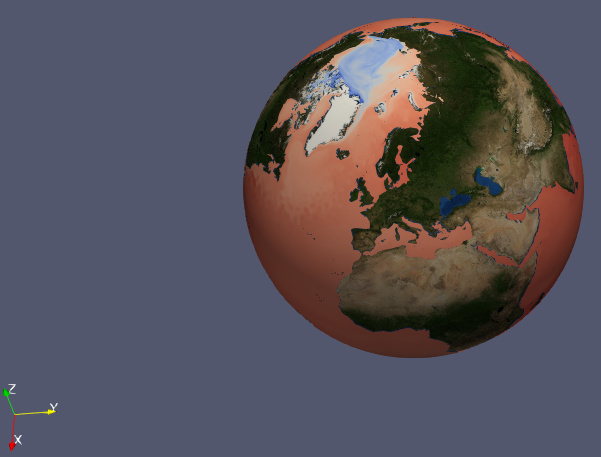
Setting proper view in RenderView and then applying camera-\>orbit with the same settings, as in example animation doesn’t work - z-axis is reseted to vertical.
Do you have any tips how to solve it?
And second question:
Do you have any ideas how to change the variable or variable’s dimension indices during the animation? e.g. I have values with n time steps and during this animation I’d like to change rendered value from 1 to n (or change variable)
Thank you for any tips!
---
### Author:  [@mwestphal](https://discourse.paraview.org/u/mwestphal)
#### Post date: [April 10, 2019, 8:28am UTC](https://discourse.paraview.org/t/animation-view-rotation-around-coordinates-axis-at-an-angle/1605/2 "2019-04-10T08:28:50Z")
1. You can manually setup the camera position if you want.
2. You can add any variable in the animation view