# Annotation in the time-lapse vtk files
**URL:** https://discourse.paraview.org/t/annotation-in-the-time-lapse-vtk-files/9197
**Category:** ParaView Support
**Created:** [March 16, 2022, 12:23pm UTC](https://discourse.paraview.org/t/annotation-in-the-time-lapse-vtk-files/9197 "2022-03-16T12:23:48Z")
**Posts on this page:** 20
**Page:** 1
### Author:  [@reynoo](https://discourse.paraview.org/u/reynoo)
#### Post date: [March 16, 2022, 12:23pm UTC](https://discourse.paraview.org/t/annotation-in-the-time-lapse-vtk-files/9197/1 "2022-03-16T12:23:48Z")
Hi Paraview team,
Hope you are doing well.
I am using ParaView for the visualization of around 600 vtk files. Each file belongs to a certain date that the data were collected. When I am looking at the results I expect to have the data of the data as an annotation but I do not know how to do that in ParaView. Could you advise on that?
---
### Author:  [@mwestphal](https://discourse.paraview.org/u/mwestphal)
#### Post date: [March 16, 2022, 12:27pm UTC](https://discourse.paraview.org/t/annotation-in-the-time-lapse-vtk-files/9197/2 "2022-03-16T12:27:32Z")
Annotate Time or PythonAnnotation
---
### Author:  [@reynoo](https://discourse.paraview.org/u/reynoo)
#### Post date: [March 16, 2022, 12:45pm UTC](https://discourse.paraview.org/t/annotation-in-the-time-lapse-vtk-files/9197/3 "2022-03-16T12:45:29Z")
Dear Mathieu,
Annotate Time is just giving me the time steps number not the data that I need to see. About PythonAnnotation, I do not know hoe to do that really. In the following you can see the date that I expect to see…
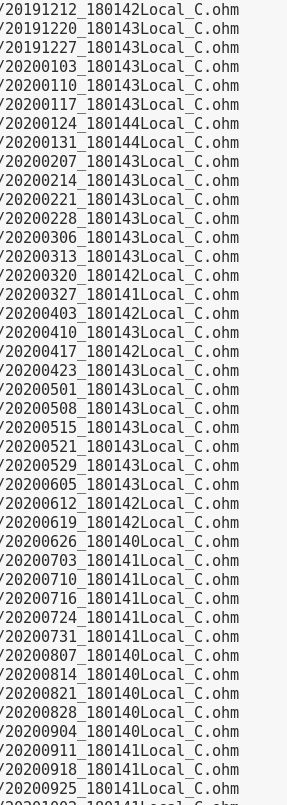
Could you give more details?
Cheers,
Reyhaneh
---
### Author:  [@mwestphal](https://discourse.paraview.org/u/mwestphal)
#### Post date: [March 16, 2022, 12:46pm UTC](https://discourse.paraview.org/t/annotation-in-the-time-lapse-vtk-files/9197/4 "2022-03-16T12:46:37Z")
What data do you want to see ?
---
### Author:  [@reynoo](https://discourse.paraview.org/u/reynoo)
#### Post date: [March 16, 2022, 12:50pm UTC](https://discourse.paraview.org/t/annotation-in-the-time-lapse-vtk-files/9197/5 "2022-03-16T12:50:09Z")
Each of the vtk files belongs to a dataset that was collected on a certain date. I need to show the DATE that the data were collected.
/Reyhaneh
---
### Author:  [@mwestphal](https://discourse.paraview.org/u/mwestphal)
#### Post date: [March 16, 2022, 12:54pm UTC](https://discourse.paraview.org/t/annotation-in-the-time-lapse-vtk-files/9197/6 "2022-03-16T12:54:20Z")
please share an example of your data
---
### Author:  [@reynoo](https://discourse.paraview.org/u/reynoo)
#### Post date: [March 16, 2022, 1:06pm UTC](https://discourse.paraview.org/t/annotation-in-the-time-lapse-vtk-files/9197/7 "2022-03-16T13:06:12Z")
[20191212\_180142Local\_C.ohm](https://discourse.paraview.org/uploads/short-url/8biyQqbuznD43hoP1Ya3D8Ruzcx.ohm) (685.6 KB)
[20191220\_180143Local\_C.ohm](https://discourse.paraview.org/uploads/short-url/3ZswWiAtiDyhJTzqEjzmtvIxYGr.ohm) (686.3 KB)
[20191212\_180142Local\_C.ohm](https://discourse.paraview.org/uploads/short-url/8biyQqbuznD43hoP1Ya3D8Ruzcx.ohm) (685.6 KB)
Here I attached one data set belongs to 2019-12-12 and two vtk files which belong to 2019-12-12 and a day after.
---
### Author:  [@mwestphal](https://discourse.paraview.org/u/mwestphal)
#### Post date: [March 16, 2022, 3:16pm UTC](https://discourse.paraview.org/t/annotation-in-the-time-lapse-vtk-files/9197/8 "2022-03-16T15:16:49Z")
ParaView cannot read .ohm files.
---
### Author:  [@reynoo](https://discourse.paraview.org/u/reynoo)
#### Post date: [March 16, 2022, 3:53pm UTC](https://discourse.paraview.org/t/annotation-in-the-time-lapse-vtk-files/9197/9 "2022-03-16T15:53:26Z")
I did confuse you. I sent the data that were collected. I want to show just a series of date in each time step.
For example:
For Time step: 1, I would like to show _Date 2019-12-12_
For Time step: 2, I would like to show _Date 2019-12-18_
…
---
### Author:  [@mwestphal](https://discourse.paraview.org/u/mwestphal)
#### Post date: [March 16, 2022, 3:53pm UTC](https://discourse.paraview.org/t/annotation-in-the-time-lapse-vtk-files/9197/10 "2022-03-16T15:53:58Z")
please share an example .vtk file
---
### Author:  [@reynoo](https://discourse.paraview.org/u/reynoo)
#### Post date: [March 16, 2022, 5:35pm UTC](https://discourse.paraview.org/t/annotation-in-the-time-lapse-vtk-files/9197/11 "2022-03-16T17:35:10Z")
It is so large to be uploaded. So you can find it in the following link:
> **[Meet Google Drive – One place for all your files](https://accounts.google.com/ServiceLogin?service=wise&passive=1209600&continue=https:%2F%2Fdrive.google.com%2Ffile%2Fd%2F12ye4cR7mXw85EukFJqsRiRjf7y9QW2z1%2Fview?usp%3Dsharing&followup=https:%2F%2Fdrive.google.com%2Ffile%2Fd%2F12ye4cR7mXw85EukFJqsRiRjf7y9QW2z1%2Fview?usp%3Dsharing)**
>
> Google Drive is a free way to keep your files backed up and easy to reach from any phone, tablet, or computer. Start with 15GB of Google storage – free.
Cheers,
Reyhaneh
---
### Author:  [@mwestphal](https://discourse.paraview.org/u/mwestphal)
#### Post date: [March 17, 2022, 8:13am UTC](https://discourse.paraview.org/t/annotation-in-the-time-lapse-vtk-files/9197/12 "2022-03-17T08:13:19Z")
I requested access
---
### Author:  [@reynoo](https://discourse.paraview.org/u/reynoo)
#### Post date: [March 18, 2022, 8:55am UTC](https://discourse.paraview.org/t/annotation-in-the-time-lapse-vtk-files/9197/13 "2022-03-18T08:55:23Z")
> **[dcinv.result\_1.vtk](https://drive.google.com/file/d/12ye4cR7mXw85EukFJqsRiRjf7y9QW2z1/view?usp=sharing)**
>
> Google Drive file.
You have access now. sorry that I did not check sooner …
---
### Author:  [@mwestphal](https://discourse.paraview.org/u/mwestphal)
#### Post date: [March 18, 2022, 4:23pm UTC](https://discourse.paraview.org/t/annotation-in-the-time-lapse-vtk-files/9197/14 "2022-03-18T16:23:12Z")
Hello,
The information you are looking for is not present on your data, so there is nothing ParaView can do.
Best,
---
### Author:  [@Kenichiro-Yoshimi](https://discourse.paraview.org/u/Kenichiro-Yoshimi)
#### Post date: [March 19, 2022, 11:18am UTC](https://discourse.paraview.org/t/annotation-in-the-time-lapse-vtk-files/9197/15 "2022-03-19T11:18:14Z")
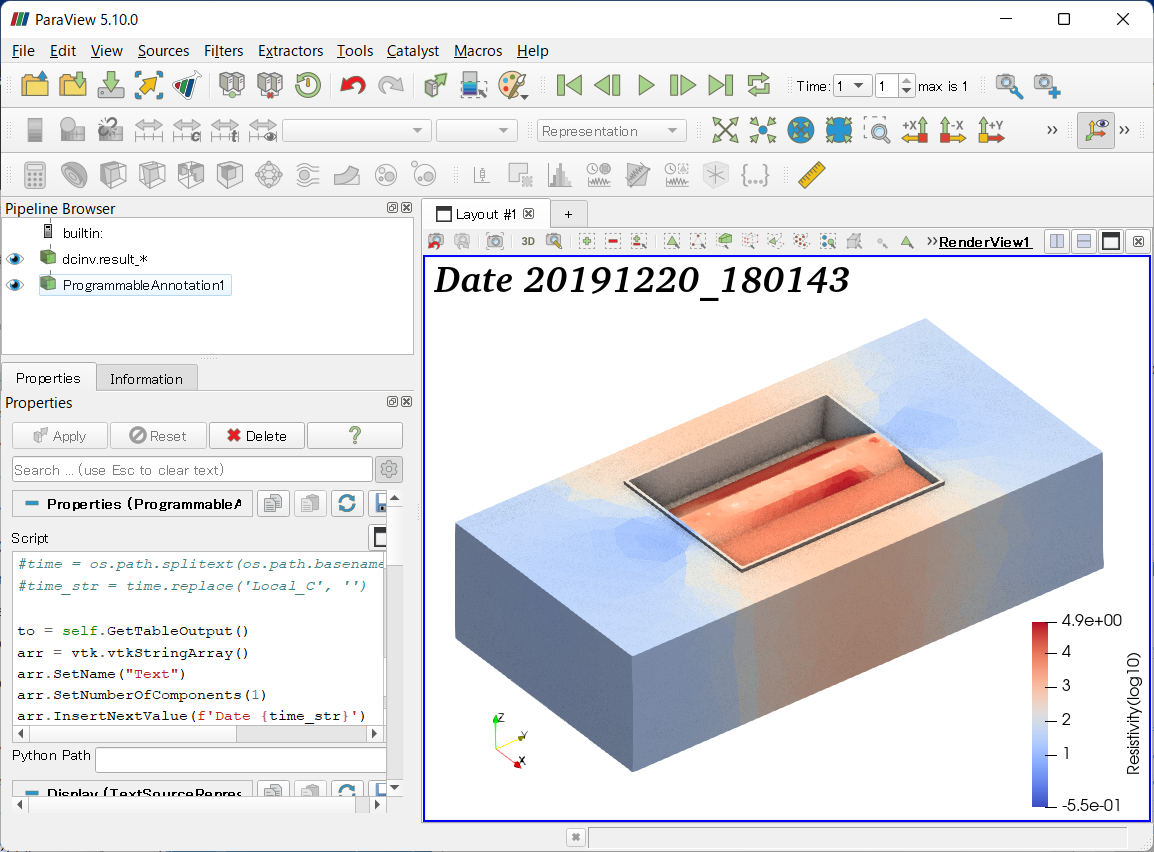
If you can prepare a list of time information for each time step, there may be a way to display the time using the **Programmable Annotation** filter.
In that case, the **script** in the **Programmable Annotation** filter would look something like this:
```python
import glob
import os
def GetUpdateTimestep(algorithm):
"""Returns the requested time value, or None if not present"""
executive = algorithm.GetExecutive()
outInfo = executive.GetOutputInformation(0)
return outInfo.Get(executive.UPDATE_TIME_STEP()) \
if outInfo.Has(executive.UPDATE_TIME_STEP()) else None
time_list = ['20191212_180142','20191220_180143']
time_step = int(GetUpdateTimestep(self))
time_str = time_list[time_step]
# This is for getting time information from a file name
# Need to change your working folder name
#path = 'C:/Users/rccmk/Desktop/dcinv.result/*.ohm'
#ohms = sorted(glob.glob(path))
#time = os.path.splitext(os.path.basename(ohms[time_step]))[0]
#time_str = time.replace('Local_C', '')
to = self.GetTableOutput()
arr = vtk.vtkStringArray()
arr.SetName("Text")
arr.SetNumberOfComponents(1)
arr.InsertNextValue(f'Date {time_str}')
to.AddColumn(arr)
```
---
### Author:  [@reynoo](https://discourse.paraview.org/u/reynoo)
#### Post date: [March 25, 2022, 1:02pm UTC](https://discourse.paraview.org/t/annotation-in-the-time-lapse-vtk-files/9197/16 "2022-03-25T13:02:42Z")
Hello,
Many thanks for your help.
I am using the following script:
import glob
import os
def GetUpdateTimestep(algorithm):
“”“Returns the requested time value, or None if not present”“”
executive = algorithm.GetExecutive()
outInfo = executive.GetOutputInformation(0)
return outInfo.Get(executive.UPDATE\_TIME\_STEP())
if outInfo.Has(executive.UPDATE\_TIME\_STEP()) else None
time\_list=[‘20191220\_180143’,‘20191227\_180143’,‘20200103\_180143’,‘20200110\_180143’,‘20200117\_180143’,‘20200124\_180144’,‘20200131\_180144’,‘20200207\_180143’,‘20200214\_180143’,‘20200221\_180143’,‘20200228\_180143’,‘20200306\_180143’,‘20200313\_180143’,‘20200320\_180142’,‘20200327\_180141’,‘20200403\_180142’,‘20200410\_180143’,‘20200417\_180142’,‘20200423\_180143’,‘20200501\_180143’,‘20200508\_180143’,‘20200515\_180143’,‘20200521\_180143’,‘20200529\_180143’,‘20200605\_180143’,‘20200612\_180142’,‘20200619\_180142’,‘20200626\_180140’,‘20200703\_180141’,‘20200710\_180141’,‘20200716\_180141’,‘20200724\_180141’,‘20200731\_180141’,‘20200807\_180140’,‘20200814\_180140’,‘20200821\_180140’,‘20200828\_180140’,‘20200904\_180140’,‘20200911\_180141’,‘20200918\_180141’,‘20200925\_180141’,‘20201002\_180141’,‘20201009\_180143’,‘20201127\_180144’,‘20201204\_180140’,‘20201211\_180142’,‘20201218\_180142’,‘20201225\_180143’,‘20210101\_180143’,‘20210108\_180143’,‘20210115\_180144’,‘20210122\_180144’,‘20210129\_180144’]
time\_step = int(GetUpdateTimestep(self))
time\_str = time\_list[time\_step]
# This is for getting time information from a file name
# Need to change your working folder name
#path = ‘/lunarc/nobackup/projects/snic2020-12-6/Inversion\_RealData/WeeklyData/FirstRound/runLong\_L1\_RobustData\_MemoryRobust/data/\*.ohm’
#ohms = sorted(glob.glob(path))
#time = os.path.splitext(os.path.basename(ohms[time\_step]))[0]
#time\_str = time.replace(‘Local\_C’, ‘’)
to = self.GetTableOutput()
arr = vtk.vtkStringArray()
arr.SetName(“Text”)
arr.SetNumberOfComponents(1)
arr.InsertNextValue(f’Date {time\_str}')
to.AddColumn(arr)
But I am getting the folloiwing error:
File “”, line 27
arr.InsertNextValue(f’Date {time\_str}')
^
SyntaxError: invalid syntax
Traceback (most recent call last):
File “”, line 22, in
NameError: name ‘RequestData’ is not defined
Could you advise?
Cheers,
Reyhaneh
---
### Author:  [@Kenichiro-Yoshimi](https://discourse.paraview.org/u/Kenichiro-Yoshimi)
#### Post date: [March 25, 2022, 1:44pm UTC](https://discourse.paraview.org/t/annotation-in-the-time-lapse-vtk-files/9197/17 "2022-03-25T13:44:22Z")
Are you using the old ParaView? If so, you may need to rewrite the line with the error as follows
```python
arr.InsertNextValue(’Date {}’.format(time_str))
```
---
### Author:  [@reynoo](https://discourse.paraview.org/u/reynoo)
#### Post date: [March 25, 2022, 2:30pm UTC](https://discourse.paraview.org/t/annotation-in-the-time-lapse-vtk-files/9197/18 "2022-03-25T14:30:27Z")
The version that I am using is 5.4.1. I have another error again:
Traceback (most recent call last):
File “”, line 22, in
File “”, line 28, in RequestData
AttributeError: ‘NoneType’ object has no attribute ‘AddColumn’
Sorry for bothering you.
/Reyhaneh
---
### Author:  [@Kenichiro-Yoshimi](https://discourse.paraview.org/u/Kenichiro-Yoshimi)
#### Post date: [March 26, 2022, 1:42am UTC](https://discourse.paraview.org/t/annotation-in-the-time-lapse-vtk-files/9197/19 "2022-03-26T01:42:00Z")
Version 5.4.1. is too old. Please use the latest version.
[https://www.paraview.org/download/](https://www.paraview.org/download/)
---
### Author:  [@reynoo](https://discourse.paraview.org/u/reynoo)
#### Post date: [April 21, 2022, 9:34am UTC](https://discourse.paraview.org/t/annotation-in-the-time-lapse-vtk-files/9197/20 "2022-04-21T09:34:11Z")
Hello again and thanks for your help.
The annotation is working and it looks perfect. I need to take out the median value of the ‘Resistivity/ohmm’ variable now. I know how to do it for Max, Min and Average not for the Median. The filter called ‘Median’ is not active and I know it is not working with this geometry that I have. Could you advise, please?
[Next page](https://discourse.paraview.org/t/annotation-in-the-time-lapse-vtk-files/9197.md?page=2)