# Appending a multi-component dataset in Programmable Filter
**URL:** https://discourse.paraview.org/t/appending-a-multi-component-dataset-in-programmable-filter/10764
**Category:** ParaView Support
**Created:** [November 16, 2022, 9:15am UTC](https://discourse.paraview.org/t/appending-a-multi-component-dataset-in-programmable-filter/10764 "2022-11-16T09:15:48Z")
**Posts on this page:** 4
**Page:** 1
### Author:  [@Andrei](https://discourse.paraview.org/u/Andrei)
#### Post date: [November 16, 2022, 9:15am UTC](https://discourse.paraview.org/t/appending-a-multi-component-dataset-in-programmable-filter/10764/1 "2022-11-16T09:15:48Z")
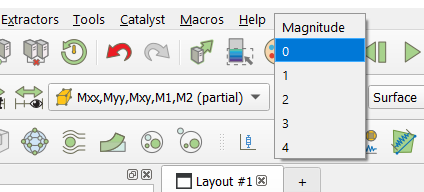
Dear Colleagues! How to add a new multi-component dataset (see figure) to the CellData in the Programmable Filter?
Below is an example. I take component `0` of multi-component dataset `Mxx,Myy,Mxy,M1,M2` for some calculation. I would like dataset `K` to have 3 components too, combined from `K1, K2, K3` (in order to work with it as shown in the figure)
```auto
input0 = inputs[0]
M = input0.CellData["Mxx,Myy,Mxy,M1,M2"]
K1=M[:,0] * 0.5
K2=M[:,0] * 0.25
K3=M[:,0] * 0.2
output.CellData.append(K1, "K1")
output.CellData.append(K2, "K2")
output.CellData.append(K3, "K3")
```
An additional question, is it possible to name these components not 0-1-2, but give them a custom name like “K1”, “K2”, “K3”
---
### Author:  [@mwestphal](https://discourse.paraview.org/u/mwestphal)
#### Post date: [November 16, 2022, 9:42am UTC](https://discourse.paraview.org/t/appending-a-multi-component-dataset-in-programmable-filter/10764/2 "2022-11-16T09:42:20Z")
Hi @Andrei ,
You need to create a multi component numpy array instead of three different K1, K2, K3
Best
---
### Author:  [@Andrei](https://discourse.paraview.org/u/Andrei)
#### Post date: [November 16, 2022, 10:15am UTC](https://discourse.paraview.org/t/appending-a-multi-component-dataset-in-programmable-filter/10764/3 "2022-11-16T10:15:03Z")
@mwestphal , thank you!
But how to convert VTK data to NumPy and vice versa?
I try but it doesn’t work
```auto
K1=np.array(M[:,0] * 0.5)
K2=np.array(M[:,0] * 0.25)
K3=np.array(M[:,0] * 0.1)
K = np.hstack((K1, K2, K3))
output.CellData.append(K, "K")
```
---
### Author:  [@Andrei](https://discourse.paraview.org/u/Andrei)
#### Post date: [November 16, 2022, 11:47am UTC](https://discourse.paraview.org/t/appending-a-multi-component-dataset-in-programmable-filter/10764/4 "2022-11-16T11:47:16Z")

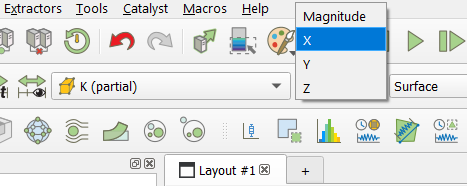
Dear @mwestphal , thanks for the help!
I managed to come up with the following algorithm
```auto
# Import NumPy
import numpy as np
# VTK data access
input0 = inputs[0]
M = input0.CellData['Mxx,Myy,Mxy,M1,M2']
# Conversation to NumPy, where vtk_index is the index
# of the numerical data array in the VTK object M in the considered model
# (this may be a different vtk_index in different models)
vtk_index = 1
data = np.array(M.Arrays[vtk_index])
rows = data.shape[0]
print(data.shape)
# Performing calculations on the example of the first column of data
k1 = (data[:, 0] * 0.5).reshape(rows, 1)
k2 = (data[:, 0] * 0.25).reshape(rows, 1)
k3 = (data[:, 0] * 0.2).reshape(rows, 1)
print(k1.shape, k2.shape, k3.shape)
k_data = np.hstack((k1, k2, k3))
print(k_data.shape)
# Creating a new VTK object using an existing object as a template
K = M * 0
K.Arrays[vtk_index] = k_data
output.CellData.append(K, "K")
# As a result, a 3-component dataset "K" was created
# using a 5-component dataset "M" as a template (see figures)
# It is important that datasets "M" and "K" refer to the same cells
```
The question of how to manage the name of dataset components remains relevant. In the graphical interface, they are automatically named depending on the number of components:
X-Y for 2,
X-Y-Z for 3,
XX-YY-ZZ-XY-YZ-XZ for 6
0-1-2-3-4 for another number of components.