# apply appendattributes to several med files
**URL:** https://discourse.paraview.org/t/apply-appendattributes-to-several-med-files/15136
**Category:** ParaView Support
**Created:** [July 27, 2024, 12:18pm UTC](https://discourse.paraview.org/t/apply-appendattributes-to-several-med-files/15136 "2024-07-27T12:18:25Z")
**Posts on this page:** 10
**Page:** 1
### Author:  [@dim14](https://discourse.paraview.org/u/dim14)
#### Post date: [July 27, 2024, 12:18pm UTC](https://discourse.paraview.org/t/apply-appendattributes-to-several-med-files/15136/1 "2024-07-27T12:18:25Z")
Using a loop python script applied to several \*. med file
I want to open , select a specific parameter, apply calculator filter and at last a wrap filter
The main problem lay with the use of appenattibute filter. Indeed in my script, i don’t manage to apply it, to all med files :
```auto
import pvsimple
pvsimple.ShowParaviewView()
# trace generated using paraview version 5.9.0
#### import the simple module from the paraview
from pvsimple import *
#### disable automatic camera reset on 'Show'
pvsimple._DisableFirstRenderCameraReset()
a = []
b = [None]
d = [None]
e = [None]
f = [None]
g = [None]
h = [None]
p = [None]
for i in range(3):
# create a new 'MED Reader'
if i < 10:
b.append('rbassin0000%d' % i + 'med')
d.append('rbassin0000%d' % i + 'med' + 'Display')
b[i] = MEDReader(registrationName='rbassin0000' + str(i) + '.med', FileName='/home/vesvard211/maillage/rbassin0000' + str(i) + '.med')
else:
b.append('rbassin0000%d' % i + 'med')
d.append('rbassin000%d' % i + 'med' + 'Display')
b[i] = MEDReader(registrationName='rbassin000' + str(i) + '.med', FileName='/home/vesvard211/maillage/rbassin000' + str(i) + '.med')
# get animation scene
animationScene1 = GetAnimationScene()
# update animation scene based on data timesteps
animationScene1.UpdateAnimationUsingDataTimeSteps()
SetActiveSource(b[i])
# Properties modified on bassin0med
b[i].AllArrays = ['TS0/bassin/ComSup1/Mdepl@@][@@P1']
# get active view
renderView1 = GetActiveViewOrCreate('RenderView')
# show data in view
d[i] = Show(b[i], renderView1, 'UnstructuredGridRepresentation')
# trace defaults for the display properties.
d[i].Representation = 'Surface'
# reset view to fit data
renderView1.ResetCamera()
# get the material library
materialLibrary1 = GetMaterialLibrary()
# update the view to ensure updated data information
renderView1.Update()
# set scalar coloring
ColorBy(d[i], ('POINTS', 'Mdepl', 'Magnitude'))
# rescale color and/or opacity maps used to include current data range
d[i].RescaleTransferFunctionToDataRange(True, False)
# show color bar/color legend
d[i].SetScalarBarVisibility(renderView1, True)
# get color transfer function/color map for 'Mdepl'
mdeplLUT = GetColorTransferFunction('Mdepl')
# get opacity transfer function/opacity map for 'Mdepl'
mdeplPWF = GetOpacityTransferFunction('Mdepl')
# update the view to ensure updated data information
renderView1.Update()
# set active source
SetActiveSource(print(b[0]))
SetActiveSource(print(b[1]))
SetActiveSource(print(b[2]))
# create a new 'Append Attributes'
appendAttributes1 = AppendAttributes(registrationName='AppendAttributes1', Input=[print(b[i])])
# show data in view
appendAttributes1Display = Show(appendAttributes1, renderView1, 'UnstructuredGridRepresentation')
# trace defaults for the display properties.
appendAttributes1Display.Representation = 'Surface'
for j in range(3):
# create a new 'Calculator'
k = j - 1
e.append("calculator%d" % j)
e[j] = Calculator(registrationName='calculator%d' % j, Input=appendAttributes1)
# Properties modified on calculator1
if j == 0:
e[j].ResultArrayName = 'M%d' % j
e[j].Function = 'Mdepl'
else:
e[j].ResultArrayName = 'M%d' % j
e[j].Function = 'M%d' % k + '+' + 'Mdepl_input_%d' % j
# create a new 'Warp By Vector'
f.append("warpByVector%d" % j)
g.append("warpByVector%d" % j + "Display" )
f[j] = WarpByVector(registrationName="warpByVector%d" % j, Input=[print('calculator%d' % j)])
# Properties modified on warpByVector1
f[j].ScaleFactor = 5000
# show data in view
g[j] = Show(f[j], renderView1, 'UnstructuredGridRepresentation')
# trace defaults for the display properties.
g[j].Representation = 'Surface'
# hide data in view
Hide(b[j], renderView1)
# update the view to ensure updated data information
renderView1.Update()
# set scalar coloring
ColorBy(g[j], ('POINTS', 'M%d' % j, 'Magnitude'))
# rescale color and/or opacity maps used to include current data range
g[j].RescaleTransferFunctionToDataRange(True, False)
# show color bar/color legend
g[j].SetScalarBarVisibility(renderView1, True)
# get color transfer function/color map for 'Mdepl'
mdeplLUT = GetColorTransferFunction('M%d' % j)
# get opacity transfer function/opacity map for 'Mdepl'
mdeplPWF = GetOpacityTransferFunction('M%d' % j)
# Apply a preset using its name. Note this may not work as expected when presets have duplicate names.
mdeplLUT.ApplyPreset('Rainbow Uniform', True)
#### saving camera placements for all active views
# current camera placement for renderView1
renderView1.CameraPosition = [0.007254707374675282, -0.49900709211761174, 0.46427352241737563]
renderView1.CameraFocalPoint = [1.2015019498213393e-06, -6.744833810744443e-08, 0.15000010536583305]
renderView1.CameraViewUp = [0.011771325523215763, 0.5330006202259059, 0.8460329631487336]
renderView1.CameraParallelScale = 0.15264365376518474
```
see in attach file the screen shot :
[question1.pdf](https://discourse.paraview.org/uploads/short-url/k0RNRmqxPGfnb4bA5hZSU3jSAfN.pdf) (97.4 KB)
regards
---
### Author:  [@nicolas.vuaille](https://discourse.paraview.org/u/nicolas.vuaille)
#### Post date: [August 6, 2024, 8:13am UTC](https://discourse.paraview.org/t/apply-appendattributes-to-several-med-files/15136/2 "2024-08-06T08:13:40Z")
AppendAttributes take several inputs: give it the full list of input readers as `Input` instead of the single-element list as you do.
---
### Author:  [@dim14](https://discourse.paraview.org/u/dim14)
#### Post date: [August 6, 2024, 1:47pm UTC](https://discourse.paraview.org/t/apply-appendattributes-to-several-med-files/15136/3 "2024-08-06T13:47:44Z")
thanks for your answer. I understand the concept but i’m wondering the way to code it
regards
---
### Author:  [@nicolas.vuaille](https://discourse.paraview.org/u/nicolas.vuaille)
#### Post date: [August 7, 2024, 11:44am UTC](https://discourse.paraview.org/t/apply-appendattributes-to-several-med-files/15136/4 "2024-08-07T11:44:53Z")
Well, I mean something like
```python
AppendAttributes(registrationName='AppendAttributes1', Input=b)
```
---
### Author:  [@dim14](https://discourse.paraview.org/u/dim14)
#### Post date: [August 10, 2024, 5:51pm UTC](https://discourse.paraview.org/t/apply-appendattributes-to-several-med-files/15136/5 "2024-08-10T17:51:26Z")
Thanks
But the main problem links to the Input parameter. Indeed i need to address all the b(i) files, and when i try
````auto
Input=b
```it doesn't work too
Regards
````
---
### Author:  [@nicolas.vuaille](https://discourse.paraview.org/u/nicolas.vuaille)
#### Post date: [August 12, 2024, 7:36am UTC](https://discourse.paraview.org/t/apply-appendattributes-to-several-med-files/15136/6 "2024-08-12T07:36:02Z")
Well, something wrong happen in your script then. Try with a simpler script, and if you do not get it please provide error messages.
For info, the following works just fine:
```auto
spheres = []
spheres.append(XMLPolyDataReader(registrationName='sphere_0.vtp', FileName=['/tmp/sphere/sphere_0.vtp']))
spheres.append(XMLPolyDataReader(registrationName='sphere_1.vtp', FileName=['/tmp/sphere/sphere_1.vtp']))
spheres.append(XMLPolyDataReader(registrationName='sphere_2.vtp', FileName=['/tmp/sphere/sphere_2.vtp']))
# create a new 'Append Datasets'
appendDatasets1 = AppendDatasets(registrationName='AppendDatasets1', Input=spheres)
UpdatePipeline(time=0.0, proxy=appendDatasets1)
```
---
### Author:  [@dim14](https://discourse.paraview.org/u/dim14)
#### Post date: [August 21, 2024, 4:20pm UTC](https://discourse.paraview.org/t/apply-appendattributes-to-several-med-files/15136/7 "2024-08-21T16:20:09Z")
Thank you for helping
the appendattribute function is working :
```auto
import pvsimple
pvsimple.ShowParaviewView()
# trace generated using paraview version 5.9.0
#### import the simple module from the paraview
from pvsimple import *
#### disable automatic camera reset on 'Show'
pvsimple._DisableFirstRenderCameraReset()
medFiles = []
medDisplays = []
e = []
f = []
g = []
h = [None]
p = [None]
l = [None]
for i in range(3):
# create a new 'MED Reader'
if i < 10:
medFiles.insert(i,MEDReader(registrationName='rbassin0000' + str(i) + '.med', FileName='/home/vesvard211/maillage/rbassin0000' + str(i) + '.med' ))
else:
medFiles.insert(i,MEDReader(registrationName='rbassin000' + str(i) + '.med', FileName='/home/vesvard211/maillage/rbassin000' + str(i) + '.med'))
medFiles[i].AllArrays = ['TS0/bassin/ComSup1/Mdepl@@][@@P1']
# get active view
renderView1 = GetActiveViewOrCreate('RenderView')
# show data in view
medDisplays.insert(i,Show(medFiles[i], renderView1, 'UnstructuredGridRepresentation'))
# trace defaults for the display properties.
medDisplays[i].Representation = 'Surface'
# reset view to fit data
renderView1.ResetCamera()
# get the material library
materialLibrary1 = GetMaterialLibrary()
# update the view to ensure updated data information
renderView1.Update()
# set scalar coloring
ColorBy(medDisplays[i], ('POINTS', 'Mdepl', 'Magnitude'))
# rescale color and/or opacity maps used to include current data range
medDisplays[i].RescaleTransferFunctionToDataRange(True, False)
# show color bar/color legend
medDisplays[i].SetScalarBarVisibility(renderView1, True)
# get color transfer function/color map for 'Mdepl'
mdeplLUT = GetColorTransferFunction('Mdepl')
# get opacity transfer function/opacity map for 'Mdepl'
mdeplPWF = GetOpacityTransferFunction('Mdepl')
# update the view to ensure updated data information
renderView1.Update()
for j in range(3):
SetActiveSource(medFiles[j])
# create a new 'Append Attributes'
appendAttributes1 = AppendAttributes(registrationName='AppendAttributes1', Input=medFiles)
# show data in view
appendAttributes1Display = Show(appendAttributes1, renderView1, 'UnstructuredGridRepresentation')
# trace defaults for the display properties.
appendAttributes1Display.Representation = 'Surface'
```
But i’ve got a last problem linked to the selection of the deplacement value of my med file :
```auto
medFiles[i].AllArrays = ['TS0/bassin/ComSup1/Mdepl@@][@@P1']
```
it’s not working in this script. I 'm wondering why
Regards
PS med file example is located here : [https://unicloud.unicaen.fr/index.php/s/et98DmfRAKNpi8b](https://unicloud.unicaen.fr/index.php/s/et98DmfRAKNpi8b)
---
### Author:  [@dim14](https://discourse.paraview.org/u/dim14)
#### Post date: [August 22, 2024, 7:52am UTC](https://discourse.paraview.org/t/apply-appendattributes-to-several-med-files/15136/9 "2024-08-22T07:52:44Z")
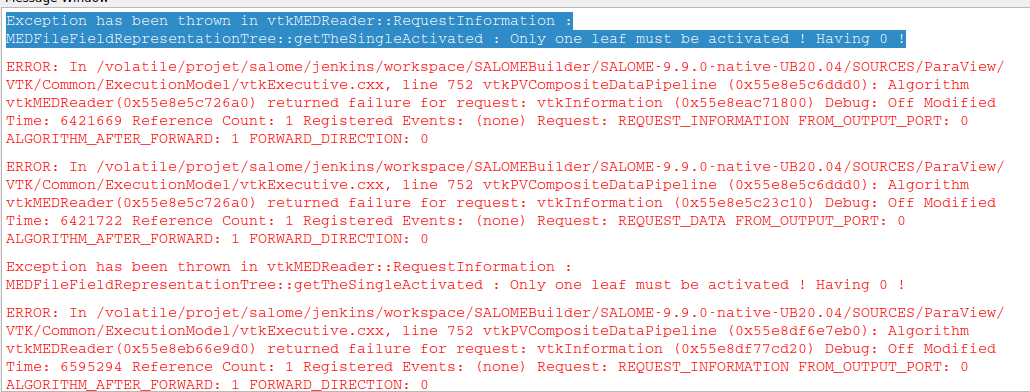
In fact it seems that the loop or the list induce a reader failure :
---
### Author:  [@nicolas.vuaille](https://discourse.paraview.org/u/nicolas.vuaille)
#### Post date: [August 22, 2024, 10:06am UTC](https://discourse.paraview.org/t/apply-appendattributes-to-several-med-files/15136/10 "2024-08-22T10:06:12Z")
Please try to open new posts for new problems, this help a lot to understand while reading the thread 🙂
Also can you try to isolate your new issue? I mean create the minimal script to reproduce, so it is easier to understand which line is faulty
---
### Author:  [@dim14](https://discourse.paraview.org/u/dim14)
#### Post date: [August 22, 2024, 1:03pm UTC](https://discourse.paraview.org/t/apply-appendattributes-to-several-med-files/15136/11 "2024-08-22T13:03:47Z")
Thanks for your advice
So i close this post and i open a new one dedicated to the medreader problem
Regards