# Applying ParaView state file to a data set with different number of time steps
**URL:** https://discourse.paraview.org/t/applying-paraview-state-file-to-a-data-set-with-different-number-of-time-steps/9093
**Category:** ParaView Support
**Created:** [March 1, 2022, 3:45pm UTC](https://discourse.paraview.org/t/applying-paraview-state-file-to-a-data-set-with-different-number-of-time-steps/9093 "2022-03-01T15:45:55Z")
**Posts on this page:** 18
**Page:** 1
### Author:  [@callista](https://discourse.paraview.org/u/callista)
#### Post date: [March 1, 2022, 3:45pm UTC](https://discourse.paraview.org/t/applying-paraview-state-file-to-a-data-set-with-different-number-of-time-steps/9093/1 "2022-03-01T15:45:56Z")
Hello everyone,
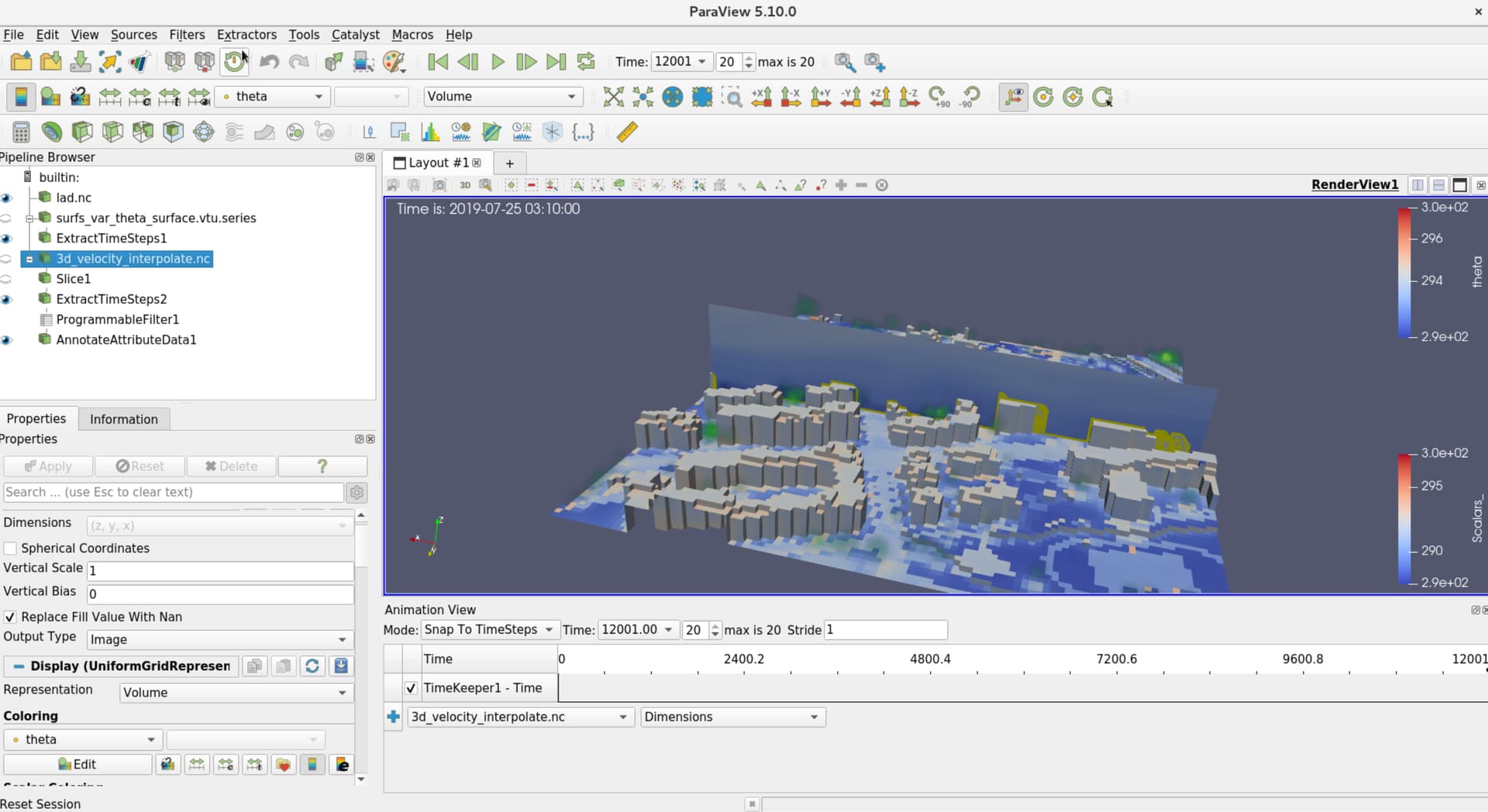
I have made a pvsm state file with one data set which has 20 time steps as you can see in the picture. What I want is to apply this state file to another data set which has 30 time steps (it is the same data just with additional timesteps), but when I try to do that, ParaView does not register this change in time steps and only shows number of steps from the state file. Even though in this time section I can see that in the toolbar the time steps are going (from 0 to 30), in the data and in this time annotation in the View area, the animation stops at time step 20.
I have tried to modify the pvsm state file by deleting several rows connected to EndTime but that did not change anything. I have also tried tomanipulate the code with LockEndTImeOff but it was unsuccessful. Do you have some ideas on where should I search for the problem?
---
### Author:  [@wascott](https://discourse.paraview.org/u/wascott)
#### Post date: [March 1, 2022, 7:05pm UTC](https://discourse.paraview.org/t/applying-paraview-state-file-to-a-data-set-with-different-number-of-time-steps/9093/2 "2022-03-01T19:05:51Z")
This really is a good idea. I added a feature request to the bug tracker here: [https://gitlab.kitware.com/paraview/paraview/-/issues/21269](https://gitlab.kitware.com/paraview/paraview/-/issues/21269).
The only thing I can think of is Fiie/ Reload Files.
---
### Author:  [@callista](https://discourse.paraview.org/u/callista)
#### Post date: [March 1, 2022, 7:52pm UTC](https://discourse.paraview.org/t/applying-paraview-state-file-to-a-data-set-with-different-number-of-time-steps/9093/3 "2022-03-01T19:52:22Z")
Hi, thanks!
I tried File/Reload files option, it does not make any difference.
Does it make sense to manually change the code in the pvsm file? Do you think it could be worth to try something like that?
---
### Author:  [@wascott](https://discourse.paraview.org/u/wascott)
#### Post date: [March 1, 2022, 8:05pm UTC](https://discourse.paraview.org/t/applying-paraview-state-file-to-a-data-set-with-different-number-of-time-steps/9093/4 "2022-03-01T20:05:37Z")
That would be good thing to try. From experience, .pvsm files are confusing.
Alternatively, when you save state, save as a .py file. These are easier to read, and edit.
---
### Author:  [@callista](https://discourse.paraview.org/u/callista)
#### Post date: [March 1, 2022, 8:13pm UTC](https://discourse.paraview.org/t/applying-paraview-state-file-to-a-data-set-with-different-number-of-time-steps/9093/5 "2022-03-01T20:13:43Z")
OK, thank you.
---
### Author:  [@callista](https://discourse.paraview.org/u/callista)
#### Post date: [March 8, 2022, 1:39pm UTC](https://discourse.paraview.org/t/applying-paraview-state-file-to-a-data-set-with-different-number-of-time-steps/9093/6 "2022-03-08T13:39:58Z")
@wascott Hi, I’m sorry for returning to this topic again, but I need to see something. I think that the issue here is caused by the ExtractTimeSteps filter in which I specified the time step range. When you have a state without any filters paraview normally reads and adjusts number of time steps accordingly. What I want to see is here, is there a way to ‘unlock’ this time step range in the pvsm state in this ExtractTimeSteps filter, or is there a filter that works similarly like the ExtractTimeSteps but does not have this time step range.
Thanks.
---
### Author:  [@wascott](https://discourse.paraview.org/u/wascott)
#### Post date: [March 8, 2022, 6:30pm UTC](https://discourse.paraview.org/t/applying-paraview-state-file-to-a-data-set-with-different-number-of-time-steps/9093/7 "2022-03-08T18:30:57Z")
No clue.
Share your data, plus detailed steps for one of us to create the state file.
---
### Author:  [@callista](https://discourse.paraview.org/u/callista)
#### Post date: [March 9, 2022, 1:18pm UTC](https://discourse.paraview.org/t/applying-paraview-state-file-to-a-data-set-with-different-number-of-time-steps/9093/8 "2022-03-09T13:18:30Z")
@wascott Hi again, I’ve prepared everything. I will attach a document with detailed steps and a gdrive link to get the data. The pvsm state is with the data as well so you can use it if you wish.
Link:
[steps\_paraview\_for\_developers.odt](https://discourse.paraview.org/uploads/short-url/r3cyN9u0Nls1kLif1hqMaB2hSZX.odt) (19.6 KB)
GDRIVE link: [Google Drive: Sign-in](https://drive.google.com/file/d/1p7GkCOcK143kUHsAPrNek1BzUdjOuMVz/view?usp=sharing)
I would really appreciate the help, because I’ve been stuck on this for a long time and I can’t locate the issue at all. Thank you.
---
### Author:  [@wascott](https://discourse.paraview.org/u/wascott)
#### Post date: [March 10, 2022, 7:13am UTC](https://discourse.paraview.org/t/applying-paraview-state-file-to-a-data-set-with-different-number-of-time-steps/9093/9 "2022-03-10T07:13:13Z")
@mwestphal Would you be able to take a look? I’m not allowed to log into Google Drive from work…
Thanks,
Alan
---
### Author:  [@mwestphal](https://discourse.paraview.org/u/mwestphal)
#### Post date: [March 10, 2022, 8:24am UTC](https://discourse.paraview.org/t/applying-paraview-state-file-to-a-data-set-with-different-number-of-time-steps/9093/10 "2022-03-10T08:24:18Z")
Ive requested access
---
### Author:  [@callista](https://discourse.paraview.org/u/callista)
#### Post date: [March 10, 2022, 8:25am UTC](https://discourse.paraview.org/t/applying-paraview-state-file-to-a-data-set-with-different-number-of-time-steps/9093/11 "2022-03-10T08:25:12Z")
Hi, I just accepted it, hope it allows you.
---
### Author:  [@mwestphal](https://discourse.paraview.org/u/mwestphal)
#### Post date: [March 10, 2022, 8:30am UTC](https://discourse.paraview.org/t/applying-paraview-state-file-to-a-data-set-with-different-number-of-time-steps/9093/12 "2022-03-10T08:30:57Z")
ExtractTimeSteps works perfectly on my side, extracting time from 0 to 9 as it is configured to.
However, I fail to see why you are even using ExtractTimeSteps at all.
---
### Author:  [@callista](https://discourse.paraview.org/u/callista)
#### Post date: [March 10, 2022, 8:36am UTC](https://discourse.paraview.org/t/applying-paraview-state-file-to-a-data-set-with-different-number-of-time-steps/9093/13 "2022-03-10T08:36:11Z")
Yes, but if you try to apply the state to the other dataset in 20\_timesteps directory then and look in the ExtracTimeSteps there will be again from 0-9 not 0-19 and if you click on play then you won’t see the other 10 timesteps and this annotation that I have will stop at 10 and the data in the view area will stop as well at 9nth time step. In the toolbar you will see that the steps are going from 0-19 but then if you look at the data and look at the ‘‘humantime’’ it’ll stop at 9.
---
### Author:  [@mwestphal](https://discourse.paraview.org/u/mwestphal)
#### Post date: [March 10, 2022, 8:38am UTC](https://discourse.paraview.org/t/applying-paraview-state-file-to-a-data-set-with-different-number-of-time-steps/9093/14 "2022-03-10T08:38:28Z")
This is expected, there is not concept of “ExtractAllTimeSteps” in ExtractTimeStep filter. But why do you want to do that, just do not use ExtractTimeStep at all.
---
### Author:  [@callista](https://discourse.paraview.org/u/callista)
#### Post date: [March 10, 2022, 8:47am UTC](https://discourse.paraview.org/t/applying-paraview-state-file-to-a-data-set-with-different-number-of-time-steps/9093/15 "2022-03-10T08:47:29Z")
Ok I see, well I tried not using it and then I’ve encountered another problem that you solved the other day by switching from vtu to vtp ([ParaView state file problem: state file does not show a slice from a dataset - #14 by mwestphal](https://discourse.paraview.org/t/paraview-state-file-problem-state-file-does-not-show-a-slice-from-a-dataset/9114/14)).
But the original problem of not seeing data after the 9th time step when I use another data set was still there and I don’t know why am I not seeing the data after that 9th time step. If it’s not ExtractTImeSteps I don’t know what is it then? I’m puzzled why I don’t see the data in the humantime annotation and in the view but in the toolbar time area you see it going normally from 0-19 .
---
### Author:  [@mwestphal](https://discourse.paraview.org/u/mwestphal)
#### Post date: [March 10, 2022, 8:52am UTC](https://discourse.paraview.org/t/applying-paraview-state-file-to-a-data-set-with-different-number-of-time-steps/9093/16 "2022-03-10T08:52:49Z")
Already reported by @wascott here: [https://gitlab.kitware.com/paraview/paraview/-/issues/21269](https://gitlab.kitware.com/paraview/paraview/-/issues/21269).
---
### Author:  [@callista](https://discourse.paraview.org/u/callista)
#### Post date: [March 10, 2022, 8:57am UTC](https://discourse.paraview.org/t/applying-paraview-state-file-to-a-data-set-with-different-number-of-time-steps/9093/17 "2022-03-10T08:57:45Z")
Alright. Thank you.
---
### Author:  [@callista](https://discourse.paraview.org/u/callista)
#### Post date: [March 10, 2022, 11:41am UTC](https://discourse.paraview.org/t/applying-paraview-state-file-to-a-data-set-with-different-number-of-time-steps/9093/18 "2022-03-10T11:41:09Z")
Hi again,
So I’ve managed to solve this problem. What I needed to do is to select all possible datasets and then apply the ProgrammableFilter, and then select all programmable filters and apply AnnotateAttributedata. And when you load new data set with the larger number of time steps it works.
However, new problem happened. When you try and open the original state with 10 time steps, you won’t be able to see the Slice you’ve made.
This is the new state if you want to check it out:
[programmable\_filter\_applied\_to\_all\_annotation\_applied\_to\_all.pvsm](https://discourse.paraview.org/uploads/short-url/wNd39WSAQY0LuEqwdusdqnrfn8a.pvsm) (663.0 KB)