# Artifacts when saving screenshot with transparent background and high resolution with enabled ray tracing
**URL:** https://discourse.paraview.org/t/artifacts-when-saving-screenshot-with-transparent-background-and-high-resolution-with-enabled-ray-tracing/10339
**Category:** ParaView Support
**Created:** [September 16, 2022, 12:49pm UTC](https://discourse.paraview.org/t/artifacts-when-saving-screenshot-with-transparent-background-and-high-resolution-with-enabled-ray-tracing/10339 "2022-09-16T12:49:07Z")
**Posts on this page:** 7
**Page:** 1
### Author:  [@reox](https://discourse.paraview.org/u/reox)
#### Post date: [September 16, 2022, 12:49pm UTC](https://discourse.paraview.org/t/artifacts-when-saving-screenshot-with-transparent-background-and-high-resolution-with-enabled-ray-tracing/10339/1 "2022-09-16T12:49:07Z")
I have an image from a µCT I would like to render with paraview 5.9. To do that, I took the following Steps:
- Load the .xmf image in paraview (the image is binary and contains only voxels with 0 or 1)
- use the Threshold Filter with min=0.5 max=1 to only show voxels with a value \>0
- Select “Surface” as display type, and “Solid Color” for coloring
- Click “Enable Ray Tracing” and “Shadows”, Set “Samples per Pixel” to 10
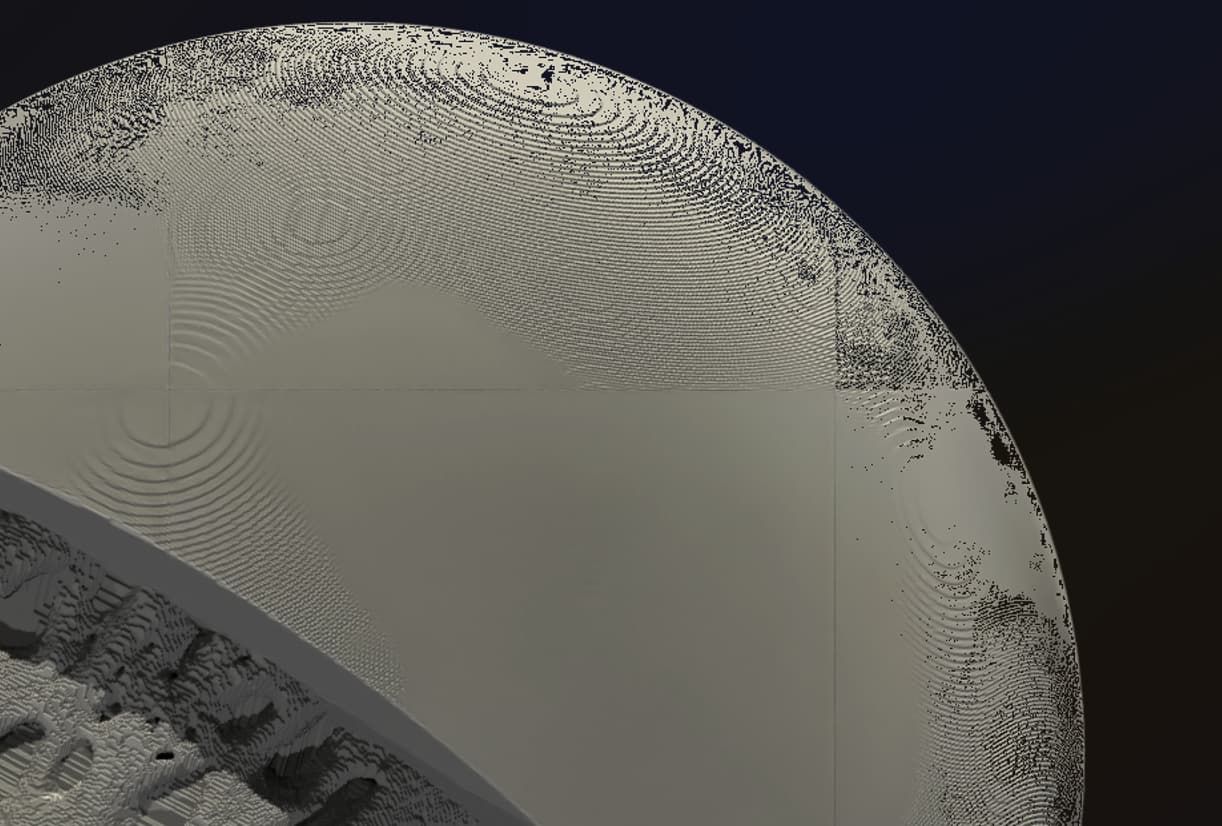
Now, in the renderview the image looks very good. But, if I save a screenshot, I get a lot of artifacts in the image. For example transparent pixels and lines going through the image:
So far I could track down where the artifacts come from:
- The transparent pixels only occur, if I save the image with transparent backgrund
- the lines only appear if I save the image in a different resolution than the one initially written in the screenshot dialog
Is there any possibility to prevent that and still save a screenshot with transparent background and high-resolution?
A workaround for the first issue is to save to a white background, then open the image in Photoshop and use the magic eraser tool. (There is probably a similar method for Gimp too…)
---
### Author:  [@mwestphal](https://discourse.paraview.org/u/mwestphal)
#### Post date: [September 19, 2022, 2:17am UTC](https://discourse.paraview.org/t/artifacts-when-saving-screenshot-with-transparent-background-and-high-resolution-with-enabled-ray-tracing/10339/2 "2022-09-19T02:17:35Z")
Hi @reox ,
Does that disapear if you increase the number of Pixels to a high number, eg 100 ?
FYI @Dave_DeMarle @timothee.chabat
---
### Author:  [@reox](https://discourse.paraview.org/u/reox)
#### Post date: [September 19, 2022, 6:31am UTC](https://discourse.paraview.org/t/artifacts-when-saving-screenshot-with-transparent-background-and-high-resolution-with-enabled-ray-tracing/10339/3 "2022-09-19T06:31:02Z")
You mean “samples per pixel” in the render settings? Or the size of the screenshot?
If I create the screenshot, the “native” size is 1070x829. If I use that, I do not get the lines, but with transparent background I get the transparent pixels in the image. Using a screenshot size of 100x100 pixel also has no lines (at least none I can see with that reduced size) but with the transparent background I still have the pixels.
I also changed the samples per pixel to 100, but it gives the same result.
Thus, the only setting that does not produce any artifacts is native resolution with a colored background.
I tried to test PV5.11rc1 but unfortunately, our system is too old… We use CentOS 7.9 here, which has a too old libc. Maybe this is an issue also for pv 5.9?
The Hardware is a nvidia GTX 1050 Ti with driver 455.32.00.
---
### Author:  [@mwestphal](https://discourse.paraview.org/u/mwestphal)
#### Post date: [September 19, 2022, 6:36am UTC](https://discourse.paraview.org/t/artifacts-when-saving-screenshot-with-transparent-background-and-high-resolution-with-enabled-ray-tracing/10339/4 "2022-09-19T06:36:02Z")
I mean sample per pixel, sry.
---
### Author:  [@reox](https://discourse.paraview.org/u/reox)
#### Post date: [September 19, 2022, 6:44am UTC](https://discourse.paraview.org/t/artifacts-when-saving-screenshot-with-transparent-background-and-high-resolution-with-enabled-ray-tracing/10339/5 "2022-09-19T06:44:04Z")
okay, no, unfortunately that seems to not change it. I tried with 500 and there is no difference.
What makes a difference is, if I enter some arbitrary resolution or if I use the x2 button. It seems like, resolutions which are a multiple of the native one, work better. But there are still faint lines visible.
---
### Author:  [@timothee.chabat](https://discourse.paraview.org/u/timothee.chabat)
#### Post date: [September 26, 2022, 7:34am UTC](https://discourse.paraview.org/t/artifacts-when-saving-screenshot-with-transparent-background-and-high-resolution-with-enabled-ray-tracing/10339/6 "2022-09-26T07:34:51Z")
that’s not the first time the “Save screenshot” feature gives this kind of artefacts … we should really start to track them down because these are recurrently appearing on the discourse.
I’ll try to see if i can reproduce the issue today on the PV5.11rc1
---
### Author:  [@mwestphal](https://discourse.paraview.org/u/mwestphal)
#### Post date: [March 29, 2024, 1:06pm UTC](https://discourse.paraview.org/t/artifacts-when-saving-screenshot-with-transparent-background-and-high-resolution-with-enabled-ray-tracing/10339/7 "2024-03-29T13:06:08Z")
A post was split to a new topic: [SamplePerPixels](https://discourse.paraview.org/t/sampleperpixels/14297)