# Averaging in spanwise direction and plotiing the data
**URL:** https://discourse.paraview.org/t/averaging-in-spanwise-direction-and-plotiing-the-data/6150
**Category:** ParaView Support
**Created:** [December 30, 2020, 12:56pm UTC](https://discourse.paraview.org/t/averaging-in-spanwise-direction-and-plotiing-the-data/6150 "2020-12-30T12:56:18Z")
**Posts on this page:** 8
**Page:** 1
### Author:  [@proxy](https://discourse.paraview.org/u/proxy)
#### Post date: [December 30, 2020, 12:56pm UTC](https://discourse.paraview.org/t/averaging-in-spanwise-direction-and-plotiing-the-data/6150/1 "2020-12-30T12:56:18Z")
Hi,
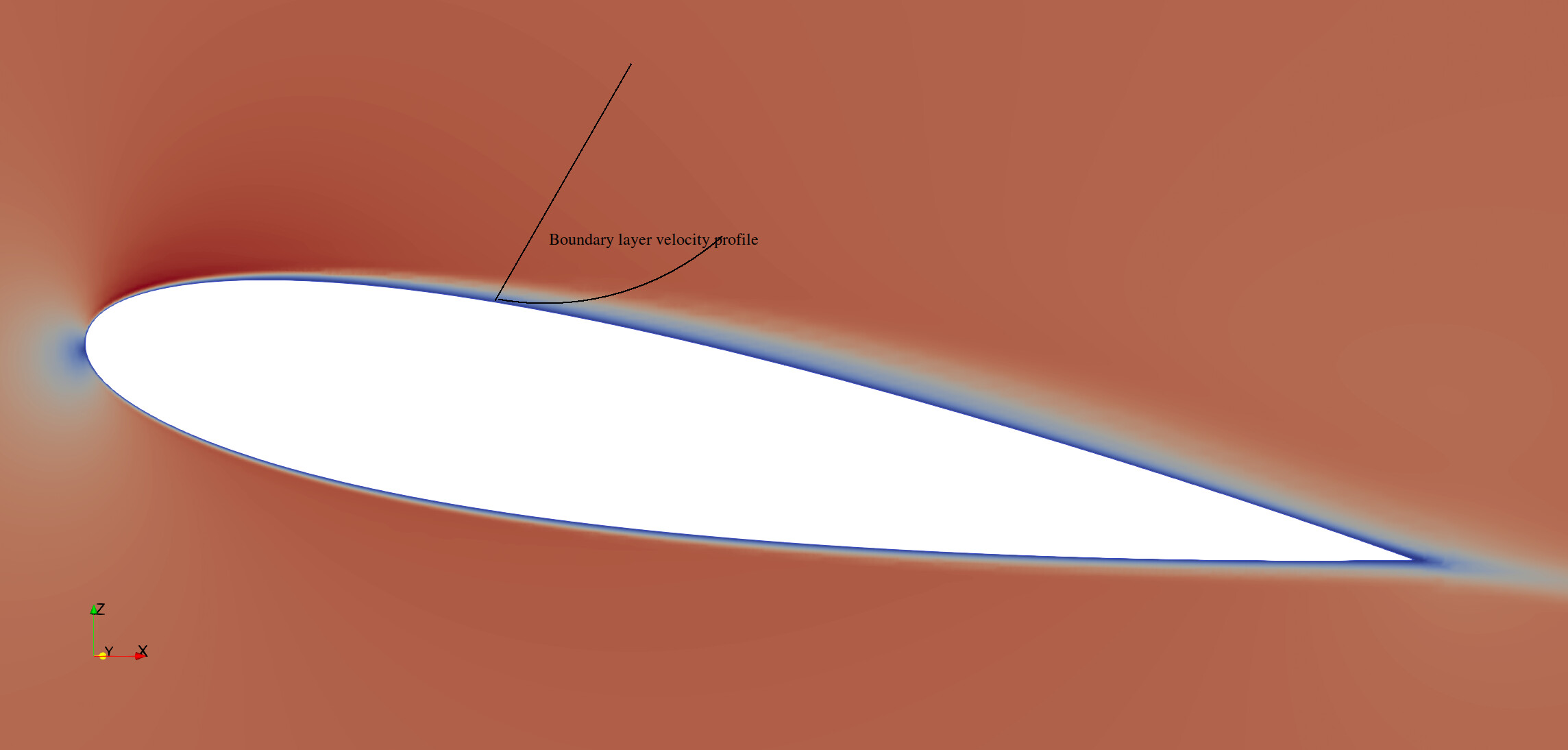
I tried to simulate a 3D NACA aerofoil in OpenFOAM. I want the velocity profile at different section of this aerofoil. To do that I need to average the velocity field in the span wise direction and then plot the velocity at different locations of the aerofoil. In the given figures: figure1 I have shown the 3D section of the aerofoil and to explicitly show what I mean by the span-wise direction; figure 2 is the contour plot of the 2D slice of the aerofoil in which I want to plot the velocity along a normal line to the surface of the aerofoil. So effectively I want to plot a velocity profile at a fixed location of aerofoil which is averaged in the spanwise direction. Is that can be processed in the ParaView, any suggestion or comments?
---
### Author:  [@randomwangran](https://discourse.paraview.org/u/randomwangran)
#### Post date: [December 30, 2020, 11:33pm UTC](https://discourse.paraview.org/t/averaging-in-spanwise-direction-and-plotiing-the-data/6150/2 "2020-12-30T23:33:41Z")
It’s not related to Paraview, but you can use this package within OpenFOAM to do what you want: [https://github.com/ZmengXu/sampledPlaneAverage/tree/of7/sampledSurface/sampledPlaneSpanwise](https://github.com/ZmengXu/sampledPlaneAverage/tree/of7/sampledSurface/sampledPlaneSpanwise)
---
### Author:  [@proxy](https://discourse.paraview.org/u/proxy)
#### Post date: [December 31, 2020, 6:01am UTC](https://discourse.paraview.org/t/averaging-in-spanwise-direction-and-plotiing-the-data/6150/3 "2020-12-31T06:01:11Z")
Thanks a lot for the information and help. Just wondering will it be fine while running this utility with the OpenFOAM v1906. Would you mind to let me know-- how to incorporate/use it in OpenFOAM? Is this a postProcess utility? Sorry for asking so many questions. Thanks again for the help.
---
### Author:  [@randomwangran](https://discourse.paraview.org/u/randomwangran)
#### Post date: [December 31, 2020, 5:36pm UTC](https://discourse.paraview.org/t/averaging-in-spanwise-direction-and-plotiing-the-data/6150/4 "2020-12-31T17:36:19Z")
I am not the author of this code, so I do not know how can it be
compatible with v1906.
> how to incorporate/use it in OpenFOAM?
The author wrote a blog about its mechanism and usage in his [blog](https://zmeng.tech/2019/04/SpanwiseAverage/):
(in Chinese, you may use google translate to read)
You can download the code and compile by `wmake`. Then pay attention
to the following code when you add to your function:
```diff
@@ -17,17 +17,19 @@
plane1
{
type sampledPlaneSpanwise;
interpolate true;
planeType pointAndNormal;
pointAndNormalDict
{
- basePoint (0 0 0.1);
+ basePoint (0 0 0.1);
+//-wr ~~~~~~~~~~~~~~~~~~~
+//-wr Set origin point of the cutting plane
normalVector (1 0 0);
}
nPoints 72;
spanwiseVector (0 0 1);
}
@@ -18,17 +18,19 @@
{
type sampledPlaneSpanwise;
interpolate true; // Must be true, or it just cut the plane do not do spanwise average.
planeType pointAndNormal; // method used to specific the cuttingPlane
pointAndNormalDict
{
basePoint (0 0 0.1);
- normalVector (1 0 0);
+ normalVector (1 0 0);
+//-wr ~~~~~~~~~~~~
+//-wr Set the normal vector for the cutting plane
}
nPoints 72;
spanwiseVector (0 0 1);
}
@@ -20,17 +20,19 @@
interpolate true; // Must be true, or it just cut the plane do not do spanwise average.
planeType pointAndNormal; // method used to specific the cuttingPlane
pointAndNormalDict
{
basePoint (0 0 0.1);
normalVector (1 0 0);
}
- nPoints 72;
+ nPoints 72;
+//-wr ~~~~~~~~~~~~~~
+//-wr how to set the distance between two sampling planes?
spanwiseVector (0 0 1);
```
Just adding the above code to your case setup and do modification
accordingly. You can follow the follwoing example:
`$FOAM_TUTORIALS/incompressible/pisoFoam/LES/motorBike/motorBike/system/streamLines`
> Is this a postProcess utility?
Yes, you can use that way to execute functionObjects after your
calculation is done. Here’s what a functionObjects looks like.
> Class
> Foam::functionObjects::FUNCTIONOBJECT
>
> Description
> This function object…
>
> Example of function object specification:
> \verbatim
> FUNCTIONOBJECT1
> {
> type FUNCTIONOBJECT;
> libs (“libFUNCTIONOBJECTFunctionObject.so”);
> …
> wordData someWord;
> scalarData 1.0;
> labelData 1;
> }
> \endverbatim
>
> Usage
> \table
> Property | Description | Required | Default value
> type | type name: FUNCTIONOBJECT | yes |
> wordData | some word option… | no | defaultWord
> scalarData | some scalar value… | yes |
> labelData | some label value… | yes |
> \endtable
However, you can also make it to run while the simulation is running,
which you can sample the data at higher frequency.
---
### Author:  [@proxy](https://discourse.paraview.org/u/proxy)
#### Post date: [January 1, 2021, 7:25am UTC](https://discourse.paraview.org/t/averaging-in-spanwise-direction-and-plotiing-the-data/6150/5 "2021-01-01T07:25:25Z")
Hello,
Many thanks for your detailed answers. I tried to run the “code” in the OpenFOAM v1906, but it gave the following error (file is attached). I think some compatibility issues are there, could you kindly help. Do you suggest to install the OpenFOAM 4?
[spanwise\_error.txt](https://discourse.paraview.org/uploads/short-url/i4lK4ollC2k0kkZmx8Ada9w3kZS.txt) (11.1 KB)
---
### Author:  [@randomwangran](https://discourse.paraview.org/u/randomwangran)
#### Post date: [January 2, 2021, 2:15am UTC](https://discourse.paraview.org/t/averaging-in-spanwise-direction-and-plotiing-the-data/6150/6 "2021-01-02T02:15:14Z")
It looks like it does not support v1906. I am afraid that I could not help
you right away. But porting data from v7 to v1906 is something that I
would like to study as well.
If you do not have time to play with, I suggest you just slice 10
planes along the span-wise direction by creating a simple python script
to cut one plane and then extend that script to 10. The tool you may
start with is `Tools → Start Tracer`.
Meanwhile, this is a forum for ParaView not for OpenFOAM, so if you
are still interested in using native OpenFOAM code to generate such a
span-wise average function, [we can discuss in this repo](https://github.com/randomwangran/improve/commit/2944826c8080492ae880e4071de7c777bd2ecefb). I recently
also play with `naca0012`.
---
### Author:  [@proxy](https://discourse.paraview.org/u/proxy)
#### Post date: [January 3, 2021, 6:15am UTC](https://discourse.paraview.org/t/averaging-in-spanwise-direction-and-plotiing-the-data/6150/7 "2021-01-03T06:15:10Z")
Thanks a lot for your help and support. You are absolutely correct about the validity of the forum. I am afraid that I digested your suggestions completely. I will continue asking you asking on your new forum, hope you won’t be offended, thanks again for your kind cooperation.
---
### Author:  [@proxy](https://discourse.paraview.org/u/proxy)
#### Post date: [January 3, 2021, 2:56pm UTC](https://discourse.paraview.org/t/averaging-in-spanwise-direction-and-plotiing-the-data/6150/8 "2021-01-03T14:56:47Z")
Hi again,
Really excited to start working with the Python scripts in Paraview. Using your suggestion
> [@randomwangran](#):
>
> The tool you may
> start with is `Tools → Start Tracer`
I sliced one plane and using Tools – Start Tracer saved the Python script and then re run that script to get the same figure again, till this point I was able to understand and did that successfully, many thanks to you. But sorry I don’t understand what needs to be done afterwards, any further clue? Sorry for asking many question but believe me this is my first Python script in Paraview which I was very excited to learn. Thanks again for all your wonderful comments and suggestions.