# Best way of visualizing exported animated scenes
**URL:** https://discourse.paraview.org/t/best-way-of-visualizing-exported-animated-scenes/9731
**Category:** ParaView Support
**Tags:** vtkjs
**Created:** [June 3, 2022, 11:16am UTC](https://discourse.paraview.org/t/best-way-of-visualizing-exported-animated-scenes/9731 "2022-06-03T11:16:19Z")
**Posts on this page:** 20
**Page:** 1
### Author:  [@Xabier\_Morales\_Ferez](https://discourse.paraview.org/u/Xabier_Morales_Ferez)
#### Post date: [June 3, 2022, 11:16am UTC](https://discourse.paraview.org/t/best-way-of-visualizing-exported-animated-scenes/9731/1 "2022-06-03T11:16:19Z")
Hello everyone,
I work with blood flow in the heart and I have been mainly exporting videos to share my results with other colleagues. I wanted to try to export the whole scene instead as a lot of information is lost when visualizing such a complex flow from a fixed point of view. I know there are options such as orbit in animation, but the optimal approach would be to freely rotate in 3D to observe the flow from different points of view.
With this in mind, I have used the Export Animated Scene and a vtkjs.zip file has been created. I understand I need to use vtk.js to visualize my data, and in fact, I managed to visualize the first frame of my data correctly using the SceneExplorer.html example. I assume I need to combine this code with the from TimeSeries.html.
As my experience in this area is rather limited I just wanted to know if I’m heading in the correct direction or if you know of alternatives to generate 3D scenes.
Kind regards,
Xabier
---
### Author:  [@mwestphal](https://discourse.paraview.org/u/mwestphal)
#### Post date: [June 3, 2022, 11:44am UTC](https://discourse.paraview.org/t/best-way-of-visualizing-exported-animated-scenes/9731/2 "2022-06-03T11:44:21Z")
Hi @Xabier_Morales_Ferez ,
You should be able to open it with ParaView Glance:
> **[Kitware Glance](https://kitware.github.io/glance/app/)**
>
> Data Viewer in a browser
Ideally, .gltf export should be added in ParaView.
Best,
---
### Author:  [@Xabier\_Morales\_Ferez](https://discourse.paraview.org/u/Xabier_Morales_Ferez)
#### Post date: [June 3, 2022, 1:29pm UTC](https://discourse.paraview.org/t/best-way-of-visualizing-exported-animated-scenes/9731/3 "2022-06-03T13:29:59Z")
Hi @mwestphal,
Thank you for the quick response! I tried to upload the .zip file to ParaView Glance before but nothing happened. I have tried again after creating a new animated scene but it starts loading index.json files but no data appears afterward.
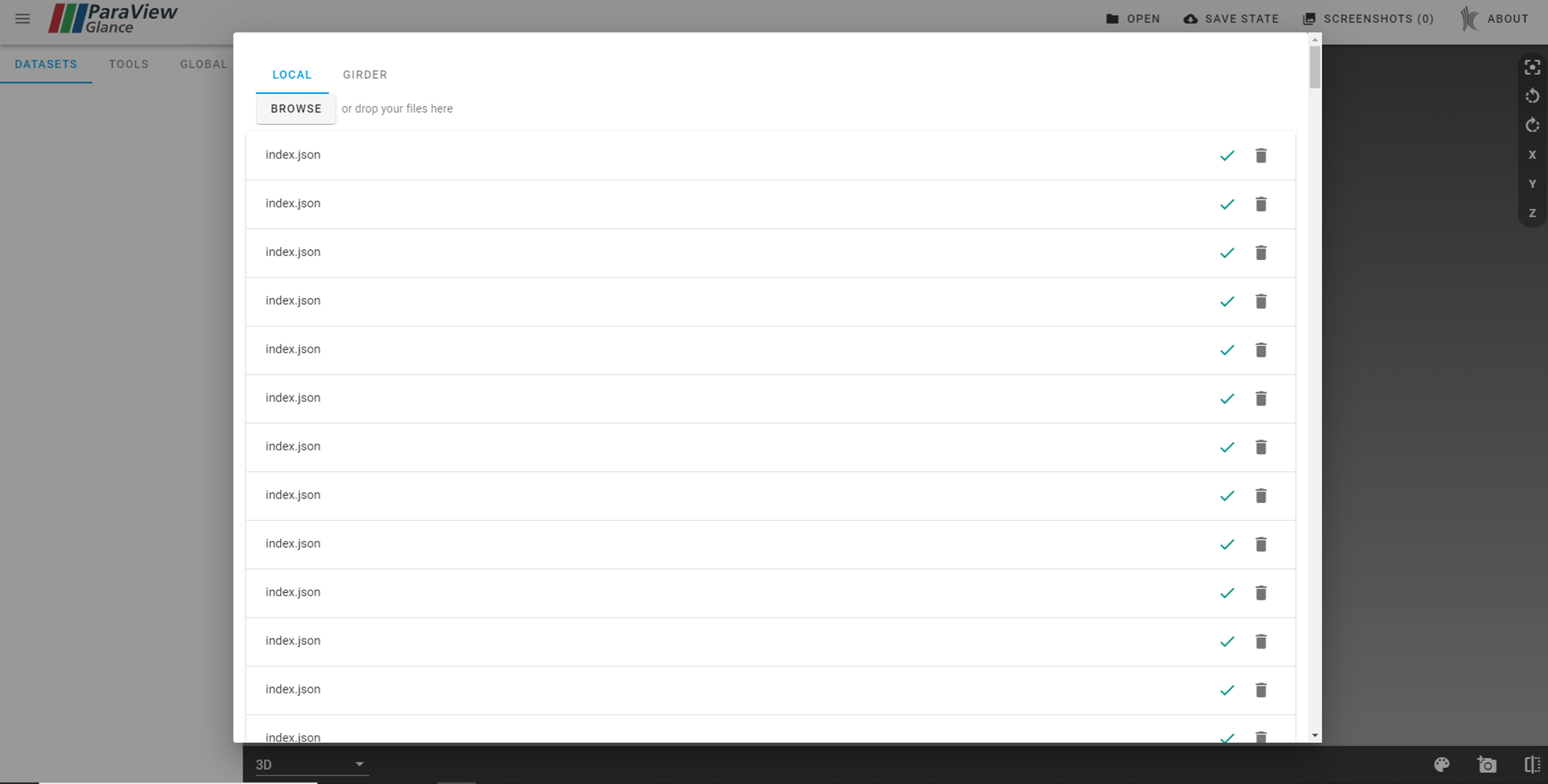
I just noticed that the scene saving process is not completed correctly, so maybe that’s something to do with it.
```auto
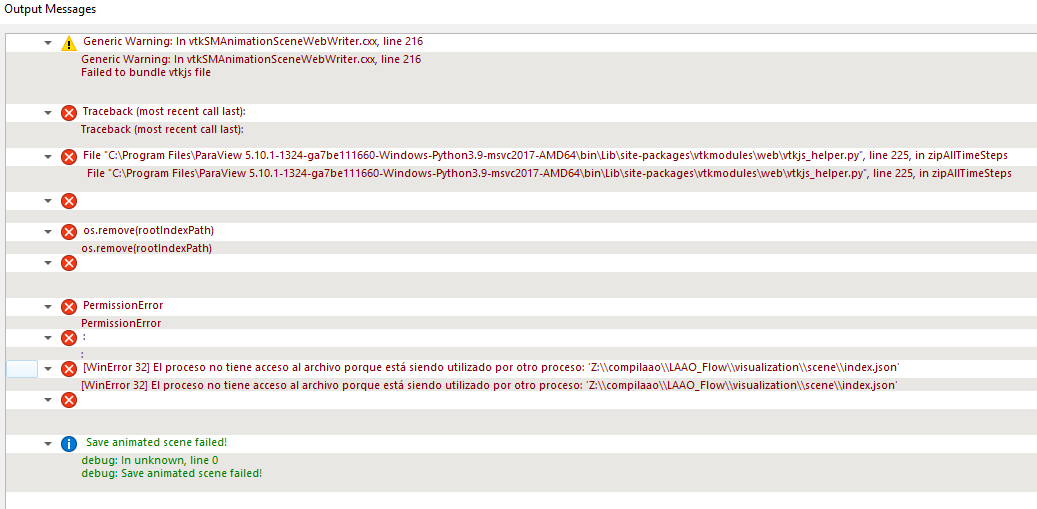
Generic Warning: In C:\glr\builds\paraview\paraview-ci\build\superbuild\paraview\src\Remoting\Animation\vtkSMAnimationSceneWebWriter.cxx, line 216
Failed to bundle vtkjs file
Traceback (most recent call last):
File "D:\Software\ParaView 5.10.0-Windows-Python3.9-msvc2017-AMD64\bin\Lib\site-packages\vtkmodules\web\vtkjs_helper.py", line 225, in zipAllTimeSteps
os.remove(rootIndexPath)
PermissionError: [WinError 32] El proceso no tiene acceso al archivo porque está siendo utilizado por otro proceso: 'Z:\\compilaao\\LAAO_Flow\\visualization\\scene\\index.json'
debug: In unknown, line 0
debug: Save animated scene failed!
```
Any idea what might be causing the error?
---
### Author:  [@mwestphal](https://discourse.paraview.org/u/mwestphal)
#### Post date: [June 3, 2022, 2:47pm UTC](https://discourse.paraview.org/t/best-way-of-visualizing-exported-animated-scenes/9731/4 "2022-06-03T14:47:36Z")
Thats a @Adrien_Boucaud question
---
### Author:  [@mau\_igna\_06](https://discourse.paraview.org/u/mau_igna_06)
#### Post date: [June 5, 2022, 7:28pm UTC](https://discourse.paraview.org/t/best-way-of-visualizing-exported-animated-scenes/9731/5 "2022-06-05T19:28:05Z")
Maybe you could.do that.on slicer…
You may ask in the discourse of Slicer to Lasso Andras because I think he has worked with.applications related tonthe haert
---
### Author:  [@Xabier\_Morales\_Ferez](https://discourse.paraview.org/u/Xabier_Morales_Ferez)
#### Post date: [June 7, 2022, 11:01am UTC](https://discourse.paraview.org/t/best-way-of-visualizing-exported-animated-scenes/9731/6 "2022-06-07T11:01:34Z")
I’m working with blood flow data and my animation includes temporal pathlines. If I am not mistaken, 3D slicer is not suited for this type of data, right?
---
### Author:  [@mau\_igna\_06](https://discourse.paraview.org/u/mau_igna_06)
#### Post date: [June 7, 2022, 11:15am UTC](https://discourse.paraview.org/t/best-way-of-visualizing-exported-animated-scenes/9731/7 "2022-06-07T11:15:44Z")
On Slicer for nodes that change in time you can use the sequemcies module like for your curveNode. You can work in tandemnwith FeBio for the animations I think
---
### Author:  [@Xabier\_Morales\_Ferez](https://discourse.paraview.org/u/Xabier_Morales_Ferez)
#### Post date: [June 7, 2022, 3:34pm UTC](https://discourse.paraview.org/t/best-way-of-visualizing-exported-animated-scenes/9731/8 "2022-06-07T15:34:14Z")
Ok, I’ll give it a try then. Nonetheless, I would still prefer to run the whole pipeline in Paraview. Saving each timestep individually I can visualize them perfectly in Glance but I haven’t managed to load them as a single animation through Exported Animated Scene.
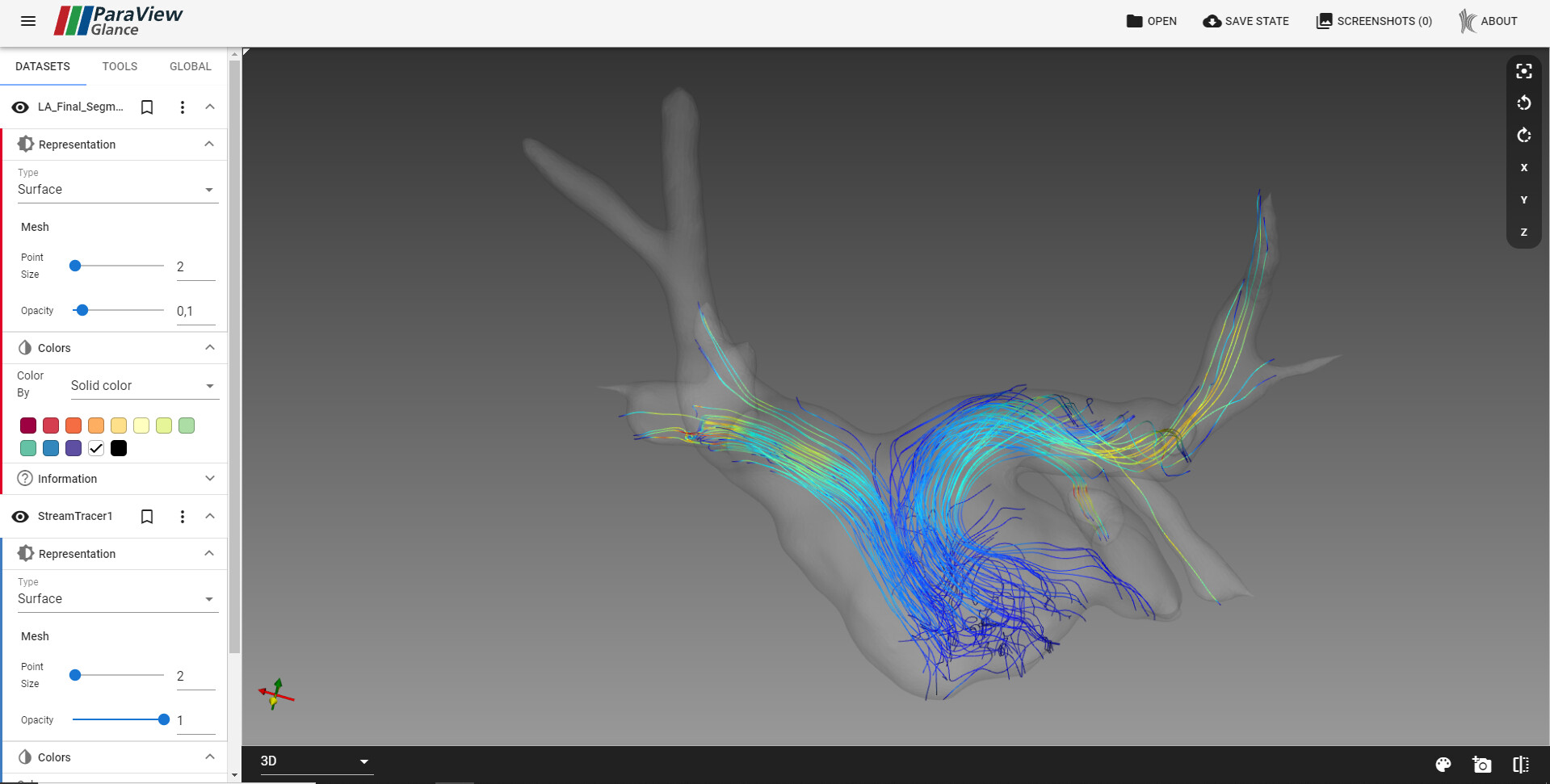
I have tried on both ubuntu and windows with versions 5.10 and 5.10.1 and using different visualization types and I keep getting the exact same error. @mwestphal @Adrien_Boucaud should I report it as a bug?
---
### Author:  [@mau\_igna\_06](https://discourse.paraview.org/u/mau_igna_06)
#### Post date: [June 7, 2022, 4:36pm UTC](https://discourse.paraview.org/t/best-way-of-visualizing-exported-animated-scenes/9731/9 "2022-06-07T16:36:24Z")
They look similar to btaintrsvks, yiu shiuld be able to visualize them as a sequence also i believe
You may ask Steve Pieper morenabout this in the slicer forum, he regularly works with them
> **[pieper](https://discourse.slicer.org/u/pieper)**
>
> Discussion of 3D Slicer open source visualization software, and related projects.
---
### Author:  [@Julien\_Finet](https://discourse.paraview.org/u/Julien_Finet)
#### Post date: [June 8, 2022, 10:11am UTC](https://discourse.paraview.org/t/best-way-of-visualizing-exported-animated-scenes/9731/10 "2022-06-08T10:11:26Z")
Regarding the error you have when saving the scene. What version of ParaView did you use ?
@David_Berger has recently ([here](https://gitlab.kitware.com/paraview/paraview/-/merge_requests/5534) ) fixed an issue on Windows.
Did you try to export the scene on Linux ?
---
### Author:  [@Xabier\_Morales\_Ferez](https://discourse.paraview.org/u/Xabier_Morales_Ferez)
#### Post date: [June 8, 2022, 10:14am UTC](https://discourse.paraview.org/t/best-way-of-visualizing-exported-animated-scenes/9731/11 "2022-06-08T10:14:57Z")
I have tried on both ubuntu 20.04 and windows 10 with Paraview versions 5.10 and 5.10.1 using different visualization types. Should I try the nightly version then?
---
### Author:  [@Xabier\_Morales\_Ferez](https://discourse.paraview.org/u/Xabier_Morales_Ferez)
#### Post date: [June 8, 2022, 10:53am UTC](https://discourse.paraview.org/t/best-way-of-visualizing-exported-animated-scenes/9731/12 "2022-06-08T10:53:07Z")
I have just tried with ParaView-master-5.10.1-1324-ga7be111660-Windows-Python3.9-msvc2017-AMD64.exe and I get the exact same error.
---
### Author:  [@Julien\_Finet](https://discourse.paraview.org/u/Julien_Finet)
#### Post date: [June 8, 2022, 11:03am UTC](https://discourse.paraview.org/t/best-way-of-visualizing-exported-animated-scenes/9731/13 "2022-06-08T11:03:50Z")
Can you try in “administrator” mode ?
Do you have the same error on linux ?
---
### Author:  [@Xabier\_Morales\_Ferez](https://discourse.paraview.org/u/Xabier_Morales_Ferez)
#### Post date: [June 8, 2022, 11:09am UTC](https://discourse.paraview.org/t/best-way-of-visualizing-exported-animated-scenes/9731/14 "2022-06-08T11:09:41Z")
Ok problem solved. It seems that the index.json file is still open when doing os.remove(rootIndexPath) at line 225 of vtkjs\_helper.py. I just commented the line and the vtkjs line bundles without issues and I can visualize it in ParaView Glance.
---
### Author:  [@Julien\_Finet](https://discourse.paraview.org/u/Julien_Finet)
#### Post date: [June 8, 2022, 1:22pm UTC](https://discourse.paraview.org/t/best-way-of-visualizing-exported-animated-scenes/9731/15 "2022-06-08T13:22:33Z")
can you please share with me/us the ParaView scene you are trying to export ? Maybe there is something that prevents the file to be closed.
Thanks,
J.
---
### Author:  [@Xabier\_Morales\_Ferez](https://discourse.paraview.org/u/Xabier_Morales_Ferez)
#### Post date: [June 8, 2022, 1:45pm UTC](https://discourse.paraview.org/t/best-way-of-visualizing-exported-animated-scenes/9731/16 "2022-06-08T13:45:13Z")
It doesn’t appear to be specific to any visualization or Paraview filter, it fails even when I try saving a scene with a simple .stl file with the Export Animated Scene option.
On the other hand, I’m beginning to suspect that the code messes up the timestep order when displayed in Glance. Could it be related to using a single digit to number each timestep? That is to say, using 0,1,2,… instead of 000,001,002,…
---
### Author:  [@Xabier\_Morales\_Ferez](https://discourse.paraview.org/u/Xabier_Morales_Ferez)
#### Post date: [June 8, 2022, 3:16pm UTC](https://discourse.paraview.org/t/best-way-of-visualizing-exported-animated-scenes/9731/17 "2022-06-08T15:16:06Z")
Hi,
I have solved the ordering issue by adding a function to natural sort the timestep folders. I have attached the vtkjs\_helper.py file if you are interested. Now I can visualize the whole scene in Paraview Glance. It is rather impressive! Thank you very much for the effort to develop such incredible tools.
One last question. Every time I change timestep in Glance the camera resets to the default position. Is there any way to keep the camera in place between time steps?
[vtkjs\_helper.py](https://discourse.paraview.org/uploads/short-url/bJYsvJzAlpsyEi541yWgwAmQv1x.py) (10.4 KB)
---
### Author:  [@Julien\_Finet](https://discourse.paraview.org/u/Julien_Finet)
#### Post date: [June 8, 2022, 3:32pm UTC](https://discourse.paraview.org/t/best-way-of-visualizing-exported-animated-scenes/9731/18 "2022-06-08T15:32:47Z")
Glad to hear it works. It would be great if you could create a pull request with your fix.
Regarding the camera reset, it has been implemented on purpose (to enforce Paraview’s camera settings at each time). Though I also think it makes sense to ignore the exported camera like you suggest. If you have funding, we could implement it for you.
Regards,
Julien.
---
### Author:  [@Xabier\_Morales\_Ferez](https://discourse.paraview.org/u/Xabier_Morales_Ferez)
#### Post date: [June 8, 2022, 4:04pm UTC](https://discourse.paraview.org/t/best-way-of-visualizing-exported-animated-scenes/9731/19 "2022-06-08T16:04:31Z")
So if I understand correctly this is the intended behavior of the camera? I assumed it was possible to watch the animation from different views as within each time step the camera can be placed in any position.
[/uploads/default/original/2X/3/31a67acdf40fd7ee7538edbe33bdcf60511f3b84.mp4](https://discourse.paraview.org/uploads/default/original/2X/3/31a67acdf40fd7ee7538edbe33bdcf60511f3b84.mp4)
I would love to finance this stuff but I’m just an underpaid overworked PhD student 😅. Thank you very much anyway!
---
### Author:  [@Julien\_Finet](https://discourse.paraview.org/u/Julien_Finet)
#### Post date: [June 8, 2022, 4:11pm UTC](https://discourse.paraview.org/t/best-way-of-visualizing-exported-animated-scenes/9731/20 "2022-06-08T16:11:14Z")
Nice video, this is a cool usage of the PV to PVGlance feature!
Alternatively, you can place the camera for each step within ParaView before exporting the scene.
[Next page](https://discourse.paraview.org/t/best-way-of-visualizing-exported-animated-scenes/9731.md?page=2)