# Big model rendering
**URL:** https://discourse.paraview.org/t/big-model-rendering/11353
**Category:** ParaView Support
**Tags:** opengl
**Created:** [February 8, 2023, 11:43am UTC](https://discourse.paraview.org/t/big-model-rendering/11353 "2023-02-08T11:43:09Z")
**Posts on this page:** 6
**Page:** 1
### Author:  [@Petr\_Melnikov](https://discourse.paraview.org/u/Petr_Melnikov)
#### Post date: [February 8, 2023, 11:43am UTC](https://discourse.paraview.org/t/big-model-rendering/11353/1 "2023-02-08T11:43:09Z")
Hi everyone
When opening a large vtu file in ParaView (4gb, number of cells: 166 506 138, number of points: 394 681 216), only part of the model is displayed.
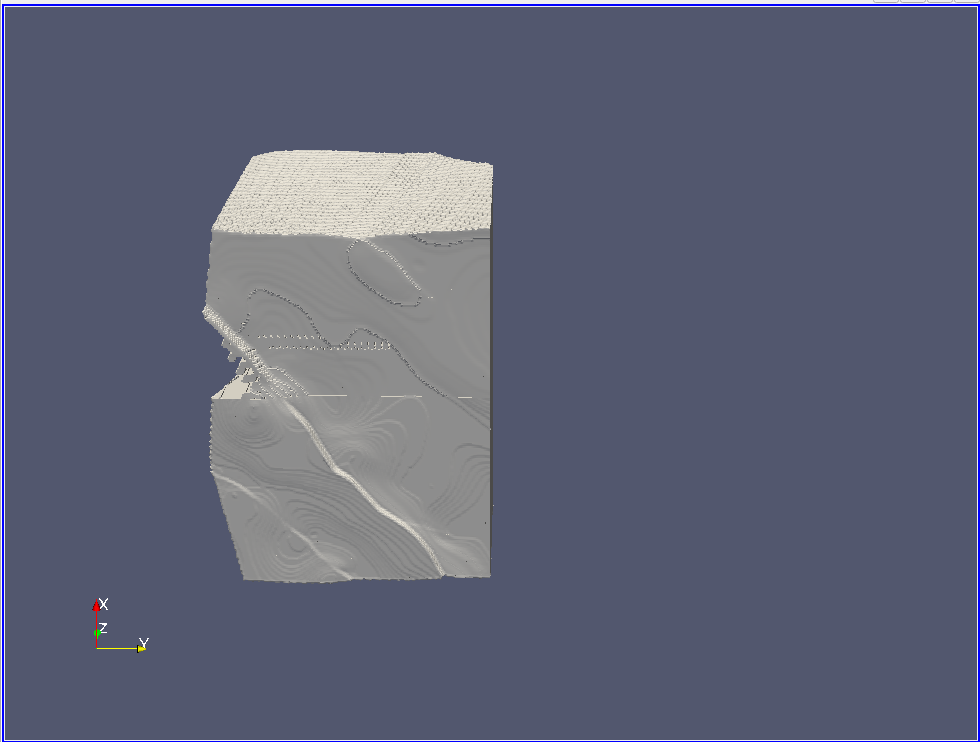
But during rotation (interactive mode) the model is displayed completely.

Because of interactive mode, decimation works, and it can be concluded that in regular mode the renderer cannot cope with such a number of entities (points / cells).
Maybe that’s not the problem.
Has anyone experienced similar behavior?
What could be wrong?
ParaView 5.11.0
Ubuntu 20.04
---
### Author:  [@mwestphal](https://discourse.paraview.org/u/mwestphal)
#### Post date: [February 8, 2023, 12:27pm UTC](https://discourse.paraview.org/t/big-model-rendering/11353/2 "2023-02-08T12:27:25Z")
Hi @Petr_Melnikov ,
Please share your data.
Best.
---
### Author:  [@Petr\_Melnikov](https://discourse.paraview.org/u/Petr_Melnikov)
#### Post date: [February 8, 2023, 5:40pm UTC](https://discourse.paraview.org/t/big-model-rendering/11353/3 "2023-02-08T17:40:55Z")
Thank you for your response!
> **[Result\_10000.vtu](https://drive.google.com/file/d/1bBEwXmlx2e85o3MAgAmJcPYaaFtey3k5/view?usp=share_link)**
>
> Google Drive file.
---
### Author:  [@timothee.chabat](https://discourse.paraview.org/u/timothee.chabat)
#### Post date: [February 10, 2023, 2:08pm UTC](https://discourse.paraview.org/t/big-model-rendering/11353/4 "2023-02-10T14:08:46Z")
Hello @Petr_Melnikov ,
I tried to render your dataset and indeed I reproduce the issue. For me it is because the dataset cannot fit in the GPU memory so it is not entierely rendered. That or there is some overflow going on somewhere. This seem related to [https://gitlab.kitware.com/paraview/paraview/-/issues/17367](https://gitlab.kitware.com/paraview/paraview/-/issues/17367) . Maybe that if you use a CPU renderer such as Mesa or OSPRay you’d be able to visualize the whole dataset.
Otherwise, for dealing with this big dataset I’d advise to run ParaView on multiple machine using `pvserver`. If you have multiple GPU on a single machine it is also possible to assign a GPU per pvserver.
---
### Author:  [@Petr\_Melnikov](https://discourse.paraview.org/u/Petr_Melnikov)
#### Post date: [February 11, 2023, 11:09am UTC](https://discourse.paraview.org/t/big-model-rendering/11353/5 "2023-02-11T11:09:13Z")
@timothee.chabat, thanks for the advice!
Mesa (llvmpipe) does not render the model at all.
Does OSPRay refer to the **Enable Ray Tracing** property of the **RenderView**?
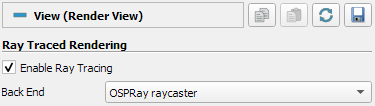
When this property is enabled, the model is displayed completely, but with large delays after every rotation/scaling.
Do I understand correctly that in order to use multiple pvserver processes with an assigned GPU, it will be necessary to break the dataset into pieces using vtkXMLPUnstructuredGridWriter in such a way that each pvserver deals with its own piece?
---
### Author:  [@timothee.chabat](https://discourse.paraview.org/u/timothee.chabat)
#### Post date: [February 13, 2023, 10:09am UTC](https://discourse.paraview.org/t/big-model-rendering/11353/6 "2023-02-13T10:09:29Z")
> [@Petr\_Melnikov](#):
>
> When this property is enabled, the model is displayed completely, but with large delays after every rotation/scaling.
yes CPU renderer will be much slower indeed.
> [@Petr\_Melnikov](#):
>
> Do I understand correctly that in order to use multiple pvserver processes with an assigned GPU, it will be necessary to break the dataset into pieces using vtkXMLPUnstructuredGridWriter in such a way that each pvserver deals with its own piece?
That is absolutely correct. If you want you can split the dataset yourself. Otherwise what you can do is use the `Redistribute Dataset` filter. See below for an example with a sphere : the `Redistribute Dataset` property values are important here. You can however choose any number of partitions you want. Once you have done that go to `File -> Save Data` and choose the `.vtpd` file format. These steps can be done with a non-distributed instance of ParaView.

2 side notes :
- if RAM is not your concern you could also directly launch the distributed ParaView instance, redistribute the dataset in your pipeline directly and then display it, instead of writing the distributed dataset to your disk.
- Since your data is very big and representations can also take a lot of RAM, what I recommand you to do is to open a spreadsheet view and make it the active view before opening your data or applying the `Redistribute Dataset` filter. Displaying the geometry in the render view only when you need to should save some Gb of RAM.