# Black background with volume rendering
**URL:** https://discourse.paraview.org/t/black-background-with-volume-rendering/11388
**Category:** ParaView Support
**Created:** [February 13, 2023, 9:37am UTC](https://discourse.paraview.org/t/black-background-with-volume-rendering/11388 "2023-02-13T09:37:11Z")
**Posts on this page:** 7
**Page:** 1
### Author:  [@Kei\_Yamamoto](https://discourse.paraview.org/u/Kei_Yamamoto)
#### Post date: [February 13, 2023, 9:37am UTC](https://discourse.paraview.org/t/black-background-with-volume-rendering/11388/1 "2023-02-13T09:37:11Z")
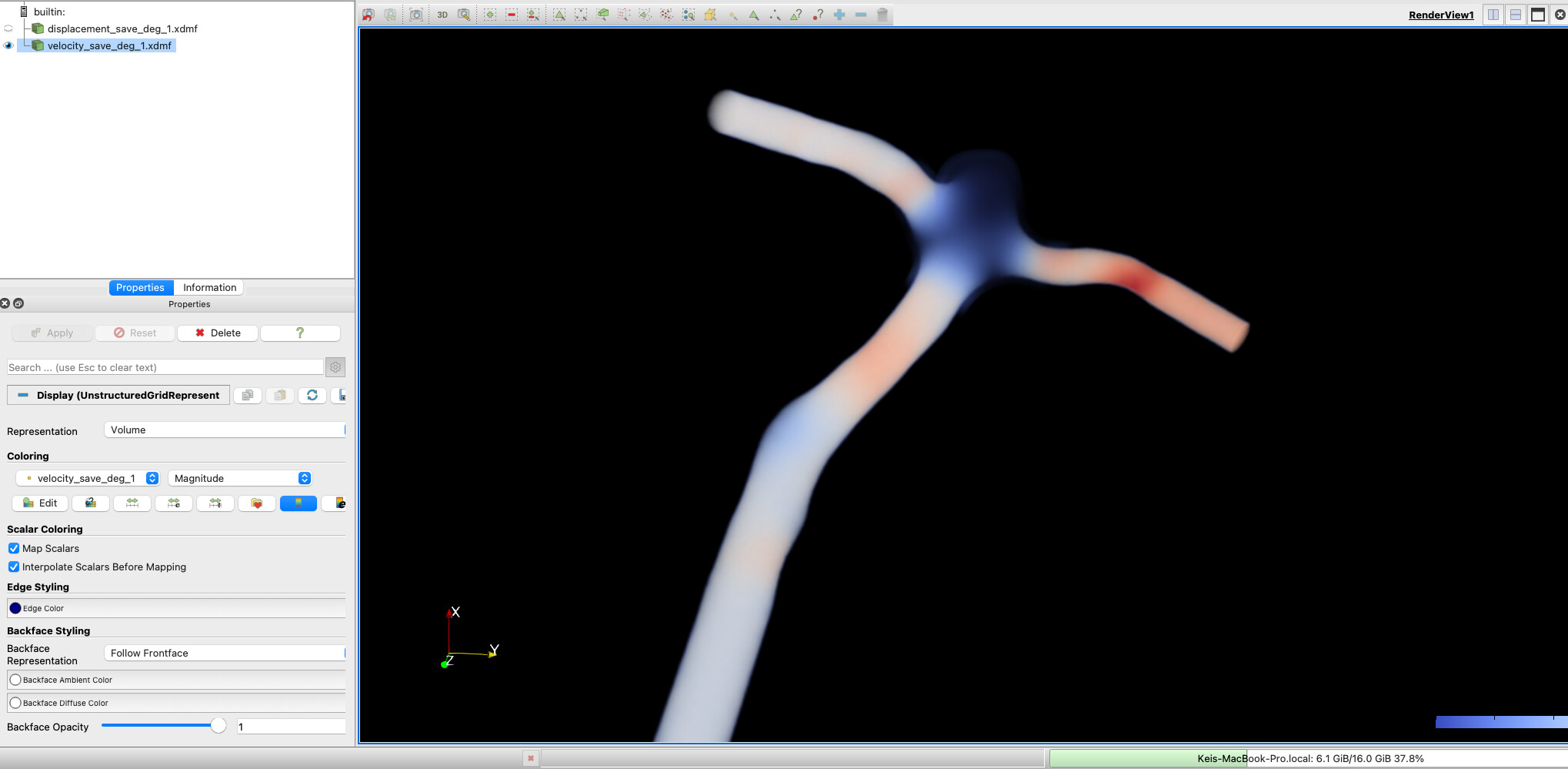
When I use volume rendering of the velocity data set, the background becomes black and I can’t find a way to change the background color. Please see the attached image as an example.
Seems like it’s the same error that has been fixed, but I still experience the same issue.
[https://gitlab.kitware.com/paraview/paraview/-/issues/20556](https://gitlab.kitware.com/paraview/paraview/-/issues/20556)
PC : Mac Book Pro with Apple M1 Pro chip
OS : macOS Ventrua 13.0
Paraview version : tried both 5.10.1 and 5.11.0
Link to the data set: [velocity\_save\_deg\_1.xdmf - Google Drive](https://drive.google.com/file/d/1Rc81EwNWYTwSjmi506LpedLfCuwVlPhp/view?usp=sharing), [velocity\_save\_deg\_1.h5 - Google Drive](https://drive.google.com/file/d/1UE3acGLz6vLtSQBbv_kaHlWlfNx1FbJr/view?usp=sharing)
---
### Author:  [@mwestphal](https://discourse.paraview.org/u/mwestphal)
#### Post date: [February 13, 2023, 1:16pm UTC](https://discourse.paraview.org/t/black-background-with-volume-rendering/11388/2 "2023-02-13T13:16:52Z")
Unabled to reproduce on Linux.
Probably a graphic driver issue.
---
### Author:  [@Kei\_Yamamoto](https://discourse.paraview.org/u/Kei_Yamamoto)
#### Post date: [February 13, 2023, 3:34pm UTC](https://discourse.paraview.org/t/black-background-with-volume-rendering/11388/3 "2023-02-13T15:34:40Z")
Thank you for the answer! Does that mean there’s no way to fix this issue at the moment rather than using Linux or other graphic driver?
---
### Author:  [@Kenneth\_Moreland](https://discourse.paraview.org/u/Kenneth_Moreland)
#### Post date: [February 13, 2023, 5:27pm UTC](https://discourse.paraview.org/t/black-background-with-volume-rendering/11388/4 "2023-02-13T17:27:02Z")
You could try playing with the `Volume Rendering` parameters under the `Display` section of the `Properties` panel. In particular, you might try turning off the `Use Floating Point Frame Buffer` option.
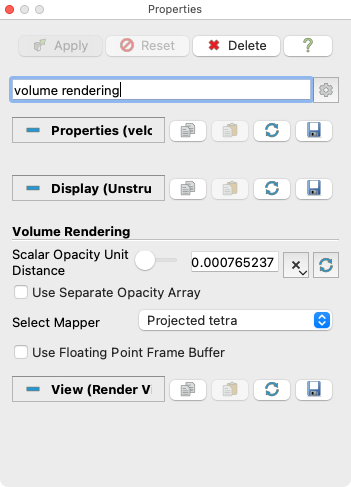
You may also try changing the type of volume renderer used by using the `Resample To Image` filter. This could reduce the quality of the image, though.
---
### Author:  [@Kei\_Yamamoto](https://discourse.paraview.org/u/Kei_Yamamoto)
#### Post date: [February 13, 2023, 6:07pm UTC](https://discourse.paraview.org/t/black-background-with-volume-rendering/11388/5 "2023-02-13T18:07:32Z")
@Kenneth_Moreland
Turning off the `Use Floating Point Frame Buffer` worked! Thank you for your suggestion.
---
### Author:  [@wascott](https://discourse.paraview.org/u/wascott)
#### Post date: [February 14, 2023, 6:45pm UTC](https://discourse.paraview.org/t/black-background-with-volume-rendering/11388/6 "2023-02-14T18:45:44Z")
This is not git bug 20556, which was having intermittent black frames. This is bug [https://gitlab.kitware.com/paraview/paraview/-/issues/19849](https://gitlab.kitware.com/paraview/paraview/-/issues/19849), which has been an issue with Macs for ever. There was even an older bug written up, but I couldn’t find it.
Thanks Ken for explaining a workaround. I am sure that will help Kitware debug and fix this one.
Alan
---
### Author:  [@Lijing\_Wang](https://discourse.paraview.org/u/Lijing_Wang)
#### Post date: [May 8, 2023, 5:02pm UTC](https://discourse.paraview.org/t/black-background-with-volume-rendering/11388/7 "2023-05-08T17:02:06Z")
Yes indeed I think that is a bug for the mac user all the time. I also have this issue for many different versions. I hope that Kitware can debug and fix this one. Thanks!