# Bounding Ruler filter: adding an option to show X, Y, Z delta
**URL:** https://discourse.paraview.org/t/bounding-ruler-filter-adding-an-option-to-show-x-y-z-delta/15274
**Category:** ParaView Support
**Created:** [August 22, 2024, 7:13am UTC](https://discourse.paraview.org/t/bounding-ruler-filter-adding-an-option-to-show-x-y-z-delta/15274 "2024-08-22T07:13:13Z")
**Posts on this page:** 8
**Page:** 1
### Author:  [@NinhGhoster](https://discourse.paraview.org/u/NinhGhoster)
#### Post date: [August 22, 2024, 7:13am UTC](https://discourse.paraview.org/t/bounding-ruler-filter-adding-an-option-to-show-x-y-z-delta/15274/1 "2024-08-22T07:13:13Z")
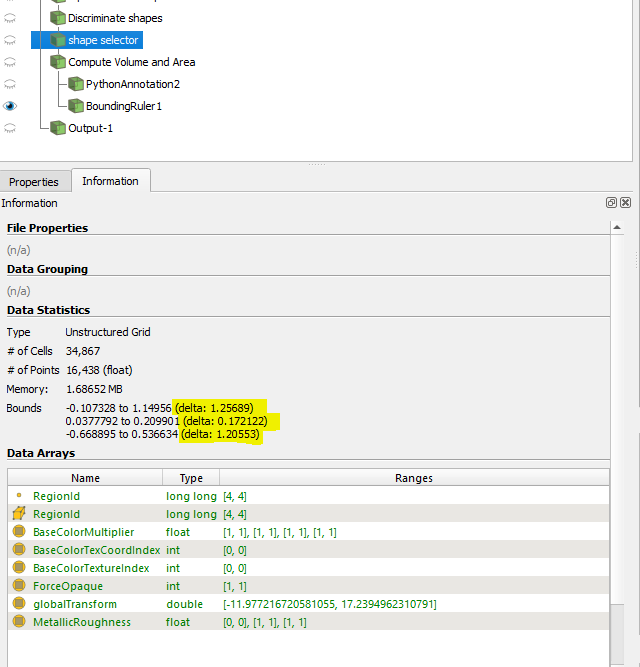
In my case, I need to extract the dimension of object bounding box, we can see it in property tab. But I don’t know how to extract these values into csv file.
So I used the Bounding Ruler filter which is shown in this article [https://www.kitware.com/measuring-oriented-bounding-box-axes-paraview/](https://www.kitware.com/measuring-oriented-bounding-box-axes-paraview/)
However, it only show the option of each value at the time (either X, Y or Z). It would be great if there is an option to shown these 3 values at once.
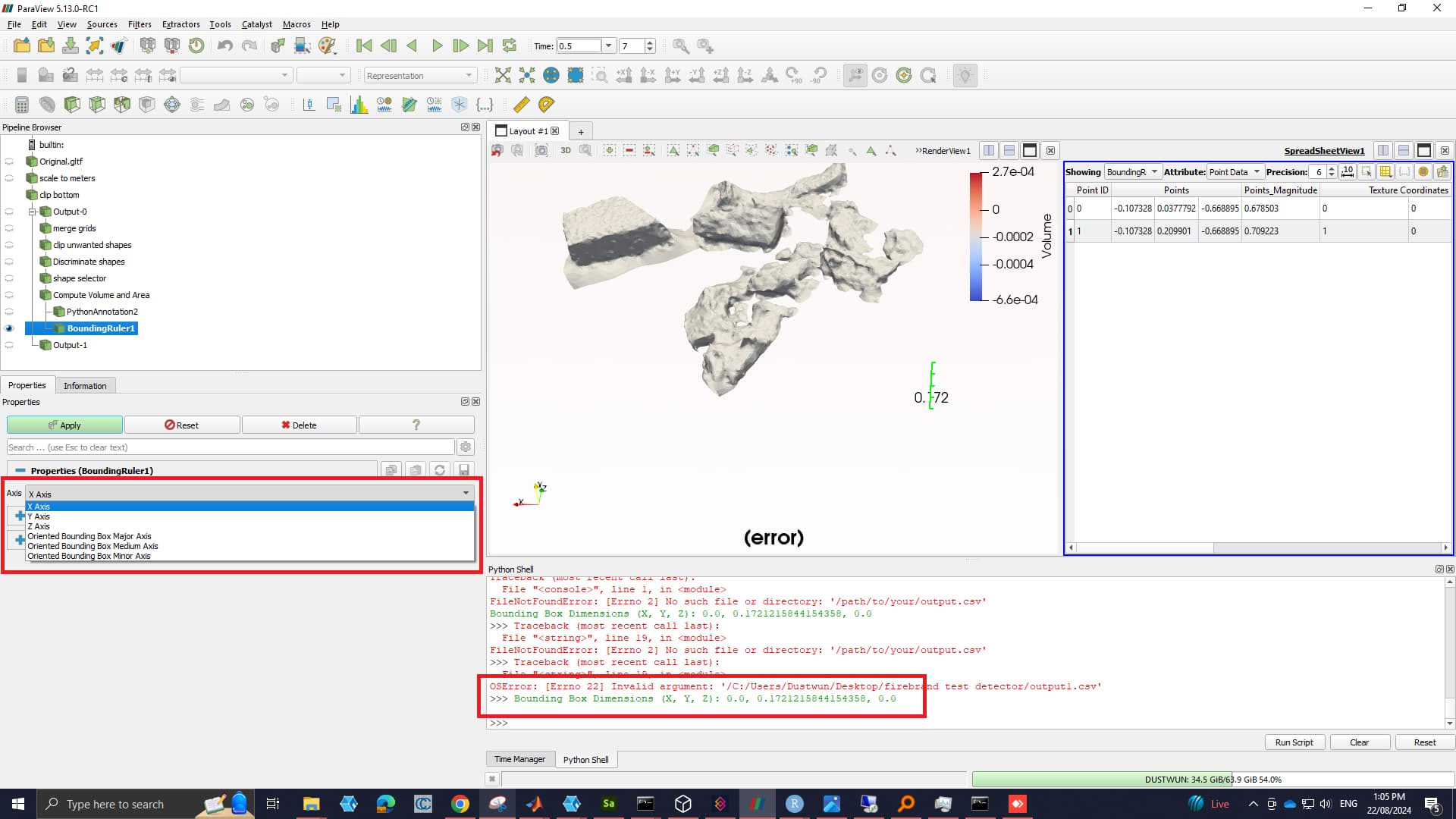
Therefore, I quickly made a script to extract this values.
I am not certain way to extract these. If yes, please share your idea.
---
### Author:  [@nicolas.vuaille](https://discourse.paraview.org/u/nicolas.vuaille)
#### Post date: [August 22, 2024, 7:16am UTC](https://discourse.paraview.org/t/bounding-ruler-filter-adding-an-option-to-show-x-y-z-delta/15274/2 "2024-08-22T07:16:03Z")
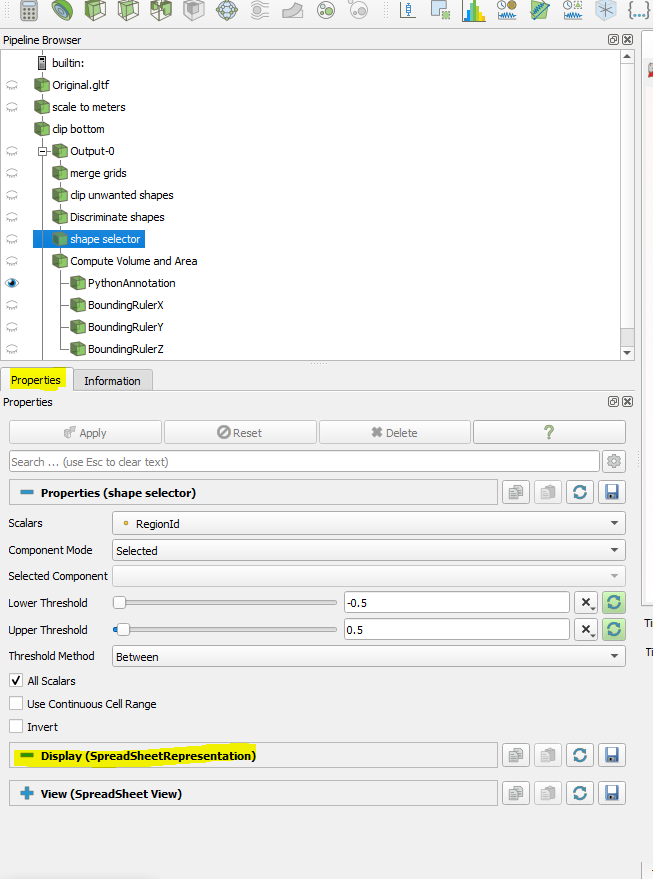
Instead of the `Ruler`, you can try to add the `Data Axes Grid` on your representation (under the `Display` section of the properties panel)
---
### Author:  [@NinhGhoster](https://discourse.paraview.org/u/NinhGhoster)
#### Post date: [August 22, 2024, 9:09am UTC](https://discourse.paraview.org/t/bounding-ruler-filter-adding-an-option-to-show-x-y-z-delta/15274/3 "2024-08-22T09:09:19Z")
Hi Nicolas, is this here? I couldn’t find it.
---
### Author:  [@nicolas.vuaille](https://discourse.paraview.org/u/nicolas.vuaille)
#### Post date: [August 22, 2024, 9:33am UTC](https://discourse.paraview.org/t/bounding-ruler-filter-adding-an-option-to-show-x-y-z-delta/15274/4 "2024-08-22T09:33:37Z")
You need to select the RenderView in order to get it.
---
### Author:  [@nicolas.vuaille](https://discourse.paraview.org/u/nicolas.vuaille)
#### Post date: [August 22, 2024, 9:40am UTC](https://discourse.paraview.org/t/bounding-ruler-filter-adding-an-option-to-show-x-y-z-delta/15274/5 "2024-08-22T09:40:50Z")
My bad, I miss the _export to csv_ part.
My suggestion will display a widget in the 3D view but not allow to save such data. I think the best way to access the `Bounds` numeric values as shown in Information panel is to use some python code [3. Understanding Data — ParaView Documentation 5.12.0 documentation](https://docs.paraview.org/en/latest/UsersGuide/understandingData.html#getting-data-information-in-pvpython)
e.g., in python shell
```auto
GetActiveSource().GetDataInformation().GetBounds()
```
---
### Author:  [@NinhGhoster](https://discourse.paraview.org/u/NinhGhoster)
#### Post date: [August 22, 2024, 9:54am UTC](https://discourse.paraview.org/t/bounding-ruler-filter-adding-an-option-to-show-x-y-z-delta/15274/6 "2024-08-22T09:54:16Z")
Great, now it showed points. This way is much better than using Ruler.
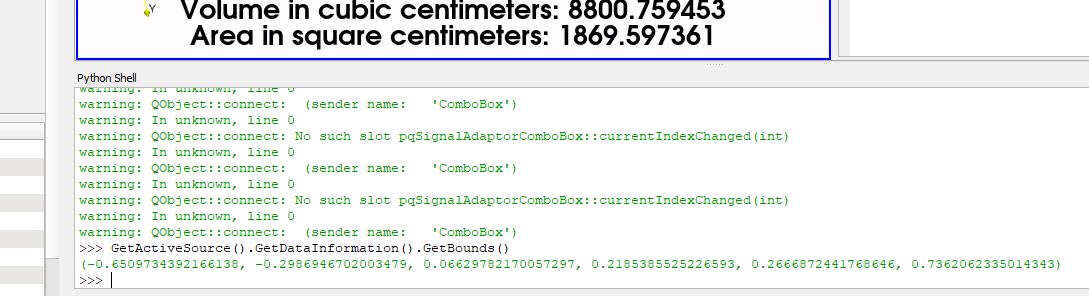
Is there a way to extract the delta or I have to calculate manually?
---
### Author:  [@nicolas.vuaille](https://discourse.paraview.org/u/nicolas.vuaille)
#### Post date: [August 22, 2024, 9:59am UTC](https://discourse.paraview.org/t/bounding-ruler-filter-adding-an-option-to-show-x-y-z-delta/15274/7 "2024-08-22T09:59:58Z")
I think manual operation is required here.
---
### Author:  [@NinhGhoster](https://discourse.paraview.org/u/NinhGhoster)
#### Post date: [August 22, 2024, 10:05am UTC](https://discourse.paraview.org/t/bounding-ruler-filter-adding-an-option-to-show-x-y-z-delta/15274/8 "2024-08-22T10:05:58Z")
Thanks for your help. I leave this script to calculate the delta here in case anyone needs
```auto
import os
import csv
# Function to generate a unique file name
def get_unique_filepath(basepath, index):
return f"{basepath}_{index}.csv"
# Base filepath (directory + base name)
base_filepath = 'C:/Users/Dustwun/Desktop/firebrand_test_detector' # Define your base path
# Function to calculate delta from bounding box
def calculate_delta(bounds):
xmin, xmax, ymin, ymax, zmin, zmax = bounds
delta_x = xmax - xmin
delta_y = ymax - ymin
delta_z = zmax - zmin
return delta_x, delta_y, delta_z
# Get the bounding box points from the active source
bounding_box = GetActiveSource().GetDataInformation().GetBounds()
if not bounding_box:
raise ValueError("Bounding box could not be retrieved. Ensure the active source has valid bounds.")
# Calculate delta values
delta_x, delta_y, delta_z = calculate_delta(bounding_box)
# Get the current time step from the time manager
time_keeper = GetTimeKeeper()
current_time_step = time_keeper.Time
# Generate a unique file name to prevent overwriting
index = 1
filepath = get_unique_filepath(base_filepath, index)
while os.path.exists(filepath):
index += 1
filepath = get_unique_filepath(base_filepath, index)
# Write to CSV
with open(filepath, mode='w', newline='') as file:
writer = csv.writer(file)
writer.writerow(['ObjectID', 'Delta_X', 'Delta_Y', 'Delta_Z'])
writer.writerow([current_time_step, delta_x, delta_y, delta_z])
# Optional: Print the dimensions for verification
print(f'Bounding Box Deltas (X, Y, Z): {delta_x}, {delta_y}, {delta_z}')
print(f'Data saved to: {filepath}')
print(f'ObjectID (Time Step): {current_time_step}')
```
