# Building a Custom Paraview Application to Only Output to a Single Window
**URL:** https://discourse.paraview.org/t/building-a-custom-paraview-application-to-only-output-to-a-single-window/14211
**Category:** Development
**Created:** [March 20, 2024, 12:47pm UTC](https://discourse.paraview.org/t/building-a-custom-paraview-application-to-only-output-to-a-single-window/14211 "2024-03-20T12:47:33Z")
**Posts on this page:** 8
**Page:** 1
### Author:  [@MulberryClassic](https://discourse.paraview.org/u/MulberryClassic)
#### Post date: [March 20, 2024, 12:47pm UTC](https://discourse.paraview.org/t/building-a-custom-paraview-application-to-only-output-to-a-single-window/14211/1 "2024-03-20T12:47:33Z")
Hi, I have setup a remote bewoulf cluster that I run a pvserver on. Using the paraview gui client, I first connect to the server, load a pvd file, apply some inbuilt and custom filters and then volume render the data. What I want to do is, build a custom application that does all of the above steps programmatically but only displays the output render on a window that I can interact with. I don’t want any other gui related things. Just a simple application. Although I am struggling to do so. I have downloaded and built the paraview source. I can also run the [examples](https://gitlab.kitware.com/paraview/paraview/-/tree/master/Examples/CustomApplications) but am having a hard time figuring out how do I create it from scratch. I have gone through the [customising paraview guide](https://www.paraview.org/Wiki/Writing_Custom_Applications) but cannot wrap my head around it. I would be grateful, If anyone can help me or point in the right direction. Any help would be greatly appreciated.
Thank You
---
### Author:  [@mwestphal](https://discourse.paraview.org/u/mwestphal)
#### Post date: [March 21, 2024, 8:24am UTC](https://discourse.paraview.org/t/building-a-custom-paraview-application-to-only-output-to-a-single-window/14211/2 "2024-03-21T08:24:48Z")
> [@MulberryClassic](#):
>
> What I want to do is, build a custom application that does all of the above steps programmatically but only displays the output render on a window that I can interact with.
Sounds like you want a pvpython script instead.
Just use File-\>SaveState-\>state.py, add `Interact()` at the end and run with pvpython.
If that doesnt do it for you, I will help with customizing paraview.
---
### Author:  [@MulberryClassic](https://discourse.paraview.org/u/MulberryClassic)
#### Post date: [March 21, 2024, 6:07pm UTC](https://discourse.paraview.org/t/building-a-custom-paraview-application-to-only-output-to-a-single-window/14211/3 "2024-03-21T18:07:04Z")
Hi, thanks for the response.
I want to connect to the cluster, run the pvpython script in parallel (which I assume is done by pvbatch) and display the output on a client. Which I am not able to do so due to my limited knowledge.
I actually want to write a custom application because I later want to send the data over to hololens and display it there. I just want to use the paraview’s capabilities to load and distribute data, read pvd files, do volume rendering, apply filters etc. I will also be dynamically extracting the subsets according to the input from the client in the application and updating the renders (like loading in more subsets, removing others etc.). This is the reason I thought writing a custom application would be a better choice.
Thanks
---
### Author:  [@mwestphal](https://discourse.paraview.org/u/mwestphal)
#### Post date: [March 22, 2024, 7:00am UTC](https://discourse.paraview.org/t/building-a-custom-paraview-application-to-only-output-to-a-single-window/14211/4 "2024-03-22T07:00:20Z")
Sounds like a standard [Trame](https://kitware.github.io/trame/) usecase to me. But it can be done with a custome ParaView based application, look at [https://gitlab.kitware.com/paraview/paraview/-/tree/master/Examples/CustomApplications/SimpleParaView?ref\_type=heads](https://gitlab.kitware.com/paraview/paraview/-/tree/master/Examples/CustomApplications/SimpleParaView?ref_type=heads)
@jourdain
---
### Author:  [@MulberryClassic](https://discourse.paraview.org/u/MulberryClassic)
#### Post date: [March 22, 2024, 11:40am UTC](https://discourse.paraview.org/t/building-a-custom-paraview-application-to-only-output-to-a-single-window/14211/5 "2024-03-22T11:40:43Z")
Ok, I will look into Trame. In the meanwhile, I tried modifying the Demo1 example
```auto
#include "mainWindow.h"
#include "ui_mainWindow.h"
#include
#include
#include
#include
#include
#include
#include
#include
#include
mainWindow::mainWindow(QWidget* parent, Qt::WindowFlags flags) : Superclass(parent, flags)
{
Ui::mainWindow ui;
ui.setupUi(this);
// make a connection to the builtin server
pqApplicationCore* core = pqApplicationCore::instance();
core->getObjectBuilder()->createServer(pqServerResource("builtin:"));
// Use auto apply to show data automatically
vtkPVGeneralSettings::GetInstance()->SetAutoApply(true);
// create render view
pqRenderView* view = qobject_cast(core->getObjectBuilder()->createView(
pqRenderView::renderViewType(), pqActiveObjects::instance().activeServer()));
pqActiveObjects::instance().setActiveView(view);
QStringList files;
files << "/mnt/c/DEV/Torso.pvd";
pqPipelineSource* pipelineSource = pqLoadDataReaction::loadData(files, "sources", "PVDReader");
pipelineSource->updatePipeline();
pqObjectBuilder *builder = pqApplicationCore::instance()->getObjectBuilder();
pqDataRepresentation *drep = builder->createDataRepresentation(pipelineSource->getOutputPort(0), view);
vtkSMPropertyHelper(drep->getProxy(), "Representation").Set("Volume");
drep->getProxy()->UpdateVTKObjects();
drep->setVisible(true);
view->render();
this->setCentralWidget(view->widget());
}
mainWindow::~mainWindow() = default;
```
This how I have modified the Demo1 example. The window opens but there is not data loaded in it. Could please point out where the issues are?
---
### Author:  [@MulberryClassic](https://discourse.paraview.org/u/MulberryClassic)
#### Post date: [March 23, 2024, 7:42am UTC](https://discourse.paraview.org/t/building-a-custom-paraview-application-to-only-output-to-a-single-window/14211/6 "2024-03-23T07:42:03Z")
Hi, I am able to load and render the pvd data in the representation modes “Outline” and “Surface”. But when I set it to “Volume” it does not display anything. What might be the reason behind this?
```auto
// create data representation and add it to render view
pqDataRepresentation *drep = builder->createDataRepresentation(pipelineSource->getOutputPort(0), view);
// Changing this to "Volume"
vtkSMPropertyHelper(drep->getProxy(), "Representation").Set("Outline");
drep->getProxy()->UpdateVTKObjects();
drep->setVisible(true);
```
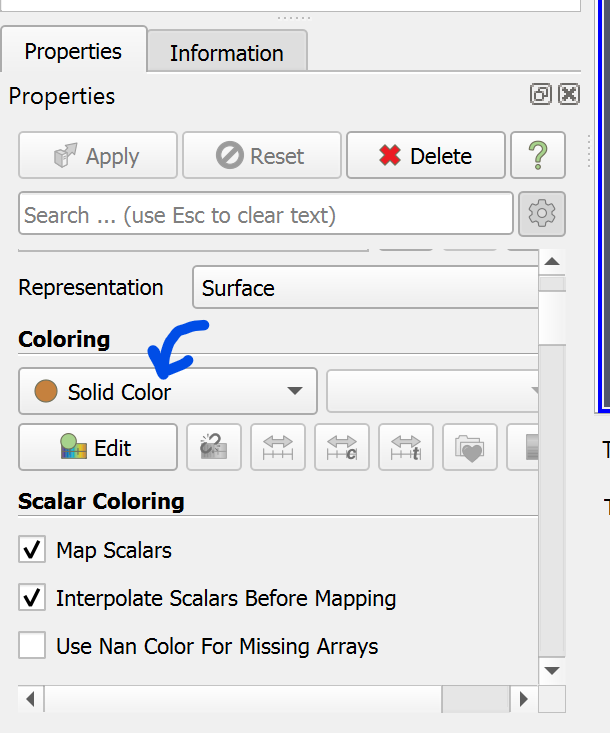
I believe it is due this property. It switches to MetaImage when I set the representation type to Volume in ParaView. How do I replicate this behaviour in script?
Thanks
---
### Author:  [@mwestphal](https://discourse.paraview.org/u/mwestphal)
#### Post date: [March 25, 2024, 8:30am UTC](https://discourse.paraview.org/t/building-a-custom-paraview-application-to-only-output-to-a-single-window/14211/7 "2024-03-25T08:30:36Z")
You need to set the scalars for rendering, it is a representation property. Use the trace in ParaView to understands how it works in python, it will help you figure out the right C++ code.
---
### Author:  [@MulberryClassic](https://discourse.paraview.org/u/MulberryClassic)
#### Post date: [March 25, 2024, 2:12pm UTC](https://discourse.paraview.org/t/building-a-custom-paraview-application-to-only-output-to-a-single-window/14211/8 "2024-03-25T14:12:00Z")
Hi, I have got it working with the following:
```auto
// create data representation and add it to render view
pqDataRepresentation *drep = builder->createDataRepresentation(pipelineSource->getOutputPort(0), view);
auto dProxy = drep->getProxy();
vtkSMPropertyHelper(dProxy, "Representation").Set("Volume");
// use color and opacity from original data
vtkSMPropertyHelper(dProxy, "UseSeparateColorMap").Set(1);
vtkSMPVRepresentationProxy::SetScalarColoring(dProxy, "MetaImage", vtkDataObject::POINT);
vtkSMPVRepresentationProxy::RescaleTransferFunctionToDataRange(dProxy, false, false);
```
Thanks