### Author:  [@alo\_gon](https://discourse.paraview.org/u/alo_gon)
#### Post date: [November 21, 2019, 5:13pm UTC](https://discourse.paraview.org/t/building-paraview-superbuild-in-windows-10/3020/1 "2019-11-21T17:13:36Z")
I have fallow this answer to build ParaView Superbuild
>

But I’m stuck after `cmake-gui`
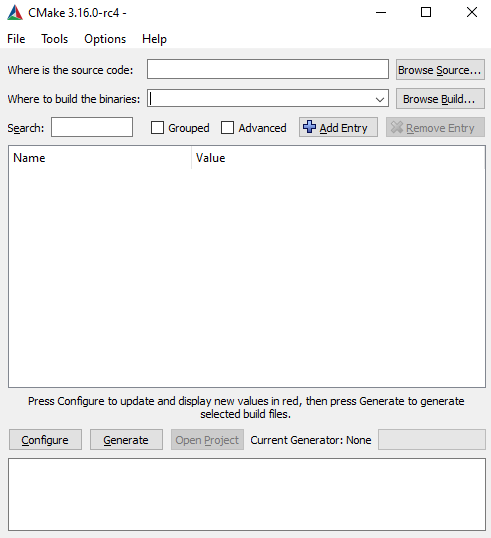
I assume there is where I “configure paraview-superfield accordingly to your need” and “ENABLE\_qt5 and USE\_SYSTEM\_qt should be ON”, but I don’t know what that means.
Any help?
---
### Author:  [@aron.helser](https://discourse.paraview.org/u/aron.helser)
#### Post date: [November 21, 2019, 6:24pm UTC](https://discourse.paraview.org/t/building-paraview-superbuild-in-windows-10/3020/2 "2019-11-21T18:24:43Z")
You need to specify the source directory when starting cmake-gui
`cmake-gui ../pvsb`
Once you do that, and hit the ‘Configure’ button, the ENABLE\_qt5 option and others will show up.
HTH,
Aron
---
### Author:  [@alo\_gon](https://discourse.paraview.org/u/alo_gon)
#### Post date: [November 21, 2019, 8:54pm UTC](https://discourse.paraview.org/t/building-paraview-superbuild-in-windows-10/3020/3 "2019-11-21T20:54:10Z")
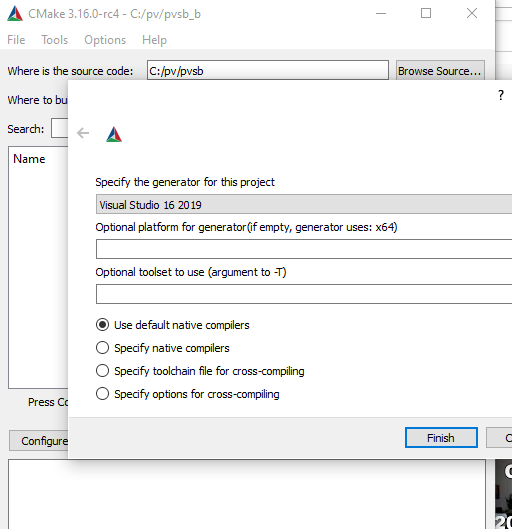
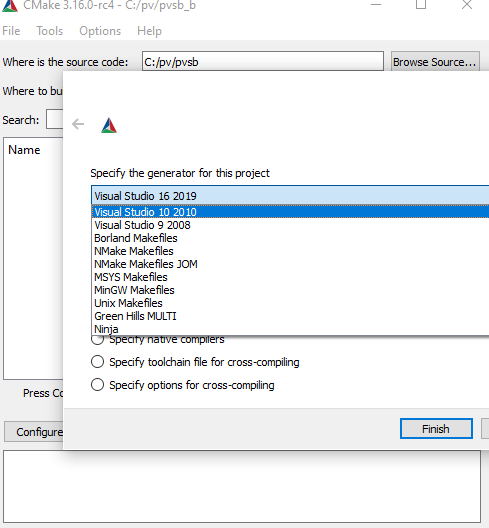
Thanks Aron! But still don’t get that. What I am missing?
---
### Author:  [@aron.helser](https://discourse.paraview.org/u/aron.helser)
#### Post date: [November 21, 2019, 10:16pm UTC](https://discourse.paraview.org/t/building-paraview-superbuild-in-windows-10/3020/4 "2019-11-21T22:16:54Z")
Yes, you have to choose a generator and click Finish. Then click the ‘Configure’ button and the options will appear. You may want to read a little about how cmake-gui works.
---
### Author:  [@alo\_gon](https://discourse.paraview.org/u/alo_gon)
#### Post date: [November 22, 2019, 5:22pm UTC](https://discourse.paraview.org/t/building-paraview-superbuild-in-windows-10/3020/5 "2019-11-22T17:22:39Z")
Great! Thanks for the answer.
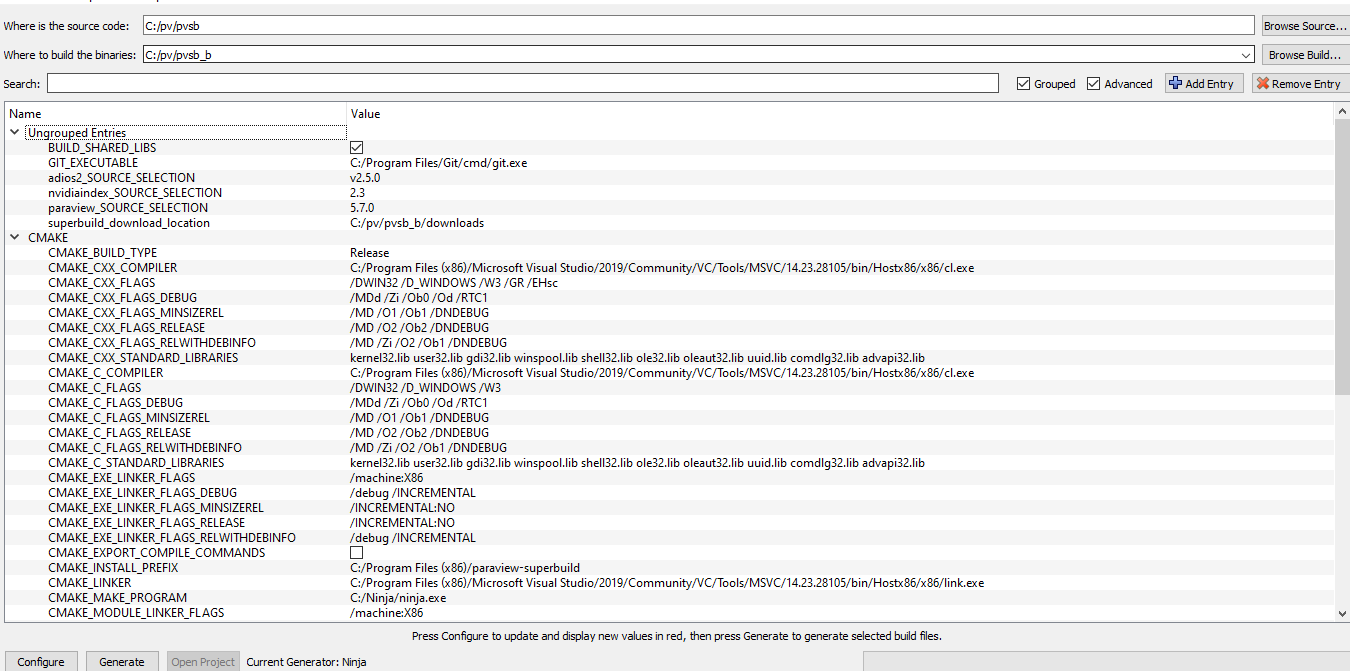
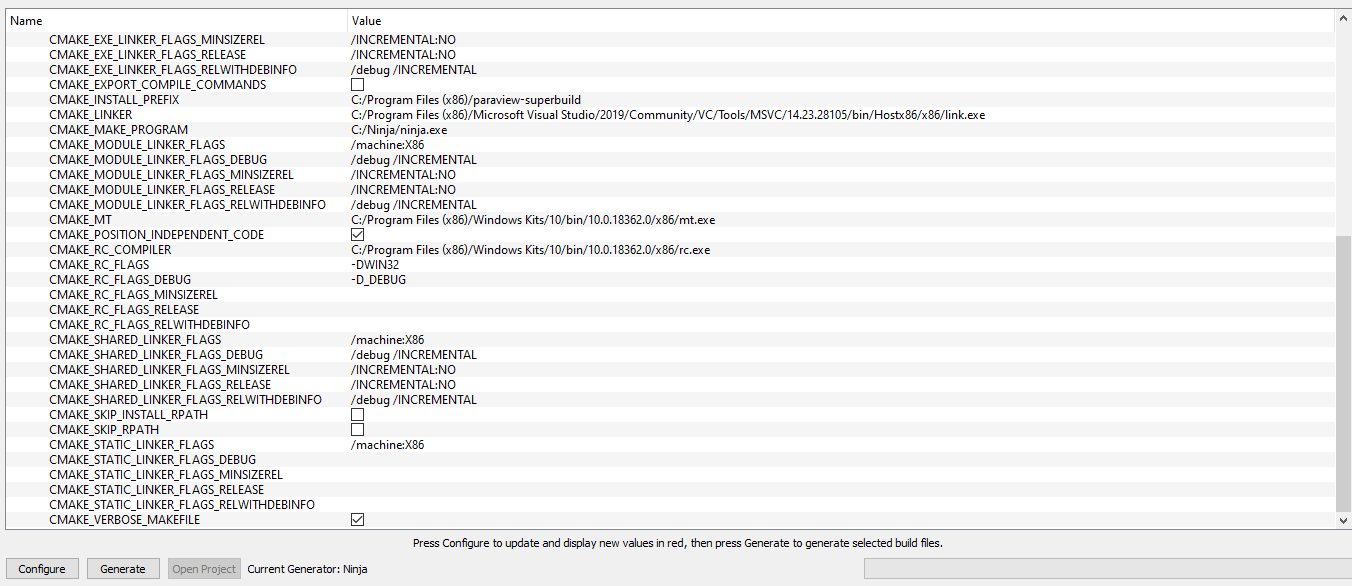
I used Ninja as the generator in cmake-gui (don’t know if that’s correct because the post mentioned `ninja` after `cmake-gui`)
I changed `CMAKE_BUILD_TYPE` from `Debug` to `Release` and
`CMAKE_INSTALL_PREFIX` from `C:\Program Files (x86)\paraview-superbuild` to `C:/pv/pvsb`. I don’t know if that’s correct but made more sense to me.
CMakeOutput.log
```auto
The system is: Windows - 10.0.18362 - AMD64
Compiling the C compiler identification source file "CMakeCCompilerId.c" succeeded.
Compiler: C:/Program Files (x86)/Microsoft Visual Studio/2019/Community/VC/Tools/MSVC/14.23.28105/bin/Hostx86/x86/cl.exe
Build flags:
Id flags:
The output was:
0
Microsoft (R) C/C++ Optimizing Compiler Version 19.23.28107 for x86
Copyright (C) Microsoft Corporation. All rights reserved.
CMakeCCompilerId.c
Microsoft (R) Incremental Linker Version 14.23.28107.0
Copyright (C) Microsoft Corporation. All rights reserved.
/out:CMakeCCompilerId.exe
CMakeCCompilerId.obj
Compilation of the C compiler identification source "CMakeCCompilerId.c" produced "CMakeCCompilerId.exe"
Compilation of the C compiler identification source "CMakeCCompilerId.c" produced "CMakeCCompilerId.obj"
The C compiler identification is MSVC, found in "C:/pv/pvsb_b/CMakeFiles/3.16.0-rc4/CompilerIdC/CMakeCCompilerId.exe"
Compiling the CXX compiler identification source file "CMakeCXXCompilerId.cpp" succeeded.
Compiler: C:/Program Files (x86)/Microsoft Visual Studio/2019/Community/VC/Tools/MSVC/14.23.28105/bin/Hostx86/x86/cl.exe
Build flags:
Id flags:
The output was:
0
Microsoft (R) C/C++ Optimizing Compiler Version 19.23.28107 for x86
Copyright (C) Microsoft Corporation. All rights reserved.
CMakeCXXCompilerId.cpp
Microsoft (R) Incremental Linker Version 14.23.28107.0
Copyright (C) Microsoft Corporation. All rights reserved.
/out:CMakeCXXCompilerId.exe
CMakeCXXCompilerId.obj
Compilation of the CXX compiler identification source "CMakeCXXCompilerId.cpp" produced "CMakeCXXCompilerId.exe"
Compilation of the CXX compiler identification source "CMakeCXXCompilerId.cpp" produced "CMakeCXXCompilerId.obj"
The CXX compiler identification is MSVC, found in "C:/pv/pvsb_b/CMakeFiles/3.16.0-rc4/CompilerIdCXX/CMakeCXXCompilerId.exe"
Determining if the C compiler works passed with the following output:
Change Dir: C:/pv/pvsb_b/CMakeFiles/CMakeTmp
Run Build Command(s):C:/Ninja/ninja.exe cmTC_174ab && [1/2] Building C object CMakeFiles\cmTC_174ab.dir\testCCompiler.c.obj
[2/2] Linking C executable cmTC_174ab.exe
Detecting C compiler ABI info compiled with the following output:
Change Dir: C:/pv/pvsb_b/CMakeFiles/CMakeTmp
Run Build Command(s):C:/Ninja/ninja.exe cmTC_c5c01 && [1/2] Building C object CMakeFiles\cmTC_c5c01.dir\CMakeCCompilerABI.c.obj
[2/2] Linking C executable cmTC_c5c01.exe
Determining if the CXX compiler works passed with the following output:
Change Dir: C:/pv/pvsb_b/CMakeFiles/CMakeTmp
Run Build Command(s):C:/Ninja/ninja.exe cmTC_c82f5 && [1/2] Building CXX object CMakeFiles\cmTC_c82f5.dir\testCXXCompiler.cxx.obj
[2/2] Linking CXX executable cmTC_c82f5.exe
Detecting CXX compiler ABI info compiled with the following output:
Change Dir: C:/pv/pvsb_b/CMakeFiles/CMakeTmp
Run Build Command(s):C:/Ninja/ninja.exe cmTC_9d1ec && [1/2] Building CXX object CMakeFiles\cmTC_9d1ec.dir\CMakeCXXCompilerABI.cpp.obj
[2/2] Linking CXX executable cmTC_9d1ec.exe
Determining size of void* passed with the following output:
Change Dir: C:/pv/pvsb_b/CMakeFiles/CMakeTmp
Run Build Command(s):C:/Ninja/ninja.exe cmTC_a39b0 && [1/2] Building C object CMakeFiles\cmTC_a39b0.dir\void_ptr_size.c.obj
[2/2] Linking C executable cmTC_a39b0.exe
```
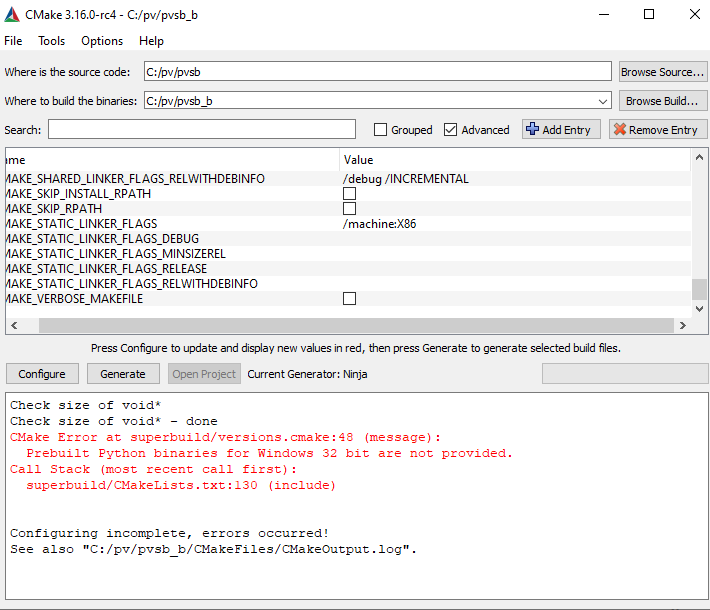
I installed the last version of Python (3.8), but still got this error message.
What else can I do?