# Calculator and texture coordinates
**URL:** https://discourse.paraview.org/t/calculator-and-texture-coordinates/629
**Category:** ParaView Support
**Created:** [September 25, 2018, 6:15am UTC](https://discourse.paraview.org/t/calculator-and-texture-coordinates/629 "2018-09-25T06:15:12Z")
**Posts on this page:** 8
**Page:** 1
### Author:  [@pcrepier](https://discourse.paraview.org/u/pcrepier)
#### Post date: [September 25, 2018, 6:15am UTC](https://discourse.paraview.org/t/calculator-and-texture-coordinates/629/1 "2018-09-25T06:15:12Z")
Hi everyone.
To try to improve my paraview output, I tried to apply a texture to a contour (free surface with the wave pattern of a ship). I tried defining the texture coordinates by checking the Tcoords checkbox, and then specified the following formula:
((sin(coordsX)+1)/2)\*iHat+((sin(coordsY)+1)/2)\*jHat (basicaly a repeating pattern)
Following this, the calculator creates an array with 3 dimensions (zeros in the third dimension), and I can now load a texture. When I do this, the texture is however not applied …
What should I do in the calculator to see my texture ?
Thanks in advance
---
### Author:  [@pcrepier](https://discourse.paraview.org/u/pcrepier)
#### Post date: [October 3, 2018, 2:56pm UTC](https://discourse.paraview.org/t/calculator-and-texture-coordinates/629/2 "2018-10-03T14:56:56Z")
Does anyone has thoughts on this ?
---
### Author:  [@utkarsh.ayachit](https://discourse.paraview.org/u/utkarsh.ayachit)
#### Post date: [October 3, 2018, 3:12pm UTC](https://discourse.paraview.org/t/calculator-and-texture-coordinates/629/3 "2018-10-03T15:12:21Z")
currently, ParaView needs the array to be marked as texture coordinates. In the **Calculator** panel, just make sure you check the **Result TCoords** checkbox.
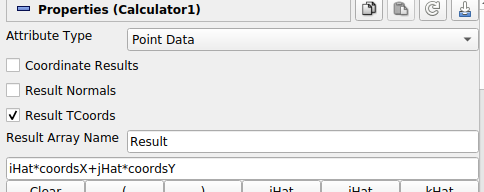
It’s an advanced parameter, so either search for it by name using the search box or click on the  icon.
---
### Author:  [@pcrepier](https://discourse.paraview.org/u/pcrepier)
#### Post date: [October 4, 2018, 1:32pm UTC](https://discourse.paraview.org/t/calculator-and-texture-coordinates/629/4 "2018-10-04T13:32:29Z")
That is what I am doing.
I tried again without luck, also using the 5.6.0RC2.
Load my dataset, extract the block I want, extract the surfaces to be sure I only have surface data.
Add a calculator, specify the expression and check “Result TCoords”.
This appends a new array with 3 dimensions to the surface data. the Z direction is filled with zeros.
Load the texture, but the texture does not show up.
If I append a " Texture Map to Plane" filter, and select the loaded jpg, then the texture is visible.
---
### Author:  [@utkarsh.ayachit](https://discourse.paraview.org/u/utkarsh.ayachit)
#### Post date: [October 4, 2018, 1:54pm UTC](https://discourse.paraview.org/t/calculator-and-texture-coordinates/629/5 "2018-10-04T13:54:37Z")
If you have dataset/state file to reproduce the issue, that’d be great.
---
### Author:  [@pcrepier](https://discourse.paraview.org/u/pcrepier)
#### Post date: [October 4, 2018, 2:47pm UTC](https://discourse.paraview.org/t/calculator-and-texture-coordinates/629/6 "2018-10-04T14:47:26Z")
Sure here is are the files.
[texture.zip](https://discourse.paraview.org/uploads/default/original/1X/28cd8b5036d101efc5ea600820c0c42ff75d2c16.zip) (2.0 MB)
Three files: a vtp file with the data, state file and jpg for the texture. you may have to change the path to the texture file.
---
### Author:  [@utkarsh.ayachit](https://discourse.paraview.org/u/utkarsh.ayachit)
#### Post date: [October 4, 2018, 3:42pm UTC](https://discourse.paraview.org/t/calculator-and-texture-coordinates/629/7 "2018-10-04T15:42:57Z")
Ah! Two issues:
1. calculator filter is producing 3-component arrays alone, even when 2 component was requested.
2. 3-component tcoords don’t correctly map 2D texture images.
Solution is to use Python Progammable filter instead. I applied a Python Programmable filter with the following script after your Calculator filter and then things worked as expected.
```python
output.PointData.append(inputs[0].PointData["Result"][:,0:1], "Result2")
output.PointData.SetActiveTCoords("Result2")
```
You can totally ditch the Calculator and just update the expression in the Programmable Filter instead, as well.
---
### Author:  [@pcrepier](https://discourse.paraview.org/u/pcrepier)
#### Post date: [October 5, 2018, 6:26am UTC](https://discourse.paraview.org/t/calculator-and-texture-coordinates/629/8 "2018-10-05T06:26:29Z")
That does the trick! Thanks
Only, the texture array only had one coordinate, buy doing the following, everything is back on track:
```auto
output.PointData.append(inputs[0].PointData["Result"][:,0:2], "Result2")
output.PointData.SetActiveTCoords("Result2")
```