# Camera configuration hides part of domain
**URL:** https://discourse.paraview.org/t/camera-configuration-hides-part-of-domain/4463
**Category:** ParaView Support
**Created:** [May 31, 2020, 1:24pm UTC](https://discourse.paraview.org/t/camera-configuration-hides-part-of-domain/4463 "2020-05-31T13:24:17Z")
**Posts on this page:** 3
**Page:** 1
### Author:  [@Argyris\_Apostolidis](https://discourse.paraview.org/u/Argyris_Apostolidis)
#### Post date: [May 31, 2020, 1:24pm UTC](https://discourse.paraview.org/t/camera-configuration-hides-part-of-domain/4463/1 "2020-05-31T13:24:17Z")
Hello everyone,
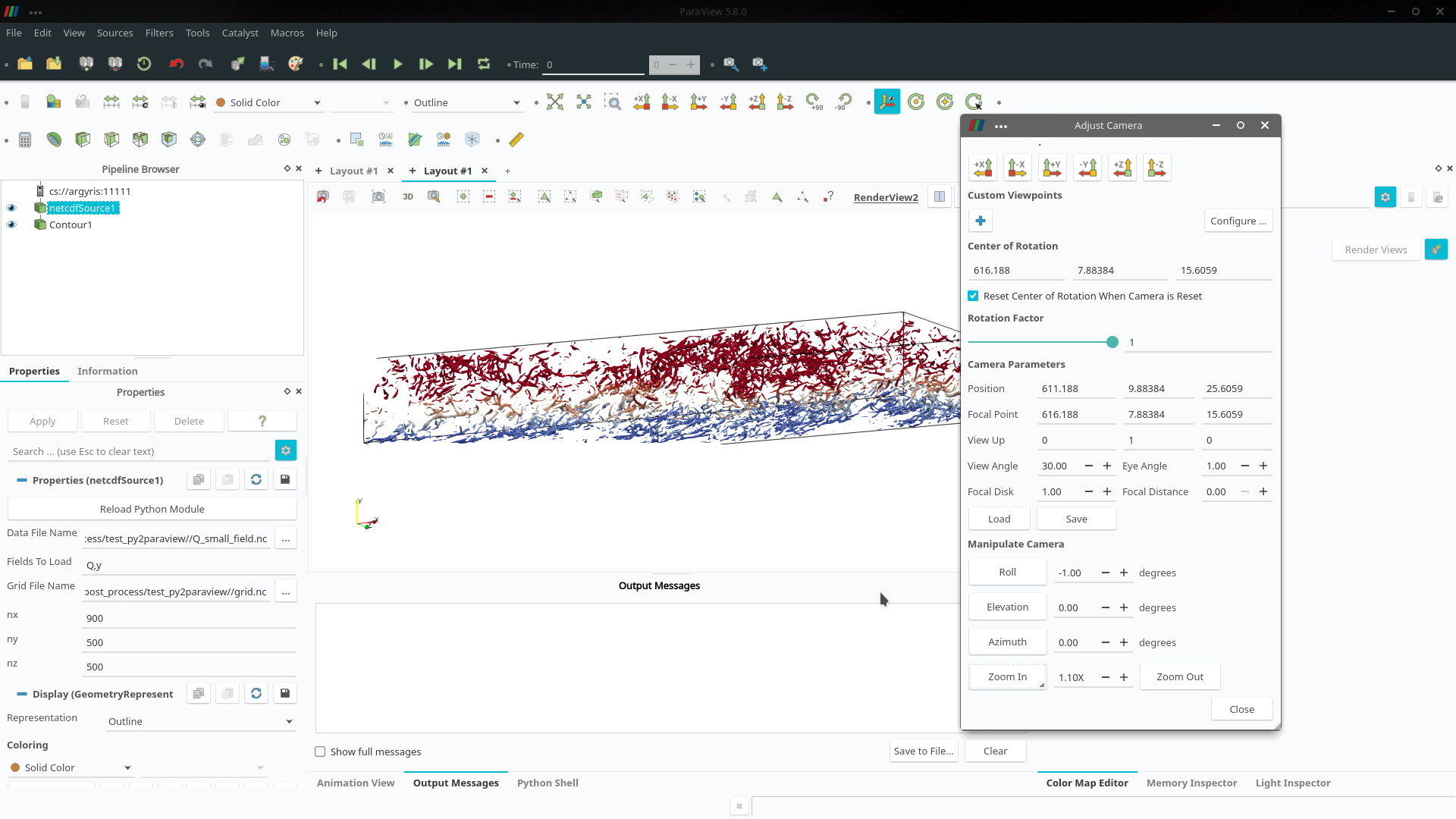
I made a script to make a isosurface and save an image. But as you can see in the screenshot attached, my camera configuration cuts part of the domain.
What should I change to have the full domain without any part of it cut out from the image?
Thank you for your help in advance.
Argyris
---
### Author:  [@mwestphal](https://discourse.paraview.org/u/mwestphal)
#### Post date: [June 1, 2020, 1:23am UTC](https://discourse.paraview.org/t/camera-configuration-hides-part-of-domain/4463/2 "2020-06-01T01:23:13Z")
ResetCamera ?
---
### Author:  [@Argyris\_Apostolidis](https://discourse.paraview.org/u/Argyris_Apostolidis)
#### Post date: [June 1, 2020, 6:46am UTC](https://discourse.paraview.org/t/camera-configuration-hides-part-of-domain/4463/3 "2020-06-01T06:46:16Z")
I want my script to save the screenshot from the camera configuration that I have prescribed.
I think I found the problem. The Camera Position values in y and z were too small and I had "manually
" zoomed out by increasing the Camera Parallel Scale number.
The Camera Parallel Scale is the distance from the focal point to the top edge in grid dimensions?
I want a way, no matter the grid size and dimensions the image to have the same zoom, position and angle, without opening the GUI.
A way that I found is to set Camera Parallel Scale equal to a fraction of my vertical height dimension:
CameraParallelScale=1.8\*y[-1] for example.
It seems to produce well fitted images no matter the dimensions of my grid but if you have a better solution I would be happy to implement.
Thank you for your time.