# Cannot convert csv file to vtk data
**URL:** https://discourse.paraview.org/t/cannot-convert-csv-file-to-vtk-data/14236
**Category:** ParaView Support
**Tags:** vtk, python
**Created:** [March 23, 2024, 8:38am UTC](https://discourse.paraview.org/t/cannot-convert-csv-file-to-vtk-data/14236 "2024-03-23T08:38:34Z")
**Posts on this page:** 3
**Page:** 1
### Author:  [@Sang](https://discourse.paraview.org/u/Sang)
#### Post date: [March 23, 2024, 8:38am UTC](https://discourse.paraview.org/t/cannot-convert-csv-file-to-vtk-data/14236/1 "2024-03-23T08:38:34Z")
I have a csv file like this. When I attempt to convert to vtk data, it doesn’t appear to be functioning. Is there anyone I can get help from? I sincerely appreciate this.
[vm\_particle400.csv](https://discourse.paraview.org/uploads/short-url/9NLAzqcShRH04aQaRUYcondJBcr.csv) (979.2 KB)
---
### Author:  [@mwestphal](https://discourse.paraview.org/u/mwestphal)
#### Post date: [March 25, 2024, 11:07am UTC](https://discourse.paraview.org/t/cannot-convert-csv-file-to-vtk-data/14236/2 "2024-03-25T11:07:05Z")
You should use TableToPoints filter however, for some reasons, you `VorZ` data is not detected as a numeric column, check for incorrect data there.
---
### Author:  [@Kenneth\_Moreland](https://discourse.paraview.org/u/Kenneth_Moreland)
#### Post date: [March 25, 2024, 11:20am UTC](https://discourse.paraview.org/t/cannot-convert-csv-file-to-vtk-data/14236/3 "2024-03-25T11:20:38Z")
The `VorZ` column is loaded into ParaView, but it is loaded as string data, not numeric data.
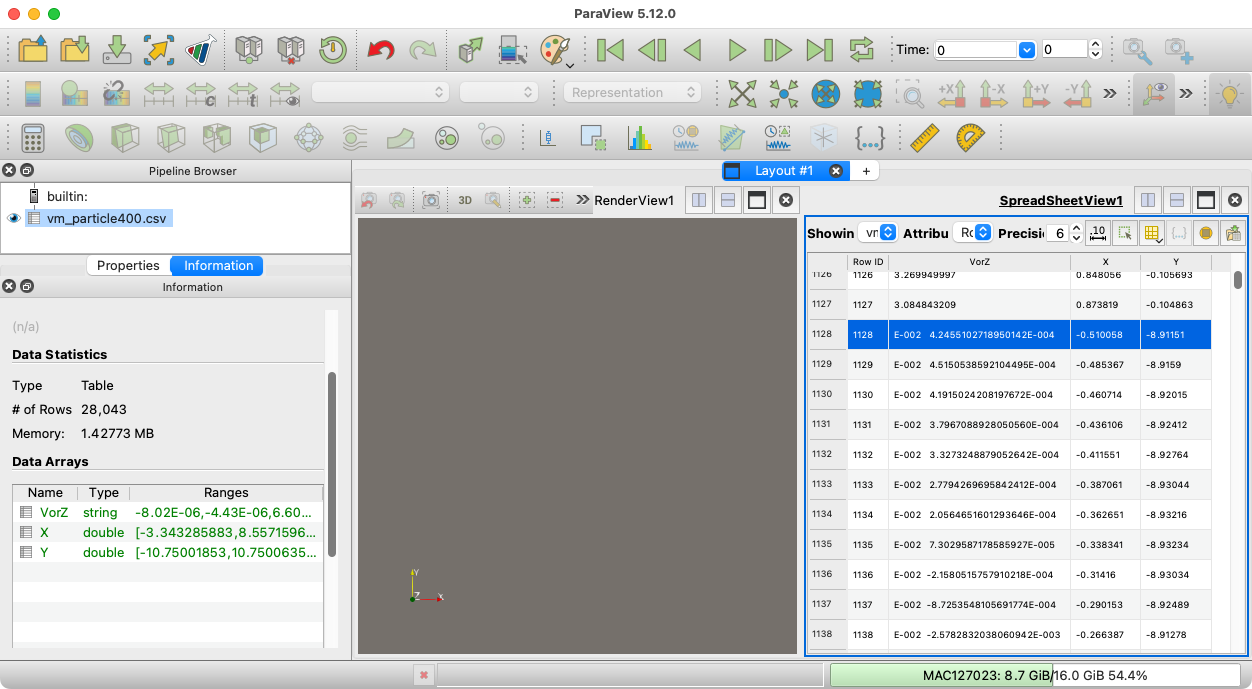
The problem is that some of the rows in your csv file are written incorrectly. For example, if you look in your file at around line 1130, you see rows like this:
```csv
-0.510058043,-8.911512859,E-002 4.2455102718950142E-004
-0.485367146,-8.915900859,E-002 4.5150538592104495E-004
-0.460714033,-8.920145216,E-002 4.1915024208197672E-004
-0.436105754,-8.924117912,E-002 3.7967088928050560E-004
-0.411550975,-8.927635731,E-002 3.3273248879052642E-004
-0.387061074,-8.930436586,E-002 2.7794269695842412E-004
```
It looks like whatever was writing your csv file wrote the comma out in the wrong place in these lines. (Or perhaps you have some text processing that replace substrings improperly.) Because the values in the third column are no longer proper representations of numbers, ParaView assumes that the data for that column are strings. Once you fix that, ParaView should load your csv file correctly.