# Cannot read VTU file with \`The data array in the element may be too short.\` message
**URL:** https://discourse.paraview.org/t/cannot-read-vtu-file-with-the-data-array-in-the-element-may-be-too-short-message/14266
**Category:** ParaView Support
**Tags:** python
**Created:** [March 26, 2024, 12:17pm UTC](https://discourse.paraview.org/t/cannot-read-vtu-file-with-the-data-array-in-the-element-may-be-too-short-message/14266 "2024-03-26T12:17:43Z")
**Posts on this page:** 10
**Page:** 1
### Author:  [@Kei\_Yamamoto](https://discourse.paraview.org/u/Kei_Yamamoto)
#### Post date: [March 26, 2024, 12:17pm UTC](https://discourse.paraview.org/t/cannot-read-vtu-file-with-the-data-array-in-the-element-may-be-too-short-message/14266/1 "2024-03-26T12:17:43Z")
I have a following python script to take the time-average of XDMF file, which works completely fine with my MacBook Pro.
```auto
#### import the simple module from the paraview
from paraview.simple import *
from pathlib import Path
import argparse
#### disable automatic camera reset on 'Show'
paraview.simple._DisableFirstRenderCameraReset()
def parse_command_line_args() -> argparse.Namespace:
parser = argparse.ArgumentParser()
parser.add_argument("--input_path", type=str, required=True)
return parser.parse_args()
def compute_time_average(input_path):
print(" -- Reading file: ", input_path)
xdmf_file = XDMFReader(FileNames=[input_path])
print(" -- File read successfully")
# create a new 'Temporal Statistics'
print(" -- Computing time average")
temporalStatistics1 = TemporalStatistics(registrationName='TemporalStatistics1', Input=xdmf_file)
# Properties modified on temporalStatistics1
temporalStatistics1.ComputeMinimum = 0
temporalStatistics1.ComputeMaximum = 0
temporalStatistics1.ComputeStandardDeviation = 0
output_path = input_path.replace('.xdmf', '_time_average.vtu')
# save data
SaveData(output_path, proxy=temporalStatistics1, DataMode='Ascii')
print(" -- Time average computed successfully and saved to: ", output_path)
# delete objects
del xdmf_file
del temporalStatistics1
def main():
args = parse_command_line_args()
compute_time_average(args.input_path)
if __name__ == " __main__":
main()
```
However, when I use this on the cluster, some files cannot be read with the following message.
A few files were fine, but most of the files throw the same error message. I opened up `.vtu` file and checked the number of components, but cannot really find any problem.
```auto
ERROR: In /opt/glr/paraview/paraview-ci/build/superbuild/paraview/src/VTK/IO/XML/vtkXMLDataReader.cxx, line 410
vtkXMLUnstructuredGridReader (0x167254170): Cannot read point data array "displacement_25_to_1000_amplitude_average" from PointData in piece 0. The data array in the element may be too short.
```
In this google drive, you can find working and not-working VTU files.
[https://drive.google.com/drive/folders/1-UU466lmmwOG1ep98IoN6Jcr0Edz8veR?usp=sharing](https://drive.google.com/drive/folders/1-UU466lmmwOG1ep98IoN6Jcr0Edz8veR?usp=sharing)
---
### Author:  [@mwestphal](https://discourse.paraview.org/u/mwestphal)
#### Post date: [March 26, 2024, 12:23pm UTC](https://discourse.paraview.org/t/cannot-read-vtu-file-with-the-data-array-in-the-element-may-be-too-short-message/14266/2 "2024-03-26T12:23:03Z")
Opens fine with ParaView 5.12.0 Linux binary release:
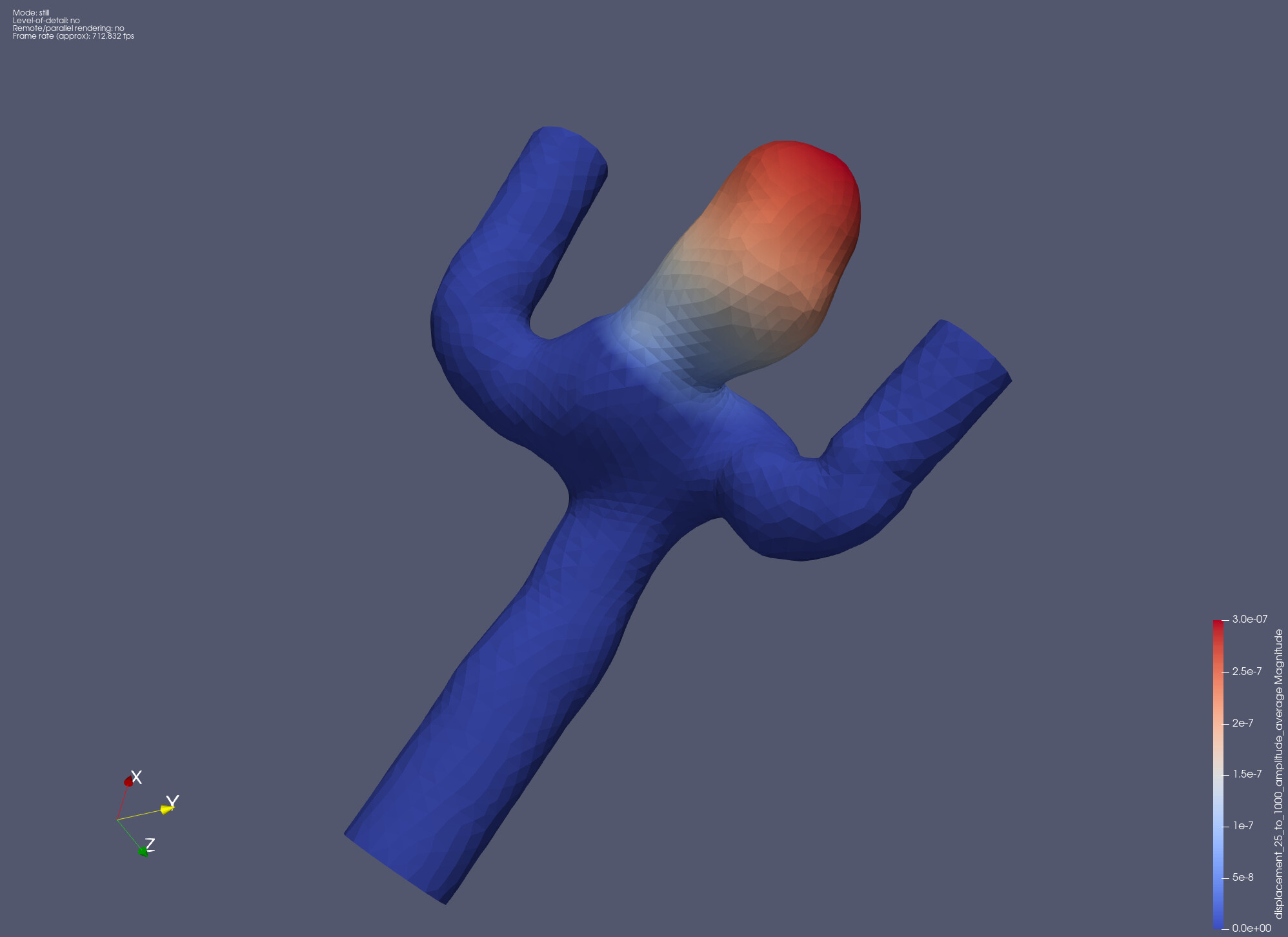
Which version of paraview are you using on your cluster ?
---
### Author:  [@Kei\_Yamamoto](https://discourse.paraview.org/u/Kei_Yamamoto)
#### Post date: [March 26, 2024, 12:26pm UTC](https://discourse.paraview.org/t/cannot-read-vtu-file-with-the-data-array-in-the-element-may-be-too-short-message/14266/3 "2024-03-26T12:26:03Z")
On the cluster, I first tried `ParaView-5.12.0-egl-MPI-Linux-Python3.10-x86_6` ~~but got an error~~
```auto
malloc_consolidate(): invalid chunk size
error: exception occurred: Subprocess aborted
```
So, I switched to `ParaView-5.10.1-egl-MPI-Linux-Python3.9-x86_64`, which did not give an error but the file was corrupted.
I’m using the cluster to generate `.vtu` file and read it on my local Mac computer after downloading. I tried Paraview 5.10, 5.11, 5.12 on my Mac but none of them was able to read this vtu file.
Update: I managed to run with `ParaView-5.12.0-egl-MPI-Linux-Python3.10-x86_6` but the problem still happens when I tried to read on my Mac.
---
### Author:  [@Kei\_Yamamoto](https://discourse.paraview.org/u/Kei_Yamamoto)
#### Post date: [March 26, 2024, 1:49pm UTC](https://discourse.paraview.org/t/cannot-read-vtu-file-with-the-data-array-in-the-element-may-be-too-short-message/14266/4 "2024-03-26T13:49:07Z")
I found a solution to this problem. Opening the `.vtu` file, I noticed that
```auto
```
type was `Float32`. Changing it to `Float64` manually solved the problem.
@mwestphal Could you please let me know how to specify the type when saving data?
---
### Author:  [@mwestphal](https://discourse.paraview.org/u/mwestphal)
#### Post date: [March 26, 2024, 1:51pm UTC](https://discourse.paraview.org/t/cannot-read-vtu-file-with-the-data-array-in-the-element-may-be-too-short-message/14266/5 "2024-03-26T13:51:58Z")
Using a Calculator should let you do that but since is not really a fix imo.
---
### Author:  [@Kei\_Yamamoto](https://discourse.paraview.org/u/Kei_Yamamoto)
#### Post date: [March 26, 2024, 1:55pm UTC](https://discourse.paraview.org/t/cannot-read-vtu-file-with-the-data-array-in-the-element-may-be-too-short-message/14266/6 "2024-03-26T13:55:32Z")
Thanks for the answer. Yes, that’s not really a fix but will do the job for me. Not sure if this is a bug that needs to be reported.
---
### Author:  [@Kenneth\_Moreland](https://discourse.paraview.org/u/Kenneth_Moreland)
#### Post date: [March 26, 2024, 3:11pm UTC](https://discourse.paraview.org/t/cannot-read-vtu-file-with-the-data-array-in-the-element-may-be-too-short-message/14266/7 "2024-03-26T15:11:00Z")
Have you considered writing out the data in binary format instead of ASCII format? I suspect there is a parse error somewhere when reading in the text representation of numbers.
---
### Author:  [@Kei\_Yamamoto](https://discourse.paraview.org/u/Kei_Yamamoto)
#### Post date: [March 26, 2024, 3:59pm UTC](https://discourse.paraview.org/t/cannot-read-vtu-file-with-the-data-array-in-the-element-may-be-too-short-message/14266/8 "2024-03-26T15:59:00Z")
Thank you so much! It solved my problem!🙂
---
### Author:  [@Florian\_Arbes](https://discourse.paraview.org/u/Florian_Arbes)
#### Post date: [October 7, 2025, 2:13pm UTC](https://discourse.paraview.org/t/cannot-read-vtu-file-with-the-data-array-in-the-element-may-be-too-short-message/14266/9 "2025-10-07T14:13:58Z")
> [@Kenneth\_Moreland](#):
>
> I suspect there is a parse error somewhere when reading in the text representation of numbers.
Hei, I just came across this issue and i wondered if there is any other solution than writing binary? I am using VTKFortran to write to a vtu file, when reading it with ParaView I get the same error as Kei:
> ERROR: In vtkXMLDataReader.cxx, line 399vtkXMLUnstructuredGridReader (000001DB7D44B680): Cannot read point data array “Displacement” from PointData in piece 0. The data array in the element may be too short.
I tried changing `type=“Float32”` to `type=“Float64”` manually, but that did not work for me. I can open the same file using GLView Inova without any error.
I am using version 6.0.1
> Client Information:
> Version: 6.0.1
> VTK Version: 9.5.2
> Qt Version: 6.9.0
> vtkIdType size: 64bits
> Embedded Python: On
> Python Library Path: C:\Program Files\ParaView 6.0.1\bin\Lib
> Python Library Version: 3.12.7 (tags/v3.12.7:0b05ead, Oct 1 2024, 03:06:41) [MSC v.1941 64 bit (AMD64)]
> Python Numpy Support: On
> Python Numpy Path: C:\Program Files\ParaView 6.0.1\bin\lib\site-packages\numpy
> Python Numpy Version: 1.26.4
> Python Matplotlib Support: On
> Python Matplotlib Path: C:\Program Files\ParaView 6.0.1\bin\lib\site-packages\matplotlib
> Python Matplotlib Version: 3.7.2
> Python Testing: Off
> MPI Enabled: Off
> ParaView Build ID: superbuild 8c0f929966f005396802f3b2957c734a6c68b3c1 (!1292)
> Disable Registry: Off
> Test Directory:
> Data Directory:
> SMP Backend: TBB
> SMP Max Number of Threads: 28
> OpenGL Vendor: NVIDIA Corporation
> OpenGL Version: 3.2.0 NVIDIA 573.40
> OpenGL Renderer: NVIDIA RTX 2000 Ada Generation Laptop GPU/PCIe/SSE2
> Accelerated filters overrides available: No
>
> Connection Information:
> Remote Connection: No
---
### Author:  [@Florian\_Arbes](https://discourse.paraview.org/u/Florian_Arbes)
#### Post date: [October 8, 2025, 9:02am UTC](https://discourse.paraview.org/t/cannot-read-vtu-file-with-the-data-array-in-the-element-may-be-too-short-message/14266/10 "2025-10-08T09:02:32Z")
I found out that the issue in my case was actually not the vector DataArray (“Displacement”) , but a previous scalar data array that appeared twice with the same name (“Temperature”). The error message was a bit misleading, renaming the second appearance of the scalar DataArray (“Temperature”→“TemperatureM”) fixed the issue for me.