# Cannot set view background in python
**URL:** https://discourse.paraview.org/t/cannot-set-view-background-in-python/13091
**Category:** ParaView Support
**Tags:** python
**Created:** [October 24, 2023, 5:15pm UTC](https://discourse.paraview.org/t/cannot-set-view-background-in-python/13091 "2023-10-24T17:15:59Z")
**Posts on this page:** 9
**Page:** 1
### Author:  [@RemDelaporteMathurin](https://discourse.paraview.org/u/RemDelaporteMathurin)
#### Post date: [October 24, 2023, 5:16pm UTC](https://discourse.paraview.org/t/cannot-set-view-background-in-python/13091/1 "2023-10-24T17:16:00Z")
Hi all
I am trying to set the background colour from the python interface (from [conda](https://anaconda.org/conda-forge/paraview)).
I’m doing something like:
```python
for view in [renderView1, renderView2, renderView3, renderView4]:
view.Background = [0.0, 0.0, 0.0]
ExportView("./blabla.pdf", view=renderView1)
ExportView("./blabla2.pdf", view=renderView2)
ExportView("./blabla3.pdf", view=renderView3)
ExportView("./blabla4.pdf", view=renderView4)
```
However, the exported pdfs still have the default grey background.
Any idea?
---
### Author:  [@danlipsa](https://discourse.paraview.org/u/danlipsa)
#### Post date: [October 24, 2023, 5:39pm UTC](https://discourse.paraview.org/t/cannot-set-view-background-in-python/13091/2 "2023-10-24T17:39:53Z")
Does this work if you save as PNG instead? Saving as PDF would rasterize the image anyway if you save a RenderView.
---
### Author:  [@RemDelaporteMathurin](https://discourse.paraview.org/u/RemDelaporteMathurin)
#### Post date: [October 24, 2023, 5:45pm UTC](https://discourse.paraview.org/t/cannot-set-view-background-in-python/13091/3 "2023-10-24T17:45:15Z")
Yes I have the same issue when exporting to png
I am able to export with a white background to pdf with the paraview gui
---
### Author:  [@RemDelaporteMathurin](https://discourse.paraview.org/u/RemDelaporteMathurin)
#### Post date: [October 24, 2023, 7:04pm UTC](https://discourse.paraview.org/t/cannot-set-view-background-in-python/13091/4 "2023-10-24T19:04:08Z")
I tried
```python
for view in [renderView1, renderView2, renderView3, renderView4]:
view.Background = [0.0, 0.0, 0.0]
SetActiveView(view)
SetViewProperties(Background=[0.0, 0.0, 0.0])
Render()
SaveScreenshot("test.png", view)
```
And it didn’t work, the background is still grey
---
### Author:  [@RemDelaporteMathurin](https://discourse.paraview.org/u/RemDelaporteMathurin)
#### Post date: [October 24, 2023, 8:41pm UTC](https://discourse.paraview.org/t/cannot-set-view-background-in-python/13091/5 "2023-10-24T20:41:40Z")
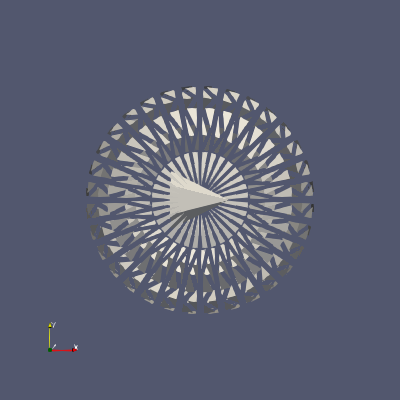
I made this MWE from one of the demos.
```python
from paraview.simple import *
ss = Sphere(Radius=2, ThetaResolution=32)
shr = Shrink(Input=ss)
cs = Cone()
app = AppendDatasets()
app.Input = [shr, cs]
Show(app)
SetViewProperties(Background=[0.0, 0.0, 0.0])
Render()
SaveScreenshot("out.png")
ExportView("./out.pdf")
```
This is out.png. As you can see the background isn’t white
---
### Author:  [@jourdain](https://discourse.paraview.org/u/jourdain)
#### Post date: [October 24, 2023, 9:10pm UTC](https://discourse.paraview.org/t/cannot-set-view-background-in-python/13091/6 "2023-10-24T21:10:11Z")
```auto
SetViewProperties(
Background=[0.0, 0.0, 0.0],
UseColorPaletteForBackground = 0,
)
```
---
### Author:  [@RemDelaporteMathurin](https://discourse.paraview.org/u/RemDelaporteMathurin)
#### Post date: [October 24, 2023, 9:23pm UTC](https://discourse.paraview.org/t/cannot-set-view-background-in-python/13091/7 "2023-10-24T21:23:42Z")
@jourdain this seems to have worked!
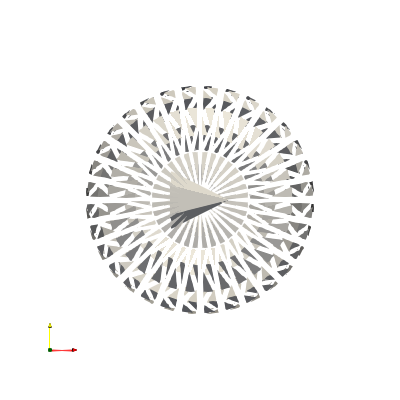
Turns out I wanted it white but was asking for 0, 0, 0 which is black
Now the issue that I have is that the text is now invisible. Usually with a white background the text turns black. Is there another setting?
---
### Author:  [@danlipsa](https://discourse.paraview.org/u/danlipsa)
#### Post date: [October 25, 2023, 4:01pm UTC](https://discourse.paraview.org/t/cannot-set-view-background-in-python/13091/8 "2023-10-25T16:01:23Z")
What about instead of SetViewProperties you use
LoadPalette(paletteName=‘WhiteBackground’)
I got that using
Tools / Start Trace
change the palette to White Background and then
Tools / Stop Trace
That should set all related colors properly.
---
### Author:  [@RemDelaporteMathurin](https://discourse.paraview.org/u/RemDelaporteMathurin)
#### Post date: [October 25, 2023, 5:37pm UTC](https://discourse.paraview.org/t/cannot-set-view-background-in-python/13091/9 "2023-10-25T17:37:24Z")
It worked thank you very much!