# Cant save animation in 5.13
**URL:** https://discourse.paraview.org/t/cant-save-animation-in-5-13/15848
**Category:** ParaView Support
**Created:** [December 9, 2024, 12:29pm UTC](https://discourse.paraview.org/t/cant-save-animation-in-5-13/15848 "2024-12-09T12:29:10Z")
**Posts on this page:** 3
**Page:** 1
### Author:  [@FOX\_HU](https://discourse.paraview.org/u/FOX_HU)
#### Post date: [December 9, 2024, 12:29pm UTC](https://discourse.paraview.org/t/cant-save-animation-in-5-13/15848/1 "2024-12-09T12:29:10Z")
Hi,
I tried to export an animation about the camera moving around a 3D object, but it didn’t work.
My object was a 3D .mph data export from Matlab, and I used a Python script to define an interpolated path for the camera.
The animation worked well when I played it in Paraview, but when I tried to export it, only the first frame was saved into the .avi/.mp4 file, and no error information was given.
I can’t find any explanation or solution to this issue. Can you help me with this problem?
Thanks,
FOX
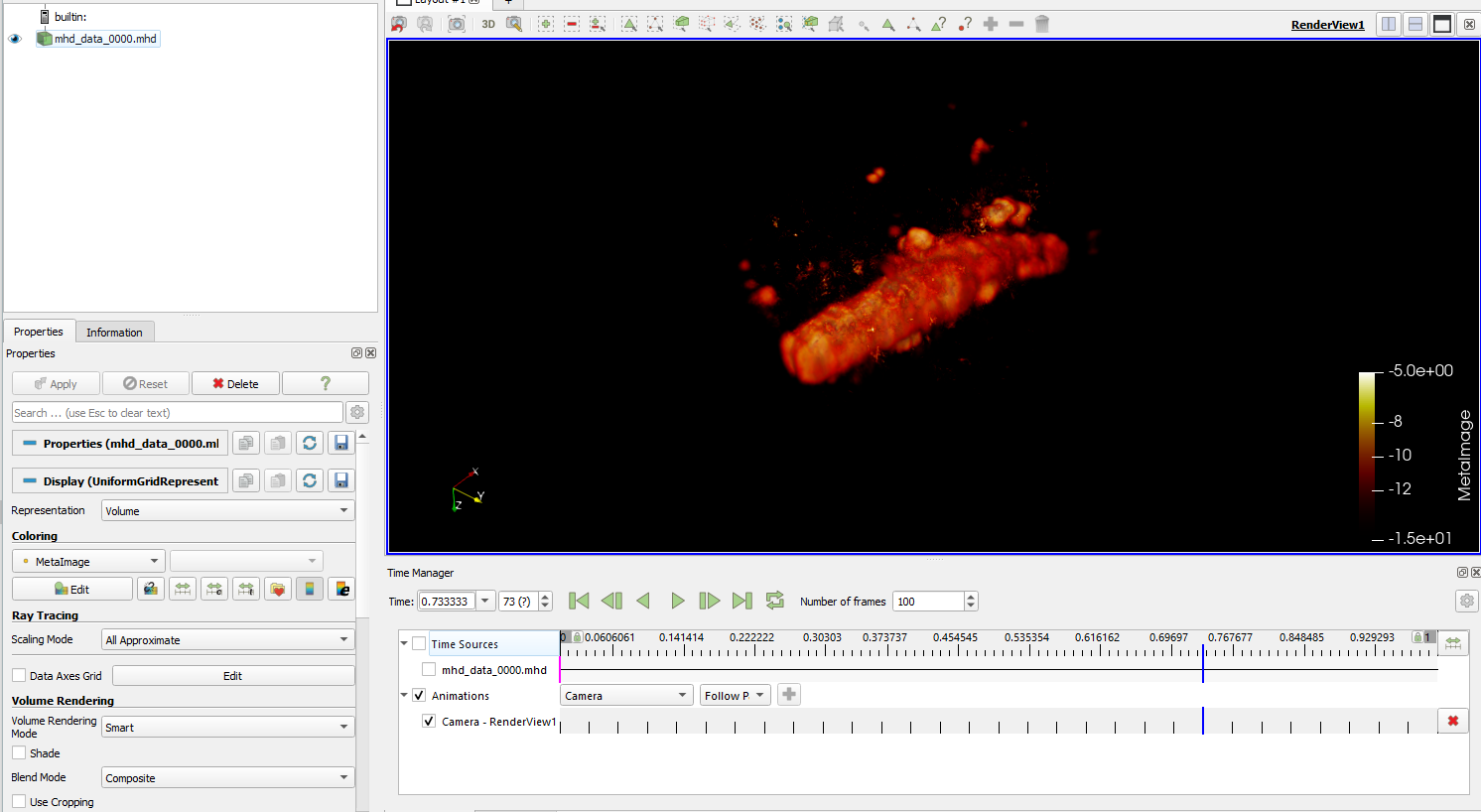
Below is my Python script to define the camera:
> from paraview.simple import \*
> import math
>
> # Get the current active view and camera
>
> view = GetActiveView()
> camera = view.GetActiveCamera()
>
> # Get current camera parameters
>
> start\_position = camera.GetPosition()
> start\_focal\_point = camera.GetFocalPoint()
> start\_view\_up = camera.GetViewUp()
>
> # Define rotation parameters
>
> axis = [0, 0, 1] # Rotation axis, e.g., [0, 0, 1] means rotating around the Z-axis
> angle\_degrees = 360 # Total rotation angle in degrees
> num\_steps = 30 # Number of keyframes
> direction = 1 # Rotation direction: 1 for positive, -1 for negative
>
> # Compute rotation center (rotate around the focal point)
>
> center = start\_focal\_point
>
> # Prepare to create the keyframe list
>
> keyframes =
>
> for i in range(num\_steps + 1):
> # Calculate the current keyframe’s time and angle
> key\_time = i / num\_steps # Keyframe time, uniformly distributed from 0 to 1
> angle = math.radians(direction \* angle\_degrees \* key\_time)
>
> ```
> # Compute rotation matrix
> c = math.cos(angle)
> s = math.sin(angle)
> t = 1 - c
> x, y, z = axis
> # Normalize the rotation axis
> norm = math.sqrt(x*x + y*y + z*z)
> x /= norm
> y /= norm
> z /= norm
> # Rotation matrix elements
> R = [
> [t*x*x + c, t*x*y - s*z, t*x*z + s*y],
> [t*x*y + s*z, t*y*y + c, t*y*z - s*x],
> [t*x*z - s*y, t*y*z + s*x, t*z*z + c]
> ]
>
> # Compute new camera position
> p = [start_position[j] - center[j] for j in range(3)] # Translate to origin
> p_rotated = [
> R[0][0]*p[0] + R[0][1]*p[1] + R[0][2]*p[2],
> R[1][0]*p[0] + R[1][1]*p[1] + R[1][2]*p[2],
> R[2][0]*p[0] + R[2][1]*p[1] + R[2][2]*p[2]
> ]
> new_position = [p_rotated[j] + center[j] for j in range(3)] # Translate back to original position
>
> # Compute new ViewUp direction
> vu = start_view_up
> vu_rotated = [
> R[0][0]*vu[0] + R[0][1]*vu[1] + R[0][2]*vu[2],
> R[1][0]*vu[0] + R[1][1]*vu[1] + R[1][2]*vu[2],
> R[2][0]*vu[0] + R[2][1]*vu[1] + R[2][2]*vu[2]
> ]
>
> # Create keyframe
> keyframe = CameraKeyFrame()
> keyframe.KeyTime = key_time # Set keyframe time
> keyframe.Position = new_position # Set camera position
> keyframe.FocalPoint = start_focal_point # Keep focal point unchanged
> keyframe.ViewUp = vu_rotated # Update ViewUp direction
> keyframes.append(keyframe)
>
> ```
>
> # Set up animation scene
>
> animationScene = GetAnimationScene()
> animationScene.StartTime = 0
> animationScene.EndTime = 1 # Use normalized time (0 to 1)
> animationScene.PlayMode = ‘Sequence’ # Ensure play mode is ‘Sequence’
> animationScene.NumberOfFrames = num\_steps # Set number of frames
>
> # Create camera animation track and assign keyframes
>
> cameraAnimationCue = GetCameraTrack(view)
> cameraAnimationCue.KeyFrames = keyframes
>
> # Optional: Play animation or save animation
>
> # animationScene.Play()
---
### Author:  [@mwestphal](https://discourse.paraview.org/u/mwestphal)
#### Post date: [December 9, 2024, 1:23pm UTC](https://discourse.paraview.org/t/cant-save-animation-in-5-13/15848/2 "2024-12-09T13:23:34Z")
> [@FOX\_HU](#):
>
> only the first frame was saved into the .avi/.mp4 file, and no error information was given.
Hi @FOX_HU
In 5.13 the default frame range is not great, you have to specify it yourself.
In the save animation dialog, show advanced option (the “cogwheel”) and then change the frame maximum range to 100
hth
---
### Author:  [@FOX\_HU](https://discourse.paraview.org/u/FOX_HU)
#### Post date: [December 9, 2024, 1:46pm UTC](https://discourse.paraview.org/t/cant-save-animation-in-5-13/15848/3 "2024-12-09T13:46:43Z")
Thanks, Mathieu!
Problem solved now 🙂
FOX