# Catalyst live visualization
**URL:** https://discourse.paraview.org/t/catalyst-live-visualization/967
**Category:** In Situ Support
**Created:** [November 27, 2018, 2:12pm UTC](https://discourse.paraview.org/t/catalyst-live-visualization/967 "2018-11-27T14:12:13Z")
**Posts on this page:** 7
**Page:** 2
### Author:  [@Liang\_Cui](https://discourse.paraview.org/u/Liang_Cui)
#### Post date: [November 29, 2018, 6:36pm UTC](https://discourse.paraview.org/t/catalyst-live-visualization/967/21 "2018-11-29T18:36:10Z")
The version is 5.6.0-364-g1c776910c8. Thanks
---
### Author:  [@utkarsh.ayachit](https://discourse.paraview.org/u/utkarsh.ayachit)
#### Post date: [November 30, 2018, 2:27pm UTC](https://discourse.paraview.org/t/catalyst-live-visualization/967/22 "2018-11-30T14:27:42Z")
Attached is a [CxxFullExample.patch](https://discourse.paraview.org/uploads/default/original/1X/cb27ff59e072aeb073595c39bba99dd4c294bfa0.patch) (1.3 KB) that does the following:
1. add a sleep to the `CxxFullExample/FEDriver.cxx` to make it loop a tad slowly to help see the simulation progress.
2. enable live visualization in the Catalyst script `CxxFullExample/SampleScripts/feslicescript.py`.
Apply this patch to your paraview source and then rebuild the examples.
Now, launch ParaView and select the menu options **Catalyst \> Connect …** , accept the **Catalyst Server Port** dialog with default options and hit **OK**.
Next, launch the sim/miniapp as follows:
> …/CxxFullExample [full path to ParaVIew source]/Examples/Catalyst/CxxFullExample/SampleScripts/feslicescript.py
As soon as the sim connects to ParaView, you’ll see something like this:
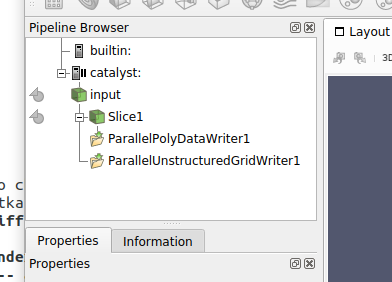
While you’re figuring things out, I’d recommend pausing the sim once this happens. To do that, chose **Catalyst \> Pause Simulation** menu option.
Next, click on the  next to the **Slice1** entry in the PIpeline Browser. This will result in the following:
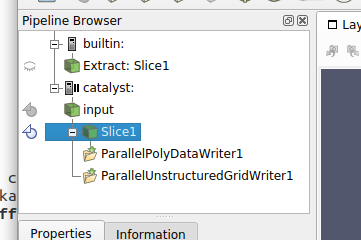
The **Extract: Slice1** is the data generated from the Slice1 filter being executing in the in situ pipeline made available to ParaView for viz. You can toggle visibility, change scalar coloring, add filters, etc to the **Extract: Slice1** data source just like a regular data source in ParaView. Try turning on the visibility for **Extract: Slice1** and then color by **Velocity** (and move the camera, since the default view has the slice orthogonal to the view plane).
Choose **Catalyst \> Continue** menu option to let the sim continue and you’ll see the color update showing the sim progressing.
Hope that gets you going.
---
### Author:  [@Liang\_Cui](https://discourse.paraview.org/u/Liang_Cui)
#### Post date: [November 30, 2018, 7:11pm UTC](https://discourse.paraview.org/t/catalyst-live-visualization/967/23 "2018-11-30T19:11:46Z")
Hi
Pretty appreciate for the patch. But after I did every step you told me I still have the same issues, which are that the animation is not the correct and the socket errors at the end of the simulation.
As you said I can ignore the socket error, but what’s going on with the animation?
Thanks
---
### Author:  [@utkarsh.ayachit](https://discourse.paraview.org/u/utkarsh.ayachit)
#### Post date: [December 2, 2018, 3:29pm UTC](https://discourse.paraview.org/t/catalyst-live-visualization/967/24 "2018-12-02T15:29:13Z")
> [@Liang\_Cui](#):
>
> what’s going on with the animation
What’s going on with the animation? You’ll need to describe in more details the steps that you are taking and the results you’re seeing before I can comment. I don’t know what do you mean by the animation is not correct.
---
### Author:  [@Liang\_Cui](https://discourse.paraview.org/u/Liang_Cui)
#### Post date: [December 2, 2018, 5:36pm UTC](https://discourse.paraview.org/t/catalyst-live-visualization/967/25 "2018-12-02T17:36:04Z")
[ catalyst-2018-12-02\_13.21.23.avi](https://drive.google.com/file/d/1ZDDWUijwtI-eRACJ559FO12CdI2TRsxd/view?usp=drive_web)
Sorry about that. I attach a video of the animation. Maybe it is best to describe the mistake.
Thanks
---
### Author:  [@Andy\_Bauer](https://discourse.paraview.org/u/Andy_Bauer)
#### Post date: [December 3, 2018, 2:46pm UTC](https://discourse.paraview.org/t/catalyst-live-visualization/967/26 "2018-12-03T14:46:26Z")
This is exactly what the animation is expected to do. The `CxxFullExample` example is a very simple driver code with minimal changes to the velocity field. Catalyst Live does not rescale the look up table automatically in the GUI. You may want to look through the Catalyst User’s Guide which is available at [https://www.paraview.org/in-situ/](https://www.paraview.org/in-situ/) and spend some time looking through the `CxxFullExample` code itself to better understand what is happening in the example.
---
### Author:  [@Liang\_Cui](https://discourse.paraview.org/u/Liang_Cui)
#### Post date: [December 3, 2018, 3:15pm UTC](https://discourse.paraview.org/t/catalyst-live-visualization/967/27 "2018-12-03T15:15:01Z")
Thanks for the responses. I read the source code of CxxFullExample again and I mistake something.
But I am still not sure is it ok to ignore the socketing errors at the end of simulation?
[Previous page](https://discourse.paraview.org/t/catalyst-live-visualization/967.md?page=1)