# Cell-wise volume integration
**URL:** https://discourse.paraview.org/t/cell-wise-volume-integration/10431
**Category:** ParaView Support
**Created:** [September 29, 2022, 9:37am UTC](https://discourse.paraview.org/t/cell-wise-volume-integration/10431 "2022-09-29T09:37:47Z")
**Posts on this page:** 7
**Page:** 1
### Author:  [@ROC\_Para](https://discourse.paraview.org/u/ROC_Para)
#### Post date: [September 29, 2022, 9:37am UTC](https://discourse.paraview.org/t/cell-wise-volume-integration/10431/1 "2022-09-29T09:37:47Z")
Hello Paraview Forum,
I’m looking for a possibility to perform cell-wise volume integration of Finite Element Method stress results. Consider, the 3D principal stress field is point-wise available for a given geometry. Now I want to calculate the volume integral cell-wise for example of the maximum principle stress S\_Max: Integral(S\_Max) over individual cell volume dV\_Cell so in the end I have the volume integral for each cell of the given geometry.
Does anybody know how this can be accomplished in Paraview? I was not able to do it with “IntegrateVariable” filter. I have to say that I’m not a Paraview expert, so please apologize my limited ability in this context 🙂
Many thanks!
---
### Author:  [@jfausty](https://discourse.paraview.org/u/jfausty)
#### Post date: [September 29, 2022, 5:10pm UTC](https://discourse.paraview.org/t/cell-wise-volume-integration/10431/2 "2022-09-29T17:10:56Z")
Hi @ROC_Para,
Welcome to the ParaView discourse! Thanks for posting your problem.
Indeed, I couldn’t find one single filter that integrates the scalar field cell by cell and retains it as a cell field. However, if your field uses linear basis functions and your mesh is comprised of tetrahedra, then I believe that the integral per cell should be the average value of the nodes comprising the cell multiplied by the volume of the cell.
Using that formula, you can use the following workflow:
- Use the “Point To Cell Data” filter to perform an average of your values cell-wise
- Use the “Cell Size” filter to compute your cell volumes
- Use a “Calculator” filter to multiply your averaged value cell field with your volume field
The resulting cell field should have the value of your scalar integrated in each cell provided my initial hypotheses were correct.
Hope that helps!
Regards,
Julien
---
### Author:  [@ROC\_Para](https://discourse.paraview.org/u/ROC_Para)
#### Post date: [September 29, 2022, 6:25pm UTC](https://discourse.paraview.org/t/cell-wise-volume-integration/10431/3 "2022-09-29T18:25:14Z")
Thank you!
---
### Author:  [@mersoj](https://discourse.paraview.org/u/mersoj)
#### Post date: [September 29, 2022, 6:37pm UTC](https://discourse.paraview.org/t/cell-wise-volume-integration/10431/4 "2022-09-29T18:37:43Z")
You can also use the “integrate variables” filter. This operates on cell data. So you will still need to use “Point To Cell Data”.
---
### Author:  [@shaoyaoqian](https://discourse.paraview.org/u/shaoyaoqian)
#### Post date: [November 1, 2023, 3:33am UTC](https://discourse.paraview.org/t/cell-wise-volume-integration/10431/5 "2023-11-01T03:33:27Z")
Hello Jacob!
I followed your instruction to use integrate variables to calculate the volume of a tetrahedron mesh, but wrong results are calculated. The volume is even not positive.
Is there something wrong?
Thanks!
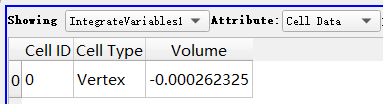
[position000001.vtu](https://discourse.paraview.org/uploads/short-url/fTKnnSkGtA8Mm0AFUzabemABRVn.vtu) (49.9 KB)
---
### Author:  [@Kenneth\_Moreland](https://discourse.paraview.org/u/Kenneth_Moreland)
#### Post date: [November 1, 2023, 2:09pm UTC](https://discourse.paraview.org/t/cell-wise-volume-integration/10431/6 "2023-11-01T14:09:28Z")
@shaoyaoqian,
I took a look at your data. The problem is that the windings on some of the tetrahedra in your mesh are wrong. That fouls up geometric operations on the cell such as volume and is causing the volume for those tetrahedra to be negative.
As is typical for any mesh representation, the VTK data set requires the vertices for a tetrahedron (or any other cell type) to be in a certain order. The correct order is shown in this figure.
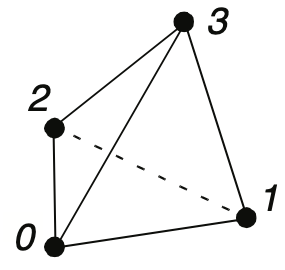
If the vertices are placed in the correct order (the winding), you can look down at vertex 3 and you will find that vertices 0, 1, 2 will form a triangle in counterclockwise order.
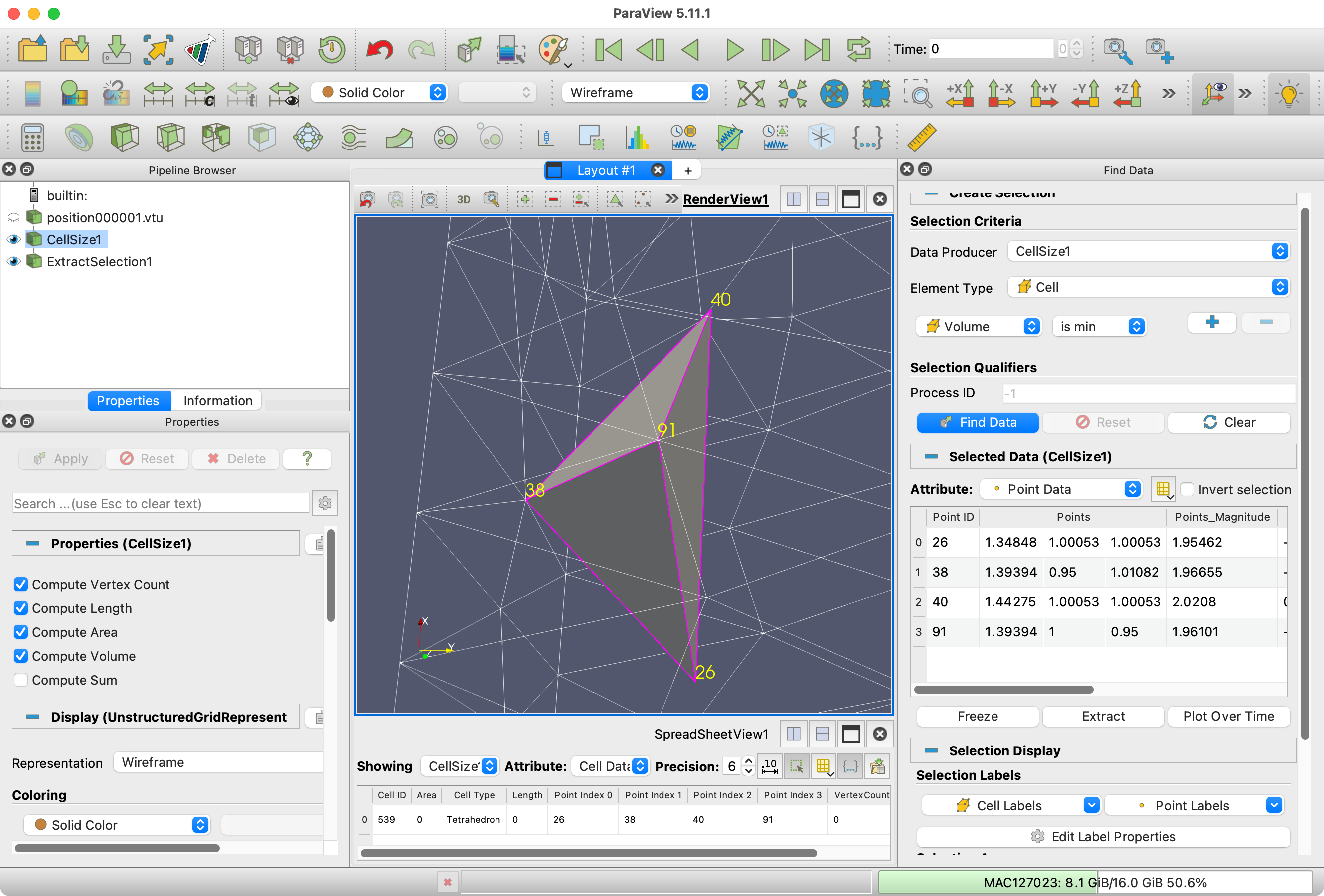
This is rather hard to show, but there are many tetrahedra in the data you posted that have the vertices in the opposite order. In the following image, I have loaded your data, run the `Cell Sizes` filter, and then selected the cell with the minimum volume, which is negative. The point IDs of the vertices are (in order) 26, 38, 40, and 91. When you view the tetrahedron looking down at vertex 3 (91), the remaining vertices are in clockwise order, not counterclockwise order.
Whatever is creating your mesh will have to be fixed to write the tetrahedron indices in the correct order.
---
### Author:  [@shaoyaoqian](https://discourse.paraview.org/u/shaoyaoqian)
#### Post date: [December 11, 2024, 9:53am UTC](https://discourse.paraview.org/t/cell-wise-volume-integration/10431/7 "2024-12-11T09:53:28Z")
@Kenneth_Moreland thanks for your answer!
I have corrected the mistake on your advice!
Here is for anyone else who needs help. Exchange any two indices of the tetrahedron can get the correct order of the volume if the volume is negative. If you do not want to modify the mesh, use the abs of the calculator filter, then use
the programmable filter calculate the integration. For example:
```auto
dataArray = sum(inputs[0].CellData["Result"])
output.PointData.append(dataArray,"sum")
```