# Chain of vectors (itinerary-like)?
**URL:** https://discourse.paraview.org/t/chain-of-vectors-itinerary-like/5821
**Category:** ParaView Support
**Created:** [November 17, 2020, 12:19am UTC](https://discourse.paraview.org/t/chain-of-vectors-itinerary-like/5821 "2020-11-17T00:19:04Z")
**Posts on this page:** 14
**Page:** 1
### Author:  [@Charliebrowne](https://discourse.paraview.org/u/Charliebrowne)
#### Post date: [November 17, 2020, 12:19am UTC](https://discourse.paraview.org/t/chain-of-vectors-itinerary-like/5821/1 "2020-11-17T00:19:04Z")
hi there
I m pretty new to Paraview sorry, my need is basic but I couldnt find any answer so far accross discussions/examples etc.
My input data is a serie of points defined by their (x,y,z) coordinates respectively (csv, one line per point) and I need to print a vector from point A to point B, and a vector from point B to point C etc… similarly to an itinerary with steps on a map. I need to be able to print a trajectory made of 50M points minimum.
Can I achieve this with Paraview and how?
The closest I could get to trace a single vector is reproducing this : [https://vtk.org/Wiki/VTK/Examples/Python/GeometricObjects/Display/OrientedArrow](https://vtk.org/Wiki/VTK/Examples/Python/GeometricObjects/Display/OrientedArrow) in a custom filter, but it seems a lot of computation to print a single vector ?..
thanks a lot!
Charlie
---
### Author:  [@mwestphal](https://discourse.paraview.org/u/mwestphal)
#### Post date: [November 17, 2020, 7:54am UTC](https://discourse.paraview.org/t/chain-of-vectors-itinerary-like/5821/2 "2020-11-17T07:54:29Z")
A simple programmable filter should do the trick. Juste create a polyline cells for your points.
---
### Author:  [@Charliebrowne](https://discourse.paraview.org/u/Charliebrowne)
#### Post date: [November 17, 2020, 10:20am UTC](https://discourse.paraview.org/t/chain-of-vectors-itinerary-like/5821/3 "2020-11-17T10:20:17Z")
Hi Mathieu!
I did using the following script ([https://stackoverflow.com/questions/22438140/how-to-connect-points-in-paraview](https://stackoverflow.com/questions/22438140/how-to-connect-points-in-paraview))
I am able to plot lines between point using the polyline, but not the **arrow** itself, I need to be able to show the direction of the itinerary (arrow starting from point and ending A to B, then another from B to C …) .
Is it doable using a polyline?
thanks
Charlie
---
### Author:  [@mwestphal](https://discourse.paraview.org/u/mwestphal)
#### Post date: [November 17, 2020, 10:23am UTC](https://discourse.paraview.org/t/chain-of-vectors-itinerary-like/5821/4 "2020-11-17T10:23:40Z")
Then this is completely different. You want to use a Glyph filter.
---
### Author:  [@Charliebrowne](https://discourse.paraview.org/u/Charliebrowne)
#### Post date: [November 17, 2020, 11:03am UTC](https://discourse.paraview.org/t/chain-of-vectors-itinerary-like/5821/5 "2020-11-17T11:03:02Z")
Thanks I will try, do you recommend to pre-compute the vectors (ie to be displayed between points) outside ParaView, or can I do it directly in ParaView (ie vector to be displayed at point A is computed using B(Xb,Yb,Zb) - A(Ax,Ya,Za) ? )
Thanks
---
### Author:  [@mwestphal](https://discourse.paraview.org/u/mwestphal)
#### Post date: [November 17, 2020, 12:09pm UTC](https://discourse.paraview.org/t/chain-of-vectors-itinerary-like/5821/6 "2020-11-17T12:09:01Z")
You can compute the vectors using a programmable filter.
---
### Author:  [@Charliebrowne](https://discourse.paraview.org/u/Charliebrowne)
#### Post date: [November 20, 2020, 12:17am UTC](https://discourse.paraview.org/t/chain-of-vectors-itinerary-like/5821/7 "2020-11-20T00:17:23Z")
Hi Mathieu
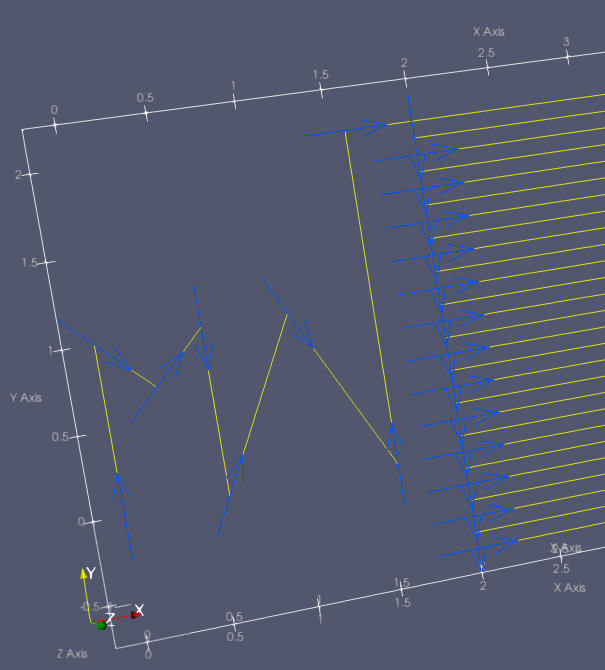
I have managed to compute the vectors that are used to orientate the glyphs (ie towards next point). However I m now struggling with the 2D arrows that are always centered on the point they belong to.
- Is there a way to offset the 2Dvectors glyph along their orientation vector ? even with coding?
Thanks a lot
Charlie
---
### Author:  [@Charliebrowne](https://discourse.paraview.org/u/Charliebrowne)
#### Post date: [November 20, 2020, 12:20am UTC](https://discourse.paraview.org/t/chain-of-vectors-itinerary-like/5821/8 "2020-11-20T00:20:33Z")
this is what I got for now, not so great as per the position of glyphs…
---
### Author:  [@mwestphal](https://discourse.paraview.org/u/mwestphal)
#### Post date: [November 20, 2020, 8:27am UTC](https://discourse.paraview.org/t/chain-of-vectors-itinerary-like/5821/9 "2020-11-20T08:27:40Z")
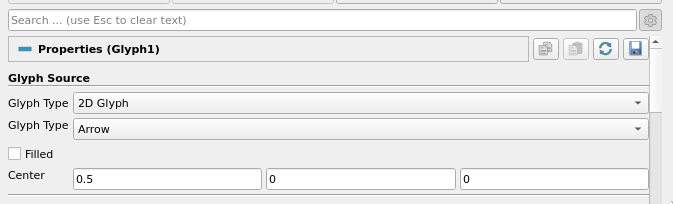
Set CenterX to 0.5
---
### Author:  [@Charliebrowne](https://discourse.paraview.org/u/Charliebrowne)
#### Post date: [November 21, 2020, 12:53am UTC](https://discourse.paraview.org/t/chain-of-vectors-itinerary-like/5821/10 "2020-11-21T00:53:12Z")
Hi Mathieu, sorry but I could not find anywhere any reference or example on how/where to change “CenterX” - can you please elaborate? what does this variable/method refer to / how do I do that ? Thanks again !!
---
### Author:  [@Joachim\_P](https://discourse.paraview.org/u/Joachim_P)
#### Post date: [November 21, 2020, 11:46am UTC](https://discourse.paraview.org/t/chain-of-vectors-itinerary-like/5821/11 "2020-11-21T11:46:37Z")
Charlie: Try by setting the X component of the `Translate` property in the `Glyph Transform` group.
---
### Author:  [@mwestphal](https://discourse.paraview.org/u/mwestphal)
#### Post date: [November 21, 2020, 1:07pm UTC](https://discourse.paraview.org/t/chain-of-vectors-itinerary-like/5821/12 "2020-11-21T13:07:25Z")
Actually, setting the first component of the Center property to 0.5 should be better.
Mkae sure to show advanced options first by clicking on the cog wheel, top right.
---
### Author:  [@Charliebrowne](https://discourse.paraview.org/u/Charliebrowne)
#### Post date: [November 22, 2020, 11:07pm UTC](https://discourse.paraview.org/t/chain-of-vectors-itinerary-like/5821/13 "2020-11-22T23:07:02Z")
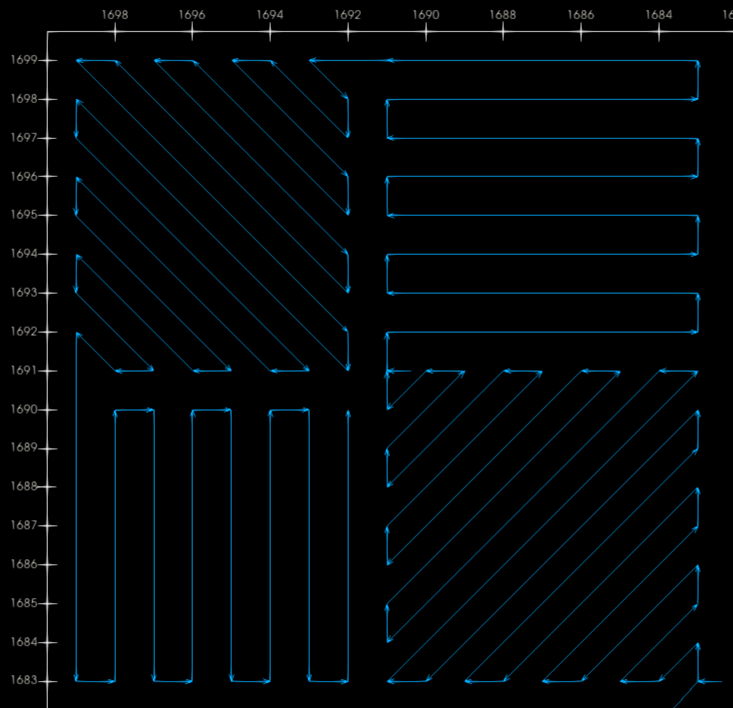
big Thanks Mathieu, thanks Joachim … I know have nice arrows! (I used Mathieu s way) please see below !
---
### Author:  [@Charliebrowne](https://discourse.paraview.org/u/Charliebrowne)
#### Post date: [November 24, 2020, 4:49pm UTC](https://discourse.paraview.org/t/chain-of-vectors-itinerary-like/5821/14 "2020-11-24T16:49:54Z")
Hi Mathieu,
just fyi I have opened a new topic because it seems it doesn’t scale on the Windows GUI client : [Paraview Gui crashes on Windows 10 with large file](https://discourse.paraview.org/t/paraview-gui-crashes-on-windows-10-with-large-file/5876/3)
Charlie