# Change the arrow shape for Glyph filter
**URL:** https://discourse.paraview.org/t/change-the-arrow-shape-for-glyph-filter/4048
**Category:** ParaView Support
**Created:** [April 13, 2020, 12:26pm UTC](https://discourse.paraview.org/t/change-the-arrow-shape-for-glyph-filter/4048 "2020-04-13T12:26:45Z")
**Posts on this page:** 8
**Page:** 1
### Author:  [@s1291](https://discourse.paraview.org/u/s1291)
#### Post date: [April 13, 2020, 12:26pm UTC](https://discourse.paraview.org/t/change-the-arrow-shape-for-glyph-filter/4048/1 "2020-04-13T12:26:45Z")
Is it possible to change the arrow shape when using the 2D arrow for the Glyph filter? the 2D arrow is very basic. Is there a way to change it to something like [this one](https://banner2.cleanpng.com/20180713/ysk/kisspng-arrow-clip-art-arrow-frame-5b48ac4ef16728.9522861715314893589888.jpg)?
Thanks
---
### Author:  [@wascott](https://discourse.paraview.org/u/wascott)
#### Post date: [April 13, 2020, 3:22pm UTC](https://discourse.paraview.org/t/change-the-arrow-shape-for-glyph-filter/4048/2 "2020-04-13T15:22:25Z")
Click on “filled”?
---
### Author:  [@s1291](https://discourse.paraview.org/u/s1291)
#### Post date: [April 13, 2020, 3:33pm UTC](https://discourse.paraview.org/t/change-the-arrow-shape-for-glyph-filter/4048/3 "2020-04-13T15:33:41Z")
Sorry I mean something like this one:
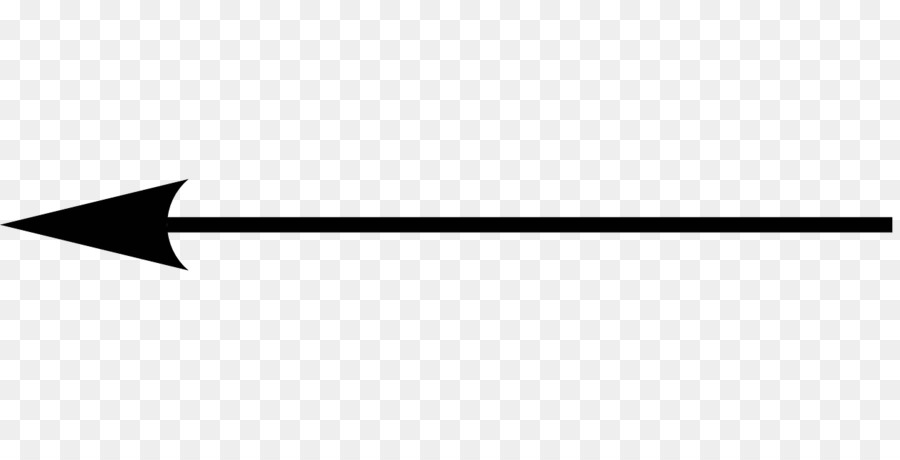
If I select the “ **filled** ” option, is there a way to change the shaft thickness? or simply fill only the arrow head without filling the arrow shaft?
---
### Author:  [@wascott](https://discourse.paraview.org/u/wascott)
#### Post date: [April 13, 2020, 4:07pm UTC](https://discourse.paraview.org/t/change-the-arrow-shape-for-glyph-filter/4048/4 "2020-04-13T16:07:51Z")
Do you intend to have the arrows point the direction of your vector fields, or you just want an arrrow?
---
### Author:  [@s1291](https://discourse.paraview.org/u/s1291)
#### Post date: [April 13, 2020, 4:19pm UTC](https://discourse.paraview.org/t/change-the-arrow-shape-for-glyph-filter/4048/5 "2020-04-13T16:19:00Z")
I would like to plot the velocity field.
---
### Author:  [@s1291](https://discourse.paraview.org/u/s1291)
#### Post date: [April 14, 2020, 10:09am UTC](https://discourse.paraview.org/t/change-the-arrow-shape-for-glyph-filter/4048/6 "2020-04-14T10:09:27Z")
I found a trick to achieve that using the 3D arrows by changing the tip and the shaft resolutions to 1. We can adjust the shaft radius, tip length, etc.
---
### Author:  [@wascott](https://discourse.paraview.org/u/wascott)
#### Post date: [April 14, 2020, 3:29pm UTC](https://discourse.paraview.org/t/change-the-arrow-shape-for-glyph-filter/4048/7 "2020-04-14T15:29:44Z")
To plot the velocity field, you want to use the Glyph filter. One of it’s options is an arrow. It is very modifyable.
---
### Author:  [@s1291](https://discourse.paraview.org/u/s1291)
#### Post date: [April 14, 2020, 3:34pm UTC](https://discourse.paraview.org/t/change-the-arrow-shape-for-glyph-filter/4048/8 "2020-04-14T15:34:09Z")
Unfortunately in my case I find the 2D Glyph useless. I want to get some nice vector visualizations (something like quiver in matplotlib, etc). So far, the workaround is to get something similar is to use the 3D glyphs and change both the arrow’s head and shaft resolution to 1.