# Change the source order in the pipeline browser
**URL:** https://discourse.paraview.org/t/change-the-source-order-in-the-pipeline-browser/15453
**Category:** ParaView Support
**Created:** [September 26, 2024, 6:47pm UTC](https://discourse.paraview.org/t/change-the-source-order-in-the-pipeline-browser/15453 "2024-09-26T18:47:49Z")
**Posts on this page:** 3
**Page:** 1
### Author:  [@Michael\_Li](https://discourse.paraview.org/u/Michael_Li)
#### Post date: [September 26, 2024, 6:47pm UTC](https://discourse.paraview.org/t/change-the-source-order-in-the-pipeline-browser/15453/1 "2024-09-26T18:47:49Z")
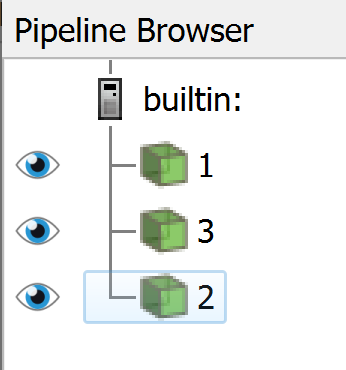
How do I change the display order in the pipeline browser? Specifically, I want the three datasets displayed in the order of 1, 2, and 3. I may have more datasets to display. By reordering them, I can avoid some confusion.
---
### Author:  [@Michael\_Li](https://discourse.paraview.org/u/Michael_Li)
#### Post date: [September 26, 2024, 7:09pm UTC](https://discourse.paraview.org/t/change-the-source-order-in-the-pipeline-browser/15453/2 "2024-09-26T19:09:56Z")
I just found this was asked in an earlier post: [Order of objects in pipeline browser](https://discourse.paraview.org/t/order-of-objects-in-pipeline-browser/7741).
It seems the request has not been implemented.
---
### Author:  [@nicolas.vuaille](https://discourse.paraview.org/u/nicolas.vuaille)
#### Post date: [September 27, 2024, 9:40am UTC](https://discourse.paraview.org/t/change-the-source-order-in-the-pipeline-browser/15453/3 "2024-09-27T09:40:24Z")
If managing the visual appearance of the pipeline matters to you, you can also try the `NodeEditor` plugin. It allows to manipulate a 2D chart of the pipeline.