# Clip and Slice fines mesh
**URL:** https://discourse.paraview.org/t/clip-and-slice-fines-mesh/2792
**Category:** ParaView Support
**Created:** [October 17, 2019, 4:28am UTC](https://discourse.paraview.org/t/clip-and-slice-fines-mesh/2792 "2019-10-17T04:28:47Z")
**Posts on this page:** 10
**Page:** 1
### Author:  [@Vaya\_Putra](https://discourse.paraview.org/u/Vaya_Putra)
#### Post date: [October 17, 2019, 4:28am UTC](https://discourse.paraview.org/t/clip-and-slice-fines-mesh/2792/1 "2019-10-17T04:28:47Z")
Hi all i have fine mesh 100x100x3, then i want to clip become small mesh 12x16x3 or 576 cells, but what i have 12.3x16x3 and consist 624 cells i cant exactly clip in the corner of cells
any one help me[12x16x3.vtu](https://discourse.paraview.org/uploads/short-url/eK8rb6lEpA52gU3HbNpaV5ntTFC.vtu) (68.3 KB)
---
### Author:  [@mwestphal](https://discourse.paraview.org/u/mwestphal)
#### Post date: [October 17, 2019, 6:14am UTC](https://discourse.paraview.org/t/clip-and-slice-fines-mesh/2792/2 "2019-10-17T06:14:07Z")
Looks like you are working with a perfectly regular grid. You should not use unstructured grid but image data, and then use the `Extract Subset` filter.
---
### Author:  [@Vaya\_Putra](https://discourse.paraview.org/u/Vaya_Putra)
#### Post date: [October 17, 2019, 6:58am UTC](https://discourse.paraview.org/t/clip-and-slice-fines-mesh/2792/3 "2019-10-17T06:58:38Z")
but i have to used unstructured grid, for applied to my simulation.
---
### Author:  [@utkarsh.ayachit](https://discourse.paraview.org/u/utkarsh.ayachit)
#### Post date: [October 17, 2019, 7:21am UTC](https://discourse.paraview.org/t/clip-and-slice-fines-mesh/2792/4 "2019-10-17T07:21:30Z")
Steps:
- hit 
- now, using “Select Cells On” (or hit `S`) and then draw a rectangle to select all of the cells on the side facing you.
- goto **Edit | Find Data dialog** , and invert the selection by checking the **Invert Selection** checkbox
- extract the selection by hitting the **Extract Selection** button
State file attached.[state.pvsm](https://discourse.paraview.org/uploads/short-url/nYzKNhaGGRZzjD1SbzAR8Ke8kQO.pvsm) (232.0 KB)
---
### Author:  [@mwestphal](https://discourse.paraview.org/u/mwestphal)
#### Post date: [October 17, 2019, 7:50am UTC](https://discourse.paraview.org/t/clip-and-slice-fines-mesh/2792/5 "2019-10-17T07:50:27Z")
Alternatively, you can ressample your unstructured grid into an image data by using `RessampleToImage` filter.
---
### Author:  [@Vaya\_Putra](https://discourse.paraview.org/u/Vaya_Putra)
#### Post date: [October 17, 2019, 3:00pm UTC](https://discourse.paraview.org/t/clip-and-slice-fines-mesh/2792/6 "2019-10-17T15:00:44Z")
since i used RessampleToImage
my type of cell was change become Voxel from hexahedron. is it?
---
### Author:  [@Vaya\_Putra](https://discourse.paraview.org/u/Vaya_Putra)
#### Post date: [October 17, 2019, 3:00pm UTC](https://discourse.paraview.org/t/clip-and-slice-fines-mesh/2792/7 "2019-10-17T15:00:56Z")
thank you
---
### Author:  [@mwestphal](https://discourse.paraview.org/u/mwestphal)
#### Post date: [October 17, 2019, 3:06pm UTC](https://discourse.paraview.org/t/clip-and-slice-fines-mesh/2792/8 "2019-10-17T15:06:17Z")
> [@Vaya\_Putra](#):
>
> my type of cell was change become Voxel from hexahedron. is it?
Yes.
---
### Author:  [@Vaya\_Putra](https://discourse.paraview.org/u/Vaya_Putra)
#### Post date: [October 17, 2019, 3:31pm UTC](https://discourse.paraview.org/t/clip-and-slice-fines-mesh/2792/9 "2019-10-17T15:31:47Z")
thank you for alternative way
---
### Author:  [@Vaya\_Putra](https://discourse.paraview.org/u/Vaya_Putra)
#### Post date: [October 18, 2019, 1:17am UTC](https://discourse.paraview.org/t/clip-and-slice-fines-mesh/2792/10 "2019-10-18T01:17:32Z")
hello
since i used clip and invert selection
for visualize was done.
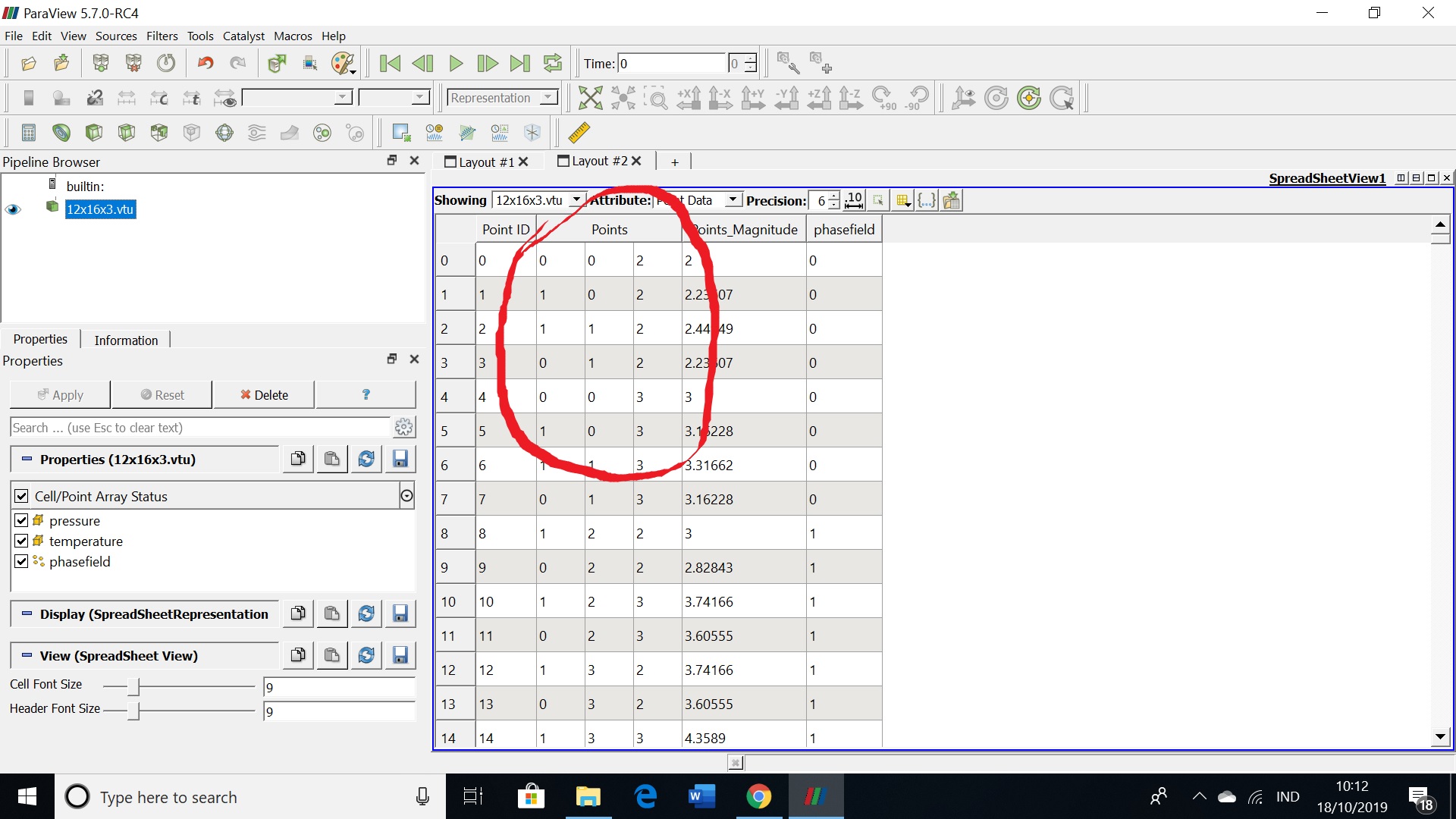
when i couple with my simulation, i need coordinate of point consecutive.
is there any menu to recalculate the coordinate of point and cell?
( it have to start from point 0 0 0, …,…)
any comment