# Clipping bug when changing representation of data from surface to volume
**URL:** https://discourse.paraview.org/t/clipping-bug-when-changing-representation-of-data-from-surface-to-volume/3381
**Category:** ParaView Support
**Created:** [January 22, 2020, 1:01pm UTC](https://discourse.paraview.org/t/clipping-bug-when-changing-representation-of-data-from-surface-to-volume/3381 "2020-01-22T13:01:09Z")
**Posts on this page:** 13
**Page:** 1
### Author:  [@Pat](https://discourse.paraview.org/u/Pat)
#### Post date: [January 22, 2020, 1:01pm UTC](https://discourse.paraview.org/t/clipping-bug-when-changing-representation-of-data-from-surface-to-volume/3381/1 "2020-01-22T13:01:09Z")
Hello,
I have noticed an annoying bug when rendering my data in both Paraview v5.7.0 and the nightly builds. My data which is stored in a HDF5 format is being read into Paraview through a XDMF file which I think could be causing this issue. For my purposes I am also importing a sphere object in Paraview which causes the buggy behavior that I am experiencing. I noticed that my data will clip through the sphere when I change my data representation from surface to volume. I can get around this bug in the v5.7.0 build by changing the opacity of the sphere to any value less than 1. I tried mirroring these steps in the nightly builds and somehow it has gotten worse. Not only does my data clip through the sphere when the opacity of the sphere is 1, but if I change the sphere’s opacity in the nightly build the sphere object completely disappears.
here is what I am experiencing:
This behavior occurs when the sphere’s opacity is 1 and the data representation is set to volume. My data is clearly clipping in front of the sphere in this example. (Occurs in v5.7.0 and the nightly build)
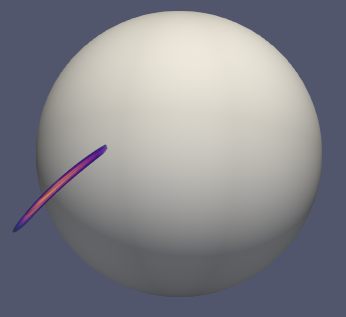
This behavior occurs when the sphere’s opacity is less than 1 and the data representation is set to volume. (Occurs only in the nightly build)

Oddly,if I enable ray tracing in my render none of these bugs occur.
Steps to reproduce:
- Open Paraview’s latest nightly build
- Open XDMF \> Open data with XDMF reader \> Click Apply
- Filters \> Common \> Threshold \> Apply
- Filters \> Search Sphere and Apply
- Change data representation from surface to volume
Thank you.
---
### Author:  [@mwestphal](https://discourse.paraview.org/u/mwestphal)
#### Post date: [January 23, 2020, 2:15am UTC](https://discourse.paraview.org/t/clipping-bug-when-changing-representation-of-data-from-surface-to-volume/3381/2 "2020-01-23T02:15:06Z")
Unable to reproduce here. Can you share your dataset ?
---
### Author:  [@saramito](https://discourse.paraview.org/u/saramito)
#### Post date: [March 16, 2020, 9:28pm UTC](https://discourse.paraview.org/t/clipping-bug-when-changing-representation-of-data-from-surface-to-volume/3381/3 "2020-03-16T21:28:28Z")
Hi all,
I obtained the bug without any data file.
I run paraview-5.7.0 under debian buster (testing) with a amd64 arch.
To reproduce the bug:
- Source -\> Sphere
- Properties : apply
- Properties : coloring -\> normals
- select “edit color map” icon on the top bar, at the left
- Edit color map :
[x] enable opacity mapping for surfaces
=\> the sphere disapears instantaneously !
It seems to be a bug in the management of opacity…
Any idea ?
Pierre
---
### Author:  [@mwestphal](https://discourse.paraview.org/u/mwestphal)
#### Post date: [March 17, 2020, 1:57am UTC](https://discourse.paraview.org/t/clipping-bug-when-changing-representation-of-data-from-surface-to-volume/3381/4 "2020-03-17T01:57:22Z")
I still don’t reproduce. The normals example is not a great one as all the magnitude values is 1.
Your initial post mentioned volume rendering though.
Can you double check your steps ?
---
### Author:  [@saramito](https://discourse.paraview.org/u/saramito)
#### Post date: [March 18, 2020, 8:26am UTC](https://discourse.paraview.org/t/clipping-bug-when-changing-representation-of-data-from-surface-to-volume/3381/5 "2020-03-18T08:26:03Z")
> From Mathieu Westphal:
> Your initial post mentioned volume rendering though.
Pat mentioned it: I am not Pat but Pierre Saramito.
I do not mentioned volume rendering.
> From Mathieu Westphal:
> I still don’t reproduce.
I could bring more details.
I run paraview-5.7.0 under Debian bullseye (testing) with a amd64 arch.
The paraview binary comes from the Debian/testing package:
aptitude install paraview
It seems that the present opacity bug comes from this packaging.
When I download a binary from [https://www.paraview.org/download](https://www.paraview.org/download)
then opacity works fine.
=\> perhaps you dont run Debian/bullseye ?
> From Mathieu Westphal:
> The normals example is not a great one as all the magnitude values is 1.
Please, select e.g. the “z” component.
To reproduce the bug with the Debian/bullseye distribution:
```
Source -> Sphere
Properties : apply
Properties : coloring -> normals
Properties : coloring -> Z (instead of magnitude)
select “edit color map” icon on the top bar, at the left
Edit color map :
[x] enable opacity mapping for surfaces
```
=\> the sphere disappears instantaneously !
Any idea ?
Pierre
---
### Author:  [@mwestphal](https://discourse.paraview.org/u/mwestphal)
#### Post date: [March 18, 2020, 8:53am UTC](https://discourse.paraview.org/t/clipping-bug-when-changing-representation-of-data-from-surface-to-volume/3381/6 "2020-03-18T08:53:33Z")
I do not reproduce with 5.7, so it must be specific to debian.
I do not run debian.
Can you share the full content of Help -\> About ?
---
### Author:  [@mwestphal](https://discourse.paraview.org/u/mwestphal)
#### Post date: [March 18, 2020, 9:00am UTC](https://discourse.paraview.org/t/clipping-bug-when-changing-representation-of-data-from-surface-to-volume/3381/7 "2020-03-18T09:00:21Z")
maybe caused by nouveau driver :
[https://gitlab.kitware.com/paraview/paraview/issues/18030](https://gitlab.kitware.com/paraview/paraview/issues/18030)
---
### Author:  [@saramito](https://discourse.paraview.org/u/saramito)
#### Post date: [March 18, 2020, 9:21am UTC](https://discourse.paraview.org/t/clipping-bug-when-changing-representation-of-data-from-surface-to-volume/3381/8 "2020-03-18T09:21:32Z")
Hum…
I do not have a nvidia graphic card but an intel one,
and run not the “nouveau” driver but the “i915” one.
I dont known how to check the opacity feature at this lower level.
```
glxinfo | grep OpenGL
OpenGL vendor string: Intel Open Source Technology Center
OpenGL renderer string: Mesa DRI Intel(R) HD Graphics 5500 (Broadwell GT2)
OpenGL core profile version string: 4.5 (Core Profile) Mesa 18.3.6
OpenGL core profile shading language version string: 4.50
OpenGL core profile context flags: (none)
OpenGL core profile profile mask: core profile
OpenGL core profile extensions:
OpenGL version string: 3.0 Mesa 18.3.6
OpenGL shading language version string: 1.30
OpenGL context flags: (none)
OpenGL extensions:
OpenGL ES profile version string: OpenGL ES 3.1 Mesa 18.3.6
OpenGL ES profile shading language version string: OpenGL ES GLSL ES 3.10
OpenGL ES profile extensions:
lspci -vvv | less
VGA compatible controller: Intel Corporation HD Graphics 5500 (rev 09) (prog-if 00 [VGA controller])
Subsystem: Hewlett-Packard Company HD Graphics 5500
Control: I/O+ Mem+ BusMaster+ SpecCycle- MemWINV- VGASnoop- ParErr- Stepping- SERR- FastB2B- DisINTx+
Status: Cap+ 66MHz- UDF- FastB2B+ ParErr- DEVSEL=fast >TAbort- SERR-
Kernel driver in use: i915
Kernel modules: i915
```
---
### Author:  [@mwestphal](https://discourse.paraview.org/u/mwestphal)
#### Post date: [March 18, 2020, 9:22am UTC](https://discourse.paraview.org/t/clipping-bug-when-changing-representation-of-data-from-surface-to-volume/3381/9 "2020-03-18T09:22:57Z")
Can you share the full content of Help -\> About ?
---
### Author:  [@saramito](https://discourse.paraview.org/u/saramito)
#### Post date: [March 19, 2020, 12:26pm UTC](https://discourse.paraview.org/t/clipping-bug-when-changing-representation-of-data-from-surface-to-volume/3381/10 "2020-03-19T12:26:42Z")
Here is a screen capture of the help-\>about :
[https://www-ljk.imag.fr/membres/Pierre.Saramito/tmp/paraview-5-7-about.png](https://www-ljk.imag.fr/membres/Pierre.Saramito/tmp/paraview-5-7-about.png)
Have an idea of what’s append ?
---
### Author:  [@mwestphal](https://discourse.paraview.org/u/mwestphal)
#### Post date: [March 20, 2020, 2:08am UTC](https://discourse.paraview.org/t/clipping-bug-when-changing-representation-of-data-from-surface-to-volume/3381/11 "2020-03-20T02:08:47Z")
Hard to say, it must be down to the debian paraview package configuration.
If paraview was built with mesa, you can try to run
`paraview-mesa paraview`
---
### Author:  [@saramito](https://discourse.paraview.org/u/saramito)
#### Post date: [March 20, 2020, 6:43am UTC](https://discourse.paraview.org/t/clipping-bug-when-changing-representation-of-data-from-surface-to-volume/3381/12 "2020-03-20T06:43:19Z")
Mathieu,
There is no “paraview-mesa” in the paraview debian package.
Could you please send a bug report to the debian package maintainers ?
You could explain with more details than me whats goes wrong with this configuration.
The debian paraview page is
[https://tracker.debian.org/pkg/paraview](https://tracker.debian.org/pkg/paraview)
For a bug report, please click on the top-right menu for bug reports.
Many thanks for your help,
Pierre
---
### Author:  [@mwestphal](https://discourse.paraview.org/u/mwestphal)
#### Post date: [March 20, 2020, 8:05am UTC](https://discourse.paraview.org/t/clipping-bug-when-changing-representation-of-data-from-surface-to-volume/3381/13 "2020-03-20T08:05:20Z")
I would have to reproduce it myself before opening an issue. May not be before a while.