# color\_by scalars not working
**URL:** https://discourse.paraview.org/t/color-by-scalars-not-working/7569
**Category:** Web Support
**Created:** [July 8, 2021, 6:00am UTC](https://discourse.paraview.org/t/color-by-scalars-not-working/7569 "2021-07-08T06:00:39Z")
**Posts on this page:** 11
**Page:** 1
### Author:  [@devngc](https://discourse.paraview.org/u/devngc)
#### Post date: [July 8, 2021, 6:00am UTC](https://discourse.paraview.org/t/color-by-scalars-not-working/7569/1 "2021-07-08T06:00:39Z")
Hi All,
I am loading the following vtkjs file on Paraview Glance. Everythng works fine except the dataset named “Grid”. I have added two scalars to this data and they can be seen in Glance.
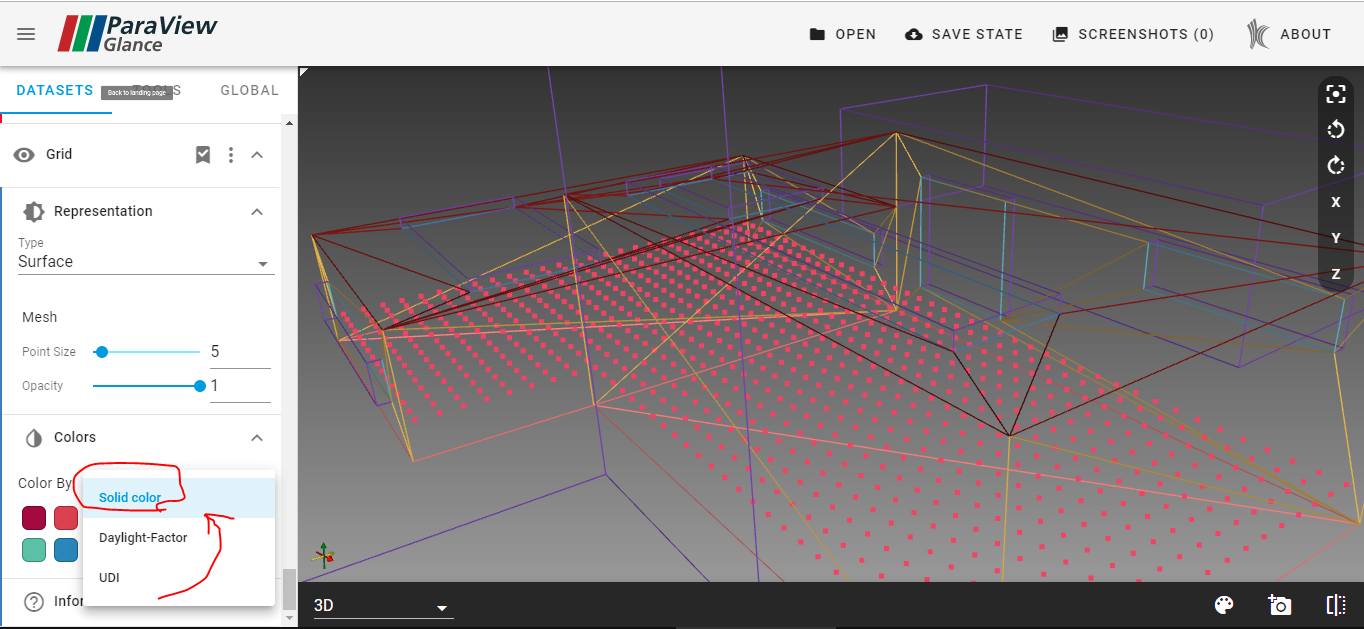
The question is why I don’t see the scalar loaded when I see in the index.json file that for this dataset “colorByArrayName” property is set to one of the scalars?
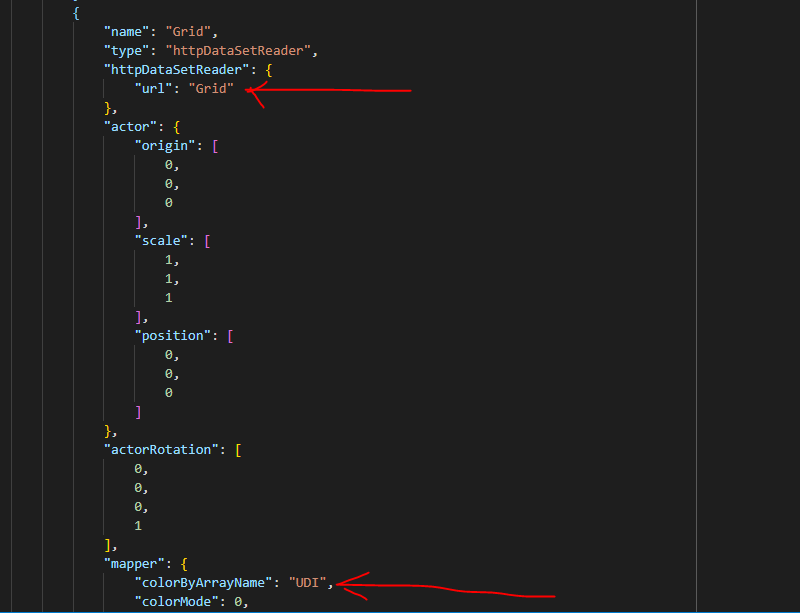
I would also share that this works fine when instead of Points, I use Polygons as a grid.
I have attached the vtkjs file and the zip file that I used to make this vtkjs below;
[test.vtkjs](https://discourse.paraview.org/uploads/short-url/h2SDrMUNyUHqVdaDf3avTnMU6Hr.vtkjs) (18.3 KB)
[test.zip](https://discourse.paraview.org/uploads/short-url/wamCUUN61wcqZt2c8sFbKHj2mb0.zip) (18.0 KB)
---
### Author:  [@devngc](https://discourse.paraview.org/u/devngc)
#### Post date: [July 9, 2021, 2:10pm UTC](https://discourse.paraview.org/t/color-by-scalars-not-working/7569/2 "2021-07-09T14:10:47Z")
I found a perfect example to show the issue. The following code is taken from the example [here](https://kitware.github.io/vtk-examples/site/Python/PolyData/TriangleColoredPoints/)
```auto
import vtk
def get_program_parameters():
import argparse
description = 'Generate a triangle with colored points and write it to a .vtp file.'
epilogue = '''
'''
parser = argparse.ArgumentParser(description=description, epilog=epilogue)
parser.add_argument('filename', help='A required vtp filename.', nargs='?',
const='TestTriangleColoredPoints.vtp',
type=str, default='TestTriangleColoredPoints.vtp')
args = parser.parse_args()
return args.filename
def main():
colors = vtk.vtkNamedColors()
filename = get_program_parameters()
# setup points and vertices
Points = vtk.vtkPoints()
Vertices = vtk.vtkCellArray()
id = Points.InsertNextPoint(1.0, 0.0, 0.0)
Vertices.InsertNextCell(1)
Vertices.InsertCellPoint(id)
id = Points.InsertNextPoint(0.0, 0.0, 0.0)
Vertices.InsertNextCell(1)
Vertices.InsertCellPoint(id)
id = Points.InsertNextPoint(0.0, 1.0, 0.0)
Vertices.InsertNextCell(1)
Vertices.InsertCellPoint(id)
# setup colors
Colors = vtk.vtkUnsignedCharArray()
Colors.SetNumberOfComponents(3)
Colors.SetName("Colors")
Colors.InsertNextTuple3(*colors.GetColor3ub('Red'))
Colors.InsertNextTuple3(*colors.GetColor3ub('LimeGreen'))
Colors.InsertNextTuple3(*colors.GetColor3ub('Blue'))
polydata = vtk.vtkPolyData()
polydata.SetPoints(Points)
polydata.SetVerts(Vertices)
polydata.GetPointData().SetScalars(Colors)
polydata.GetPointData().SetActiveScalars("Colors")
polydata.Modified()
writer = vtk.vtkXMLPolyDataWriter()
writer.SetFileName(filename)
writer.SetInputData(polydata)
writer.Write()
if __name__ == ' __main__':
main()
```
I only added the following line
```auto
polydata.GetPointData().SetActiveScalars("Colors")
```
My expectation is that when I load the resulting .vtp file in Paraview Glance it should color the points with the scalar that I set as an active scalar. But it doesn’t. Why?
---
### Author:  [@devngc](https://discourse.paraview.org/u/devngc)
#### Post date: [July 9, 2021, 2:34pm UTC](https://discourse.paraview.org/t/color-by-scalars-not-working/7569/3 "2021-07-09T14:34:29Z")
I believe [this](https://discourse.paraview.org/t/paraview-glance-default-color-by-vtu-files/7480) is similar. Is this implemented yet @Forrest_Li ?
---
### Author:  [@jourdain](https://discourse.paraview.org/u/jourdain)
#### Post date: [July 9, 2021, 10:15pm UTC](https://discourse.paraview.org/t/color-by-scalars-not-working/7569/4 "2021-07-09T22:15:43Z")
The vtkjs format should have worked and it used to work. The same should be true with custom color range defined in PV, those should be kept as well rather than recomputed the full scalar range. @Forrest_Li
---
### Author:  [@Forrest\_Li](https://discourse.paraview.org/u/Forrest_Li)
#### Post date: [July 12, 2021, 3:42pm UTC](https://discourse.paraview.org/t/color-by-scalars-not-working/7569/5 "2021-07-12T15:42:30Z")
I’ll check this out. Thanks for the pings.
---
### Author:  [@Forrest\_Li](https://discourse.paraview.org/u/Forrest_Li)
#### Post date: [July 14, 2021, 3:40pm UTC](https://discourse.paraview.org/t/color-by-scalars-not-working/7569/6 "2021-07-14T15:40:23Z")
PR is out for active scalars: [feat(ColorBy): Use default scalars for colorBy by floryst · Pull Request #397 · Kitware/paraview-glance · GitHub](https://github.com/Kitware/paraview-glance/pull/397)
---
### Author:  [@devngc](https://discourse.paraview.org/u/devngc)
#### Post date: [July 14, 2021, 4:06pm UTC](https://discourse.paraview.org/t/color-by-scalars-not-working/7569/7 "2021-07-14T16:06:03Z")
Thanks a lot @Forrest_Li! When do we get to try this?
---
### Author:  [@Forrest\_Li](https://discourse.paraview.org/u/Forrest_Li)
#### Post date: [July 14, 2021, 4:26pm UTC](https://discourse.paraview.org/t/color-by-scalars-not-working/7569/8 "2021-07-14T16:26:37Z")
I’ve just merged it after some more testing. The changes should be live shortly on the nightly build; do let me know if the active scalars are still not being picked up.
---
### Author:  [@devngc](https://discourse.paraview.org/u/devngc)
#### Post date: [July 14, 2021, 6:08pm UTC](https://discourse.paraview.org/t/color-by-scalars-not-working/7569/9 "2021-07-14T18:08:11Z")
I tried just now and it’s not being picked up. Maybe I should wait longer. Here’s the file I used.
[gridbased.vtkjs](https://discourse.paraview.org/uploads/short-url/mtbFsGliJdMNTb1iiwPGi4k6hlB.vtkjs) (15.1 KB)
---
### Author:  [@Forrest\_Li](https://discourse.paraview.org/u/Forrest_Li)
#### Post date: [July 21, 2021, 10:02pm UTC](https://discourse.paraview.org/t/color-by-scalars-not-working/7569/10 "2021-07-21T22:02:50Z")
I’ve made updates to Glance and the public instance of it. I loaded your file and it seems to work; do try it out and let me know if something is still not working.
Note: you may need to clear out the application cache via devtools or a hard reload.
---
### Author:  [@devngc](https://discourse.paraview.org/u/devngc)
#### Post date: [July 22, 2021, 4:58am UTC](https://discourse.paraview.org/t/color-by-scalars-not-working/7569/11 "2021-07-22T04:58:49Z")
You’re the man. It works. Thanks a lot!