# color legent
**URL:** https://discourse.paraview.org/t/color-legent/10877
**Category:** ParaView Support
**Created:** [November 29, 2022, 10:00am UTC](https://discourse.paraview.org/t/color-legent/10877 "2022-11-29T10:00:17Z")
**Posts on this page:** 3
**Page:** 1
### Author:  [@saman89](https://discourse.paraview.org/u/saman89)
#### Post date: [November 29, 2022, 10:00am UTC](https://discourse.paraview.org/t/color-legent/10877/1 "2022-11-29T10:00:18Z")
hi everyone
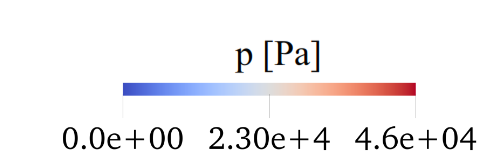
can we change the color legend like this? (text above annotation below)
---
### Author:  [@cory.quammen](https://discourse.paraview.org/u/cory.quammen)
#### Post date: [November 29, 2022, 4:27pm UTC](https://discourse.paraview.org/t/color-legent/10877/2 "2022-11-29T16:27:35Z")
You can, but you must do the following:
- In the Edit Color Legend Properties dialog, uncheck **Draw Tick Marks** , **Draw Tick Labels** , and **Add Range Labels**.
- In the Color Map Editor panel, set values and labels in the **Annotations** table. Unfortunately this must be done manually. But it will get you the effect you want.

---
### Author:  [@saman89](https://discourse.paraview.org/u/saman89)
#### Post date: [November 29, 2022, 5:20pm UTC](https://discourse.paraview.org/t/color-legent/10877/3 "2022-11-29T17:20:57Z")
thanks a lot.