# Color Map Editor - Make Bicolor Contours - Paraview
**URL:** https://discourse.paraview.org/t/color-map-editor-make-bicolor-contours-paraview/7740
**Category:** ParaView Support
**Created:** [August 2, 2021, 12:20pm UTC](https://discourse.paraview.org/t/color-map-editor-make-bicolor-contours-paraview/7740 "2021-08-02T12:20:34Z")
**Posts on this page:** 8
**Page:** 1
### Author:  [@Akash](https://discourse.paraview.org/u/Akash)
#### Post date: [August 2, 2021, 12:20pm UTC](https://discourse.paraview.org/t/color-map-editor-make-bicolor-contours-paraview/7740/1 "2021-08-02T12:20:34Z")
Hi,
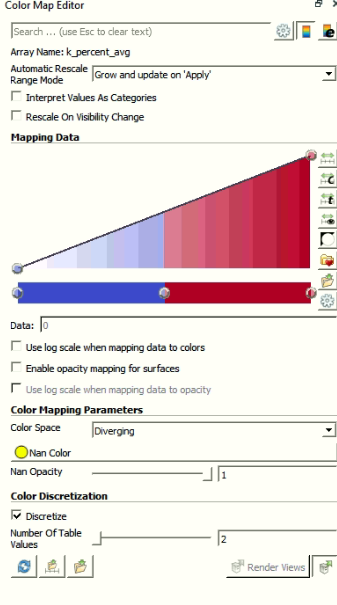
I am trying to change color map editor so that I get blue color for data points more than 0.8 and red color for less than 0.8. I have managed to make it bi-color using the Color Discretization option however I am unable to give a custom range
I have attached the screenshot. Thank you for your time and support
---
### Author:  [@mwestphal](https://discourse.paraview.org/u/mwestphal)
#### Post date: [August 2, 2021, 12:22pm UTC](https://discourse.paraview.org/t/color-map-editor-make-bicolor-contours-paraview/7740/2 "2021-08-02T12:22:36Z")
Use Step color space instead of Diverging
---
### Author:  [@Akash](https://discourse.paraview.org/u/Akash)
#### Post date: [August 2, 2021, 12:25pm UTC](https://discourse.paraview.org/t/color-map-editor-make-bicolor-contours-paraview/7740/3 "2021-08-02T12:25:41Z")
Thank you. Where can I find that option? Within Color Spacing there is a dropdown with 5 options:
RGB
HSV
Lab
Diverging
Lab/CIEDE 2000
---
### Author:  [@mwestphal](https://discourse.paraview.org/u/mwestphal)
#### Post date: [August 2, 2021, 12:26pm UTC](https://discourse.paraview.org/t/color-map-editor-make-bicolor-contours-paraview/7740/4 "2021-08-02T12:26:44Z")
Update your ParaView to the last release 5.9.1
---
### Author:  [@Akash](https://discourse.paraview.org/u/Akash)
#### Post date: [August 2, 2021, 12:27pm UTC](https://discourse.paraview.org/t/color-map-editor-make-bicolor-contours-paraview/7740/5 "2021-08-02T12:27:57Z")
Sure. I will check it out. Thank you
---
### Author:  [@Akash](https://discourse.paraview.org/u/Akash)
#### Post date: [August 2, 2021, 1:11pm UTC](https://discourse.paraview.org/t/color-map-editor-make-bicolor-contours-paraview/7740/6 "2021-08-02T13:11:26Z")
I have installed the latest version. When I choose step its showing three colors : white blue and red how to change that?
---
### Author:  [@mwestphal](https://discourse.paraview.org/u/mwestphal)
#### Post date: [August 2, 2021, 1:57pm UTC](https://discourse.paraview.org/t/color-map-editor-make-bicolor-contours-paraview/7740/7 "2021-08-02T13:57:34Z")
Then remove the color point you do not want. Click on it and press suppr.
---
### Author:  [@Akash](https://discourse.paraview.org/u/Akash)
#### Post date: [August 2, 2021, 2:38pm UTC](https://discourse.paraview.org/t/color-map-editor-make-bicolor-contours-paraview/7740/8 "2021-08-02T14:38:52Z")
Thank you 🙂