# Color Map Editor - Pick Screen Color NOT matching
**URL:** https://discourse.paraview.org/t/color-map-editor-pick-screen-color-not-matching/9848
**Category:** ParaView Support
**Created:** [June 19, 2022, 4:21am UTC](https://discourse.paraview.org/t/color-map-editor-pick-screen-color-not-matching/9848 "2022-06-19T04:21:39Z")
**Posts on this page:** 17
**Page:** 1
### Author:  [@Akash](https://discourse.paraview.org/u/Akash)
#### Post date: [June 19, 2022, 4:21am UTC](https://discourse.paraview.org/t/color-map-editor-pick-screen-color-not-matching/9848/1 "2022-06-19T04:21:39Z")
Hi,
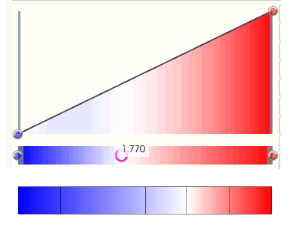
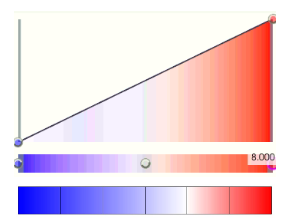
I am trying to maintain the same color for my figures. I tried to use the pick screen color tool in the Color Map Editor. However, as you can see the blue color is not exactly matching. it is more purple rather than dark blue (Attached a fig below)
Could you please let me know what I should do to get the exact color? Thanks for the help!
---
### Author:  [@Francois\_Mazen](https://discourse.paraview.org/u/Francois_Mazen)
#### Post date: [June 20, 2022, 7:02am UTC](https://discourse.paraview.org/t/color-map-editor-pick-screen-color-not-matching/9848/2 "2022-06-20T07:02:04Z")
Hello @Akash
The color difference is maybe due to the lightning of the Scene. You can disable the light kit with the Light Instpector panel (from the View menu), and check again the picked color.
Best,
---
### Author:  [@Akash](https://discourse.paraview.org/u/Akash)
#### Post date: [June 20, 2022, 7:27am UTC](https://discourse.paraview.org/t/color-map-editor-pick-screen-color-not-matching/9848/3 "2022-06-20T07:27:47Z")
Thank you for the response.
I unchecked the box of “Light Kit” within the Light Inspector panel. Then I reset the color map and chose the blue color but still, it’s the same.
---
### Author:  [@mwestphal](https://discourse.paraview.org/u/mwestphal)
#### Post date: [June 20, 2022, 7:36am UTC](https://discourse.paraview.org/t/color-map-editor-pick-screen-color-not-matching/9848/4 "2022-06-20T07:36:42Z")
@Akash , can you illustrate what discrepancy you can see ?
---
### Author:  [@Akash](https://discourse.paraview.org/u/Akash)
#### Post date: [June 20, 2022, 7:52am UTC](https://discourse.paraview.org/t/color-map-editor-pick-screen-color-not-matching/9848/5 "2022-06-20T07:52:34Z")
I have attached a pic above. You can see that the red color in the Color Map Editor matches the legend below. However, blue doesn’t. The blue color in the Color Map Editor is more purple rather than dark blue. That’s the discrepancy I notice.
Thanks for the help!
---
### Author:  [@mwestphal](https://discourse.paraview.org/u/mwestphal)
#### Post date: [June 20, 2022, 7:55am UTC](https://discourse.paraview.org/t/color-map-editor-pick-screen-color-not-matching/9848/6 "2022-06-20T07:55:04Z")
Where does the bottom of your image is coming from ?
---
### Author:  [@Akash](https://discourse.paraview.org/u/Akash)
#### Post date: [June 20, 2022, 7:57am UTC](https://discourse.paraview.org/t/color-map-editor-pick-screen-color-not-matching/9848/7 "2022-06-20T07:57:45Z")
The bottom image is the legend from a paper. My supervisor asked me to maintain the same color map used in that legend. I have just cropped that legend and attached it next to color map editor for comparison
---
### Author:  [@mwestphal](https://discourse.paraview.org/u/mwestphal)
#### Post date: [June 20, 2022, 7:59am UTC](https://discourse.paraview.org/t/color-map-editor-pick-screen-color-not-matching/9848/8 "2022-06-20T07:59:30Z")
Then what makes you think they should look the same ?
---
### Author:  [@Akash](https://discourse.paraview.org/u/Akash)
#### Post date: [June 20, 2022, 8:01am UTC](https://discourse.paraview.org/t/color-map-editor-pick-screen-color-not-matching/9848/9 "2022-06-20T08:01:27Z")
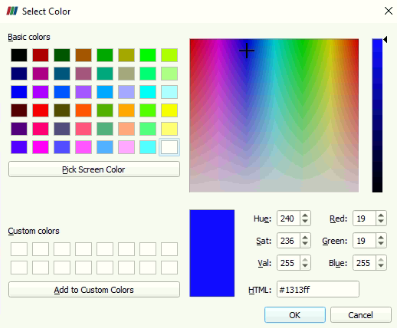
I used the pick screen color tool and click the blue in that legend. Then it should change to the same blue color, right? But it’s not. Its working for red but not for blue
---
### Author:  [@mwestphal](https://discourse.paraview.org/u/mwestphal)
#### Post date: [June 20, 2022, 8:04am UTC](https://discourse.paraview.org/t/color-map-editor-pick-screen-color-not-matching/9848/10 "2022-06-20T08:04:03Z")
I have no idea what you mean by “pick screen color”.
---
### Author:  [@Akash](https://discourse.paraview.org/u/Akash)
#### Post date: [June 20, 2022, 8:06am UTC](https://discourse.paraview.org/t/color-map-editor-pick-screen-color-not-matching/9848/11 "2022-06-20T08:06:06Z")
It is this tool:
---
### Author:  [@mwestphal](https://discourse.paraview.org/u/mwestphal)
#### Post date: [June 20, 2022, 8:08am UTC](https://discourse.paraview.org/t/color-map-editor-pick-screen-color-not-matching/9848/12 "2022-06-20T08:08:13Z")
There is no reason for the color map to be the same. To obtain the same result, you need the complete definition of the color map in the paper, eg: the RGB definition of each color used and associated value.
---
### Author:  [@Akash](https://discourse.paraview.org/u/Akash)
#### Post date: [June 20, 2022, 8:12am UTC](https://discourse.paraview.org/t/color-map-editor-pick-screen-color-not-matching/9848/13 "2022-06-20T08:12:34Z")
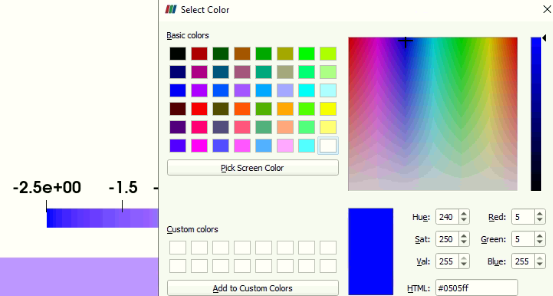
Okay, thanks. I gave the RGB values in the Select Color toolbox.
It works inside the toolbox as you can see the blue is correct. But in the contour it is purple.
Why is that happening?
---
### Author:  [@mwestphal](https://discourse.paraview.org/u/mwestphal)
#### Post date: [June 20, 2022, 8:35am UTC](https://discourse.paraview.org/t/color-map-editor-pick-screen-color-not-matching/9848/14 "2022-06-20T08:35:28Z")
This is the interpolation in use. You can change the colorspace if you want.
---
### Author:  [@Akash](https://discourse.paraview.org/u/Akash)
#### Post date: [June 20, 2022, 8:38am UTC](https://discourse.paraview.org/t/color-map-editor-pick-screen-color-not-matching/9848/15 "2022-06-20T08:38:26Z")
I don’t understand. Could you please explain? What is colorspace and where to change it?
Thank you!
---
### Author:  [@mwestphal](https://discourse.paraview.org/u/mwestphal)
#### Post date: [June 20, 2022, 8:39am UTC](https://discourse.paraview.org/t/color-map-editor-pick-screen-color-not-matching/9848/16 "2022-06-20T08:39:57Z")
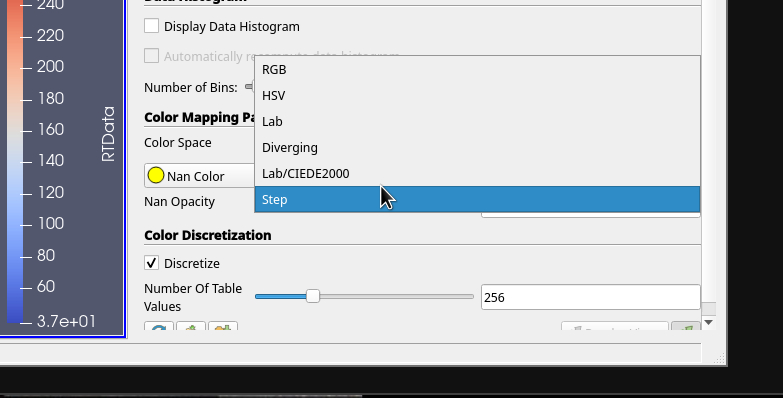
---
### Author:  [@Akash](https://discourse.paraview.org/u/Akash)
#### Post date: [June 20, 2022, 8:43am UTC](https://discourse.paraview.org/t/color-map-editor-pick-screen-color-not-matching/9848/17 "2022-06-20T08:43:52Z")
Thanks lot!!!
It worked finally I changed to “RGB” rather than “diverging”