# Color Map to png file
**URL:** https://discourse.paraview.org/t/color-map-to-png-file/8332
**Category:** ParaView Support
**Tags:** python
**Created:** [November 4, 2021, 10:38pm UTC](https://discourse.paraview.org/t/color-map-to-png-file/8332 "2021-11-04T22:38:19Z")
**Posts on this page:** 16
**Page:** 1
### Author:  [@mclarsen](https://discourse.paraview.org/u/mclarsen)
#### Post date: [November 4, 2021, 10:38pm UTC](https://discourse.paraview.org/t/color-map-to-png-file/8332/1 "2021-11-04T22:38:19Z")
I am looking for a way via python (simple.py) to extract an image of the color map. Any pointers on how I might do this for say cool2warm? I just need access to the raw values of the table.
---
### Author:  [@mwestphal](https://discourse.paraview.org/u/mwestphal)
#### Post date: [November 5, 2021, 8:57am UTC](https://discourse.paraview.org/t/color-map-to-png-file/8332/2 "2021-11-05T08:57:09Z")
do you want an image or the values ?
---
### Author:  [@mclarsen](https://discourse.paraview.org/u/mclarsen)
#### Post date: [November 5, 2021, 2:35pm UTC](https://discourse.paraview.org/t/color-map-to-png-file/8332/3 "2021-11-05T14:35:08Z")
Ultimately, I want to be able to create images of arbitrary sizes of any color map in paraview. I assume that the 'color discretization / number of values` allows me to control the underlying size of the lookup table, so if I can get access to that array of rgb values, then I can make images of any size. That said, I haven’t figured out how to get access to the array yet.
---
### Author:  [@mwestphal](https://discourse.paraview.org/u/mwestphal)
#### Post date: [November 5, 2021, 2:37pm UTC](https://discourse.paraview.org/t/color-map-to-png-file/8332/4 "2021-11-05T14:37:17Z")
Like this ?

---
### Author:  [@mclarsen](https://discourse.paraview.org/u/mclarsen)
#### Post date: [November 5, 2021, 2:37pm UTC](https://discourse.paraview.org/t/color-map-to-png-file/8332/5 "2021-11-05T14:37:44Z")
Yes
---
### Author:  [@mwestphal](https://discourse.paraview.org/u/mwestphal)
#### Post date: [November 5, 2021, 2:38pm UTC](https://discourse.paraview.org/t/color-map-to-png-file/8332/6 "2021-11-05T14:38:37Z")
Well you can do that by just controlling the style of the color map, here is a state file to demonstrate it:
[cm.pvsm](https://discourse.paraview.org/uploads/short-url/24BP7ime2kNKzt5Is3m2mY12dsc.pvsm) (313.7 KB)
---
### Author:  [@mclarsen](https://discourse.paraview.org/u/mclarsen)
#### Post date: [November 5, 2021, 2:38pm UTC](https://discourse.paraview.org/t/color-map-to-png-file/8332/7 "2021-11-05T14:38:38Z")
but only the color table values.
---
### Author:  [@mwestphal](https://discourse.paraview.org/u/mwestphal)
#### Post date: [November 5, 2021, 2:39pm UTC](https://discourse.paraview.org/t/color-map-to-png-file/8332/8 "2021-11-05T14:39:41Z")
I do not understand, do you want an **image with colors** or the **values of the color map in a text form**?
---
### Author:  [@mclarsen](https://discourse.paraview.org/u/mclarsen)
#### Post date: [November 5, 2021, 2:41pm UTC](https://discourse.paraview.org/t/color-map-to-png-file/8332/9 "2021-11-05T14:41:31Z")
I want an array of rgb values.
---
### Author:  [@mwestphal](https://discourse.paraview.org/u/mwestphal)
#### Post date: [November 5, 2021, 2:43pm UTC](https://discourse.paraview.org/t/color-map-to-png-file/8332/10 "2021-11-05T14:43:08Z")
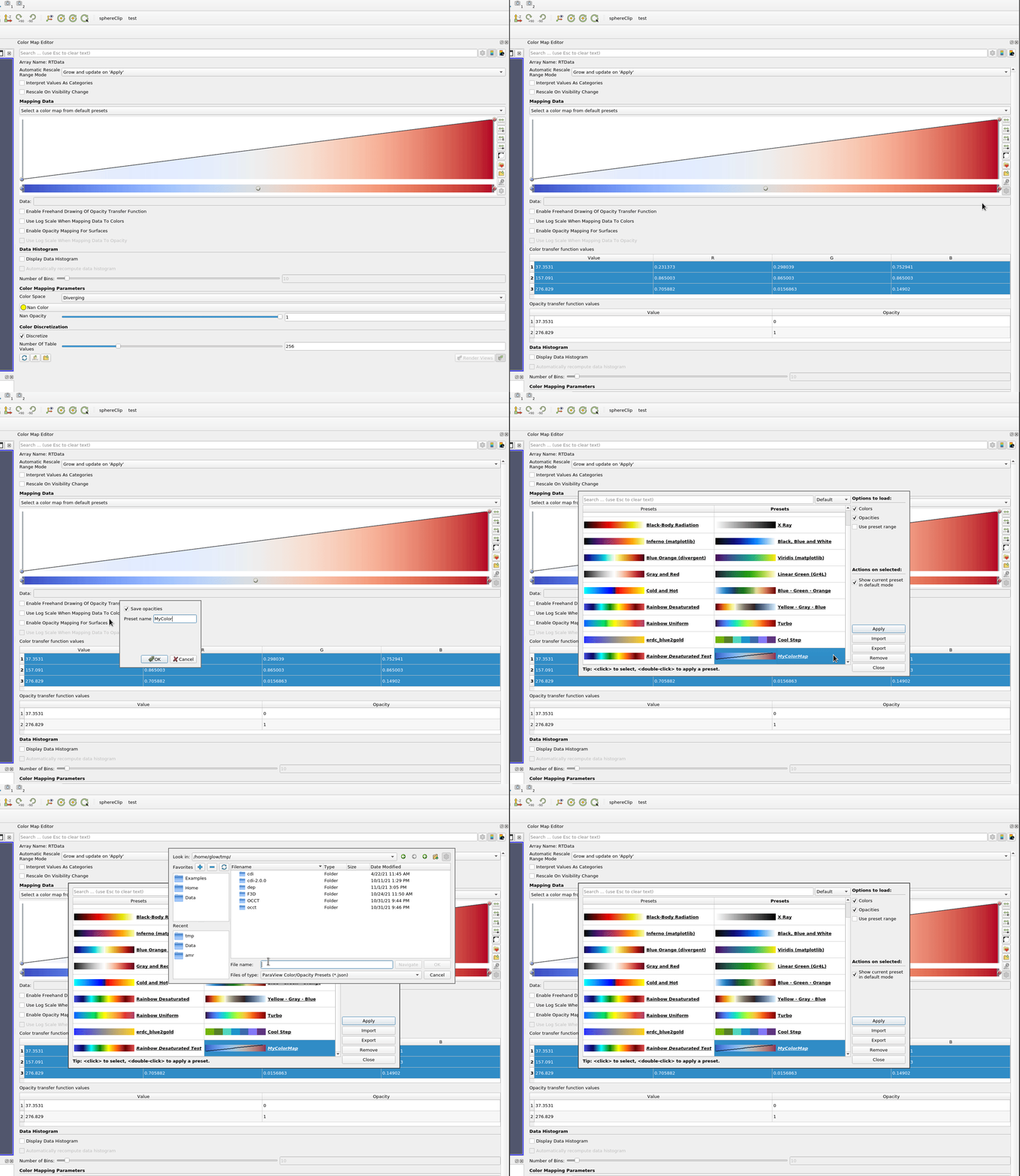
Here is how to do it:
---
### Author:  [@mclarsen](https://discourse.paraview.org/u/mclarsen)
#### Post date: [November 5, 2021, 2:46pm UTC](https://discourse.paraview.org/t/color-map-to-png-file/8332/11 "2021-11-05T14:46:47Z")
Thanks for responding.
Let me try thing again. I am assuming the cool2warm color table is discretized into say 256 values (since there is an option in the gui that asks me how many bins I want to discretize the cmap into), where the 0 index maps to the beginning of the normalized range (i.e.,m [0,1]). 255 maps to 1. Those are the values I am interested in getting, not the RGB points that define the color map in the diverging color space.
---
### Author:  [@mwestphal](https://discourse.paraview.org/u/mwestphal)
#### Post date: [November 5, 2021, 2:51pm UTC](https://discourse.paraview.org/t/color-map-to-png-file/8332/12 "2021-11-05T14:51:55Z")
I’m afraid these discretized values can’t be recovered from the interface of ParaView.
---
### Author:  [@mclarsen](https://discourse.paraview.org/u/mclarsen)
#### Post date: [November 5, 2021, 2:52pm UTC](https://discourse.paraview.org/t/color-map-to-png-file/8332/13 "2021-11-05T14:52:33Z")
Even in python?
---
### Author:  [@mwestphal](https://discourse.paraview.org/u/mwestphal)
#### Post date: [November 5, 2021, 2:53pm UTC](https://discourse.paraview.org/t/color-map-to-png-file/8332/14 "2021-11-05T14:53:39Z")
Yes, the actual discretized values are only computed at the rendering step.
That being said, this discretization is trivial, you can just compute it from the initial RGB values.
---
### Author:  [@mclarsen](https://discourse.paraview.org/u/mclarsen)
#### Post date: [November 5, 2021, 2:58pm UTC](https://discourse.paraview.org/t/color-map-to-png-file/8332/15 "2021-11-05T14:58:24Z")
So just implement the six supported color spaces in python?
---
### Author:  [@mclarsen](https://discourse.paraview.org/u/mclarsen)
#### Post date: [November 5, 2021, 3:20pm UTC](https://discourse.paraview.org/t/color-map-to-png-file/8332/16 "2021-11-05T15:20:58Z")
For anyone wondering:
```
lut = display.LookupTable.GetClientSideObject()
dataRange = customRange
if not dataRange:
dataRange = lut.GetRange()
delta = (dataRange[1] - dataRange[0]) / float(numSamples)
colorArray = vtkUnsignedCharArray()
colorArray.SetNumberOfComponents(3)
colorArray.SetNumberOfTuples(numSamples)
rgb = [0, 0, 0]
for i in range(numSamples):
lut.GetColor(dataRange[0] + float(i) * delta, rgb)
r = int(round(rgb[0] * 255))
g = int(round(rgb[1] * 255))
b = int(round(rgb[2] * 255))
colorArray.SetTuple3(i, r, g, b)
```