# Color transfer function values in pvpython
**URL:** https://discourse.paraview.org/t/color-transfer-function-values-in-pvpython/10363
**Category:** ParaView Support
**Tags:** python
**Created:** [September 20, 2022, 6:37pm UTC](https://discourse.paraview.org/t/color-transfer-function-values-in-pvpython/10363 "2022-09-20T18:37:17Z")
**Posts on this page:** 5
**Page:** 1
### Author:  [@CJBright](https://discourse.paraview.org/u/CJBright)
#### Post date: [September 20, 2022, 6:37pm UTC](https://discourse.paraview.org/t/color-transfer-function-values-in-pvpython/10363/1 "2022-09-20T18:37:18Z")
Hi there,
I’m attempting to change the colour of a section within a colour bar without impacting the overall gradient on the points outside the changed section.
The closest I have been to achieving this has been through the GUI:
- Using the default colour bar, there are 3 data points in the ‘color transfer function values’ table - Image 1.
- Clicking on the colour bar, I can add more values to the table, each inheriting the RBG value to maintain the natural gradient - Image 2.
- Then I edit a few of these points and I have a yellow section within the un-affected gradient - Image 3.
Is there a way to obtain the RGB values for certain data points using pvpython?
I’ve not found a way to specify a data point (e.g. 0.3 in the example of my images) and have pvpython return the RBG values that correspond.
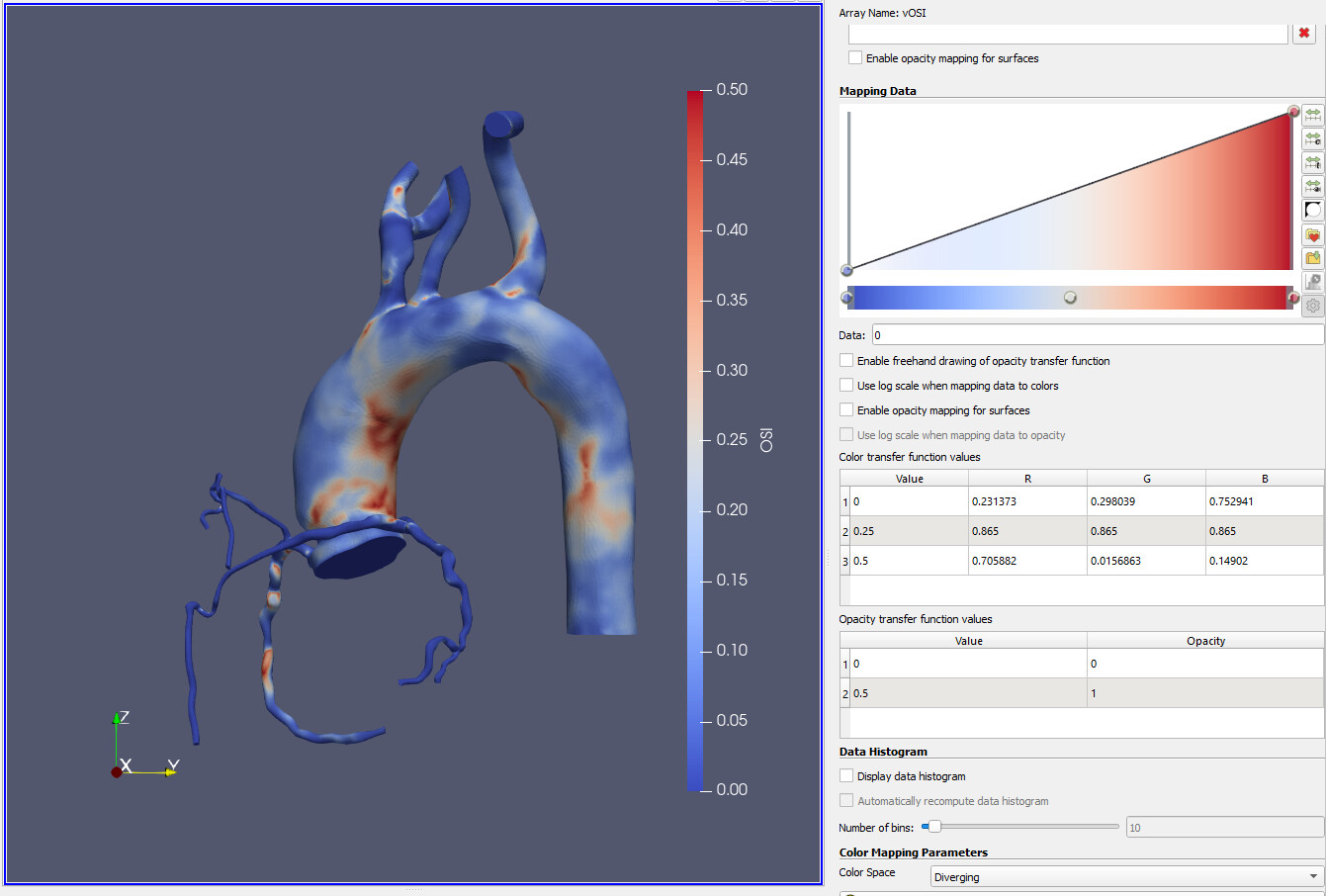
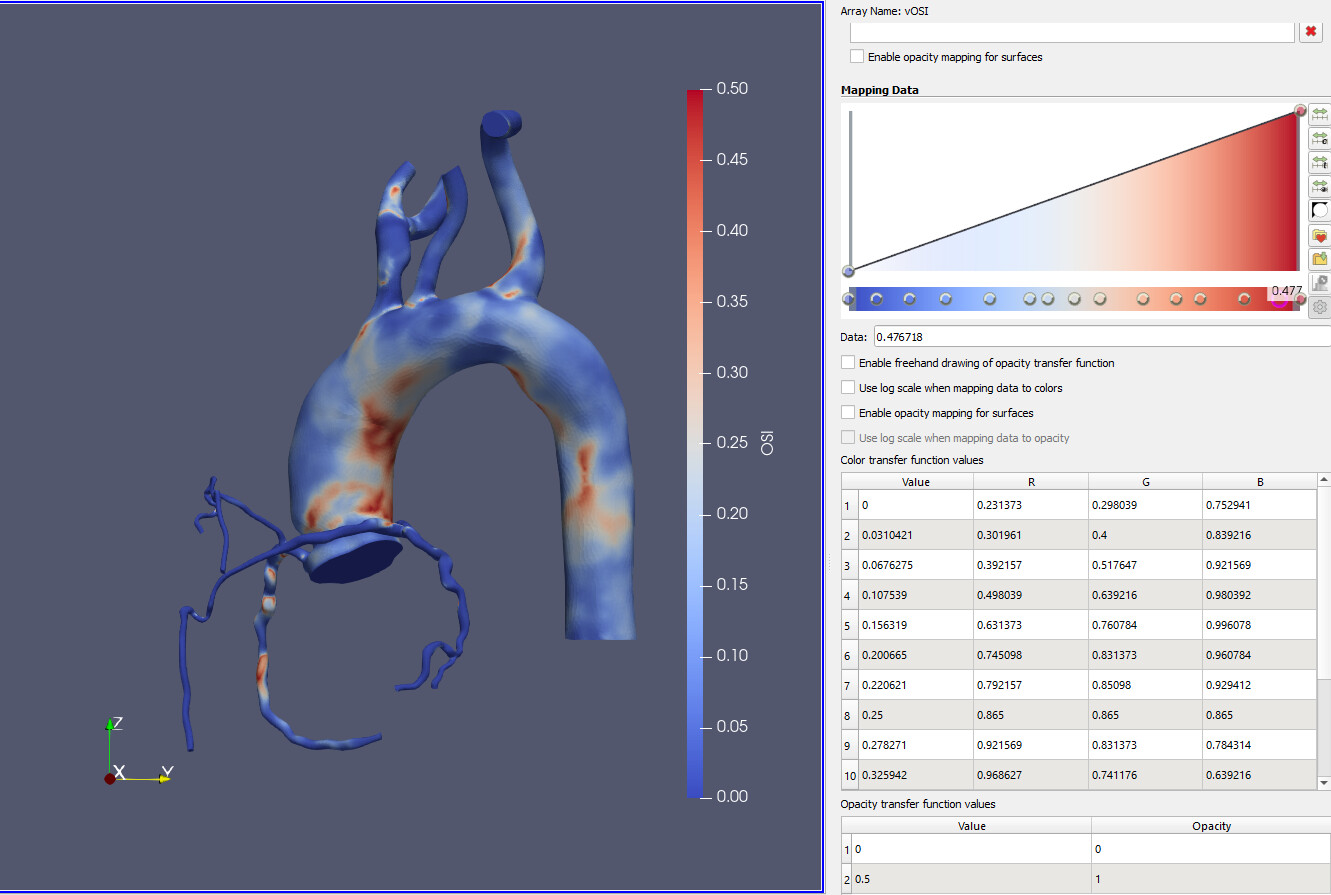
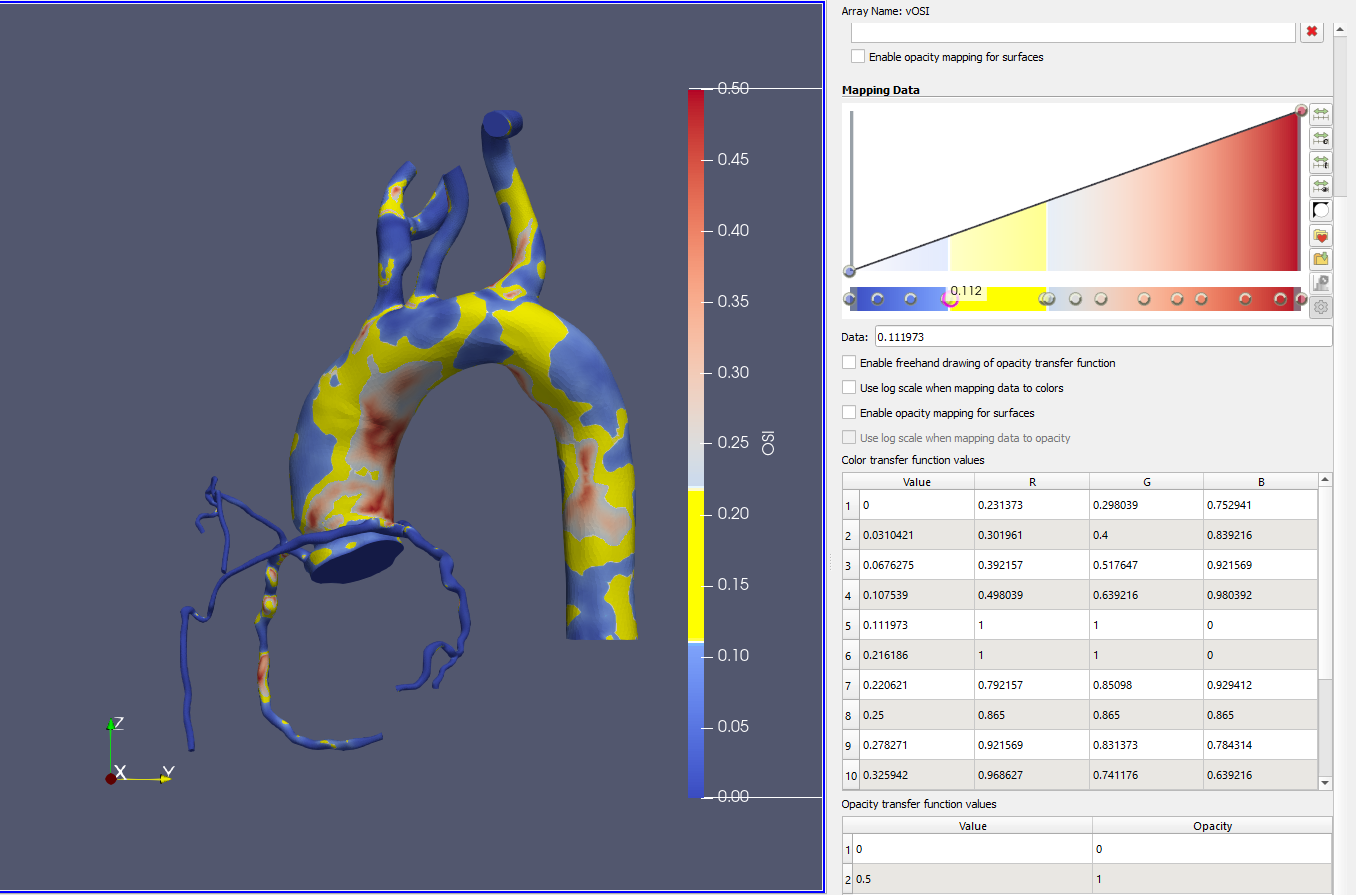
Best wishes,
Charlie
---
### Author:  [@cory.quammen](https://discourse.paraview.org/u/cory.quammen)
#### Post date: [October 2, 2022, 6:52pm UTC](https://discourse.paraview.org/t/color-transfer-function-values-in-pvpython/10363/2 "2022-10-02T18:52:09Z")
You can get the lookup table object in Python and access its color points with:
```python
lut = GetColorTransferFunction('vOSI')
print(lut.RGBPoints)
```
`RGBPoints` is a list of doubles in the order `(value_0, red_0, green_0, blue_0, value_1, red_1, green_1, blue_1, ...)` You can set the RGB points with
```python
lut.RGBPoints = [25.32328370098179, 0.231373, 0.298039, 0.752941, 2474.27393603584, 0.865003, 0.865003, 0.865003, 4923.224588370698, 0.705882, 0.0156863, 0.14902]
```
for data points 25.32328370098179, 2474.27393603584, and 4923.224588370698, for instance.
Hope that helps!
---
### Author:  [@CJBright](https://discourse.paraview.org/u/CJBright)
#### Post date: [October 10, 2022, 3:10pm UTC](https://discourse.paraview.org/t/color-transfer-function-values-in-pvpython/10363/3 "2022-10-10T15:10:06Z")
Hi Corey,
Thank you for the reply!
It half-way helps for sure.
I loaded up the dataset with the default cool-to-warm colour bar and inspected the ‘vOSI’ property.
print(lut.RBGPoints) outputs 3 points with RGB values - start, middle, and end.
Using the GUI on the Color Map Editor, if I then click to make a new point somewhere within that range ParaView creates those RGB values for me.
Is there a function I can call to access those RGB values too?
That way I could write something like this in my script:
```auto
# Get the default colour transfer points
lut = GetColorTransferFunction('vOSI')
points = lut.RGBPoints
print(points)
>>> [[0.0, 0.231373, 0.298039, 0.752941,
0.25 0.865003, 0.865003, 0.865003,
0.50 0.705882, 0.0156863, 0.14902]
# Add several more points with default colour mapping
new_points = [0.0, 0.15, 0.25, 0.37, 0.50]
new_points_RGB = []
for point in new_points:
new_points_RGB.append(point)
RGB_values = SomeFunctionToGetDefaultRGB(point)
new_points_RGB.extend(RGB_values)
print(new_points_RGB)
>>> [[0.0, 0.231373, 0.298039, 0.752941,
0.15, R, G, B,
0.25 0.865003, 0.865003, 0.865003,
0.37, R, G, B,
0.50 0.705882, 0.0156863, 0.14902]
# Applly new points
lut.RGBPoints = new_points_RGB
```
`RGB_values = SomeFunctionToGetDefaultRGB(point)`
It’s this line I’m most in need of.
Since it seems something like this happens through the GUI I thought the process should be accessible somehow through Python.
It might need some more input data, like this. But do you know if it’s possible?
`RGB_values = SomeFunctionToGetDefaultRGB(point, minimum, maximum, color_preset)`
Sorry to be a pain!
Best wishes,
Charlie
---
### Author:  [@cory.quammen](https://discourse.paraview.org/u/cory.quammen)
#### Post date: [October 10, 2022, 5:04pm UTC](https://discourse.paraview.org/t/color-transfer-function-values-in-pvpython/10363/4 "2022-10-10T17:04:27Z")
You can do this:
```auto
rgb = [0, 0, 0]
lut.GetClientSideObject().GetColor(100, rgb)
print(rgb)
[0.5647058823529412, 0.6980392156862745, 0.996078431372549]
```
---
### Author:  [@CJBright](https://discourse.paraview.org/u/CJBright)
#### Post date: [October 10, 2022, 5:35pm UTC](https://discourse.paraview.org/t/color-transfer-function-values-in-pvpython/10363/5 "2022-10-10T17:35:35Z")
Brilliant, thank you very much!