# Coloring surface by predefined RGB values
**URL:** https://discourse.paraview.org/t/coloring-surface-by-predefined-rgb-values/6011
**Category:** ParaView Support
**Created:** [December 8, 2020, 2:45pm UTC](https://discourse.paraview.org/t/coloring-surface-by-predefined-rgb-values/6011 "2020-12-08T14:45:27Z")
**Posts on this page:** 8
**Page:** 1
### Author:  [@mhadziabdic](https://discourse.paraview.org/u/mhadziabdic)
#### Post date: [December 8, 2020, 2:45pm UTC](https://discourse.paraview.org/t/coloring-surface-by-predefined-rgb-values/6011/1 "2020-12-08T14:45:27Z")
Dear All,
I have a surface on which I have RBG values stored in each cell. I am trying to see color defined by those RGB values. But I cannot figure out how to do it, or if this is possible to do it at all.
I would appreciate help a lot.
Thank you.
---
### Author:  [@mwestphal](https://discourse.paraview.org/u/mwestphal)
#### Post date: [December 8, 2020, 2:50pm UTC](https://discourse.paraview.org/t/coloring-surface-by-predefined-rgb-values/6011/2 "2020-12-08T14:50:48Z")
Uncheck MapScalars
---
### Author:  [@mhadziabdic](https://discourse.paraview.org/u/mhadziabdic)
#### Post date: [December 8, 2020, 3:11pm UTC](https://discourse.paraview.org/t/coloring-surface-by-predefined-rgb-values/6011/3 "2020-12-08T15:11:57Z")
Dear Mathieu,
Thanks for suggestion. I have 3D terrain on which I want to show Google Map photo. So I interpolate RGB values in my cells on the ground but do not know how to get a color out of it since Paraview reads these values as variable. I hope I managed to explain it.
---
### Author:  [@Kenneth\_Moreland](https://discourse.paraview.org/u/Kenneth_Moreland)
#### Post date: [December 8, 2020, 3:30pm UTC](https://discourse.paraview.org/t/coloring-surface-by-predefined-rgb-values/6011/4 "2020-12-08T15:30:01Z")
That still sounds like the unchecking of the `Map Scalars` feature that @mwestphal suggested. In case you did not see that feature, here is a screenshot showing that checkbox.
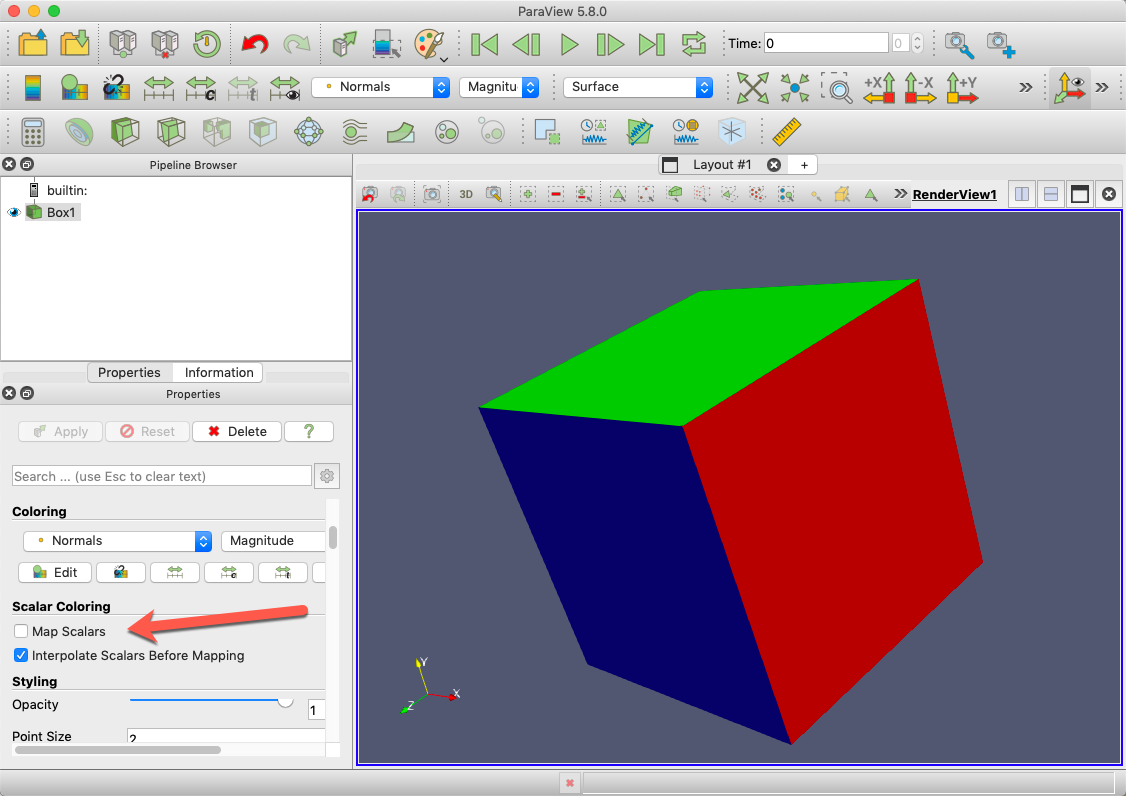
If that is not the feature you’re looking for, you may need to explain further. It helps to post example data that we can load in ParaView and/or images of what you are getting and an example of what you would like to see.
---
### Author:  [@mhadziabdic](https://discourse.paraview.org/u/mhadziabdic)
#### Post date: [December 8, 2020, 3:45pm UTC](https://discourse.paraview.org/t/coloring-surface-by-predefined-rgb-values/6011/5 "2020-12-08T15:45:08Z")
Dear Kenneth,
Here is the file. You will see the R G B values defined in the list of variables. They can be open separately but not jointly which would give a right color to the surface.
[https://mega.nz/file/i8NikL5b#yUFcSsUQwi0TxPSZHQuHGkE7WILOVEzldmAFwAnenPY](https://mega.nz/file/i8NikL5b#yUFcSsUQwi0TxPSZHQuHGkE7WILOVEzldmAFwAnenPY)
---
### Author:  [@mhadziabdic](https://discourse.paraview.org/u/mhadziabdic)
#### Post date: [December 8, 2020, 4:21pm UTC](https://discourse.paraview.org/t/coloring-surface-by-predefined-rgb-values/6011/6 "2020-12-08T16:21:05Z")
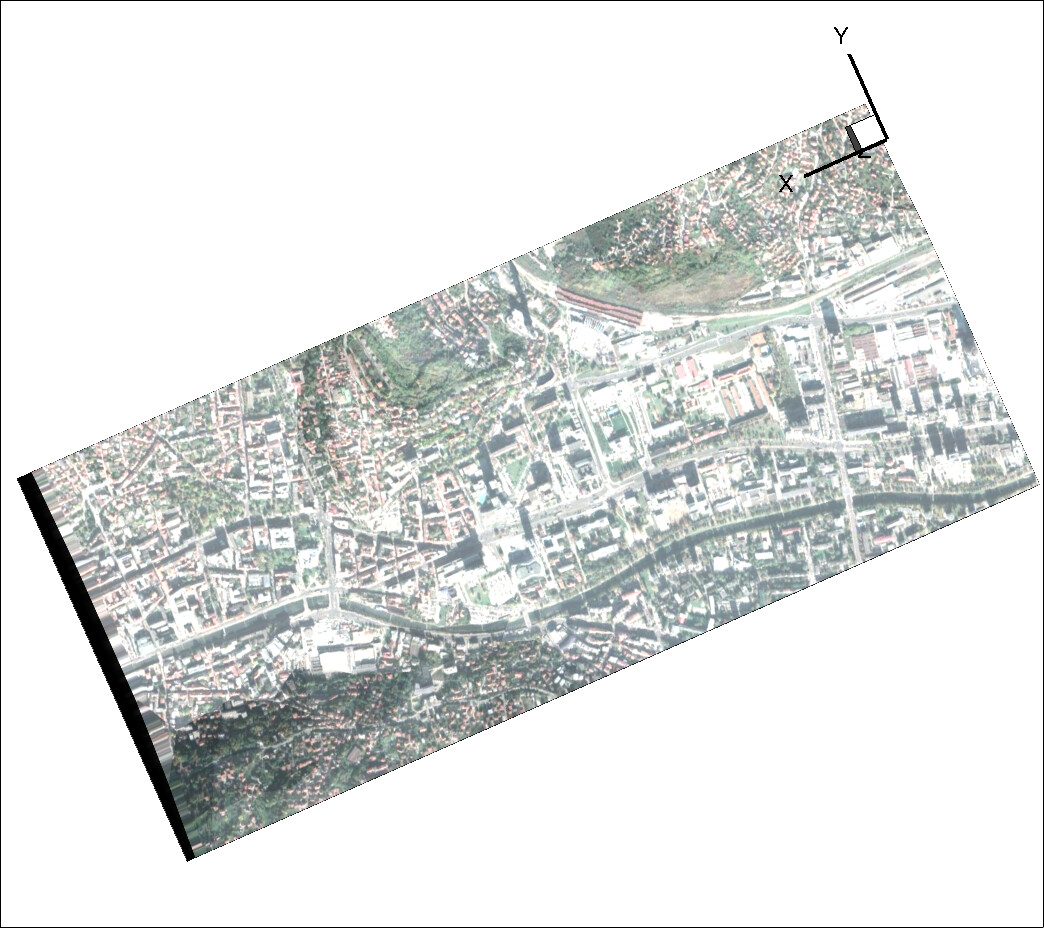
Here you can see Paraview visualization of just B values out of three RGB values, and Tecplot visualization of RGB. I would like to get in Paraview the same colors as in Tecplot.
---
### Author:  [@Kenneth\_Moreland](https://discourse.paraview.org/u/Kenneth_Moreland)
#### Post date: [December 8, 2020, 5:25pm UTC](https://discourse.paraview.org/t/coloring-surface-by-predefined-rgb-values/6011/7 "2020-12-08T17:25:05Z")
You have to combine the `R color`, `G color`, and `B color` fields into a single vector field. The easiest way to do that is to use the `Calculator` filter. The `Calculator` filter expression can convert a scalar to a 3D vector by multiplying it by `iHat`, `jHat`, or `kHat`, which represent the 3 unit axis vectors. You also need to divide the result by 255 because `Calculator` creates floating point fields, and floating point colors have to have the range of [0,1] instead of [0,255].
In all, the expression you want for the calculator is `(R color*iHat + G color*jHat + B color*kHat)/255`.
Here is a state file that properly shows the colors: [color-terrain.pvsm](https://discourse.paraview.org/uploads/short-url/5VkXuTOtaZgKdpyCEwoLrj1Aj6B.pvsm) (280.6 KB)
---
### Author:  [@mhadziabdic](https://discourse.paraview.org/u/mhadziabdic)
#### Post date: [December 8, 2020, 7:37pm UTC](https://discourse.paraview.org/t/coloring-surface-by-predefined-rgb-values/6011/8 "2020-12-08T19:37:43Z")
Dear Kenneth,
I works perfectly. I cannot thank you enough. I would hug you even risking corona infection (well I was infected 😄 a month ago).
Thanks again. All the best.
Muhamed.