# combine two temporal filter Extract Time Step and Interpolator
**URL:** https://discourse.paraview.org/t/combine-two-temporal-filter-extract-time-step-and-interpolator/4506
**Category:** ParaView Support
**Created:** [June 4, 2020, 2:22pm UTC](https://discourse.paraview.org/t/combine-two-temporal-filter-extract-time-step-and-interpolator/4506 "2020-06-04T14:22:58Z")
**Posts on this page:** 4
**Page:** 1
### Author:  [@Yoshino](https://discourse.paraview.org/u/Yoshino)
#### Post date: [June 4, 2020, 2:22pm UTC](https://discourse.paraview.org/t/combine-two-temporal-filter-extract-time-step-and-interpolator/4506/1 "2020-06-04T14:22:58Z")
I’m really interested in two kinds of temporal filters: _Extract Time Step_&_Temporal Interpolator_. The first one allows me to choose a sub-range of timesteps while the second interpolate over timesteps. However, due to paraview’s pipeline mechanism, I have to click _Apply_ twice to use them. Is it possible for me to integrate them into one filter in my custom app?
Also, I’d like to simplify the properties. **e.g.** _ExtractTimeSteps_ filter
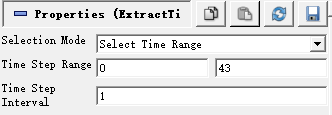
As shown above, I want the _Selection Mode_ set to _Select Time Range_ and _Time Step Interval_ to _1_ so they don’t have to appear in the panel. And I want the _Time Step Range_ to be controled by a slider instead of two integer number input.
I have learnt that I should probably use pqProxyWidget(its constructor) to manage this but not sure how to rewrite its logic, should I subclass it or simply invoke it in my custom behavior?
Thanks for any advice as well as discussion.
Yoshino.
---
### Author:  [@Kenneth\_Moreland](https://discourse.paraview.org/u/Kenneth_Moreland)
#### Post date: [June 4, 2020, 3:44pm UTC](https://discourse.paraview.org/t/combine-two-temporal-filter-extract-time-step-and-interpolator/4506/2 "2020-06-04T15:44:21Z")
You can get most of what you want very easily by using the custom filter feature. To create a custom filter that is a composite of `Extract Time Steps` and `Temporal Interpolator`, do the following:
1. Add both the `Extract Time Steps` and `Temporal Interpolator` filters to your data as you are doing now. Make sure that you set options that you want hidden, such as `Selection Mode` and `Time Step Interval` to the value that you want.
2. Select both the `Extract Time Steps` and `Temporal Interpolator` filter in the `Pipeline Browser` (using shift-click).
3. Select `Tools` -\> `Create Custom Filter...`. This will start a wizard to help you create your custom filter.
4. In the first box of the wizard, select a name for your filter (such as “Temporal Select and Interpolate”). Click `Next`.
5. In the next two boxes of the wizard, use the default definition of the inputs and outputs (i.e. hit `Next` twice).
6. In the final box of the wizard, select the properties you want exposed. For example, click on `ExtractTimeSteps1` and then select `Time Step Range` from the `Property` chooser. Then click the `+` button.
7. Now click `Finish`
The new filter that you created is now available in the alphabetical filters list (and the quick search box). If you go to `Tools` -\> `Manage Custom Filters`, you can export your custom filter and import it into other instances of ParaView.
---
### Author:  [@Yoshino](https://discourse.paraview.org/u/Yoshino)
#### Post date: [June 5, 2020, 3:25am UTC](https://discourse.paraview.org/t/combine-two-temporal-filter-extract-time-step-and-interpolator/4506/3 "2020-06-05T03:25:33Z")
Thanks for your detailed guidance. `Custom Filters` is an amazing feature and I even never heard about it. But I found something wrong with the `Temporal Interpolator` because it has a `Resample Factor` property, which doesn’t appear in the panel even if I toggle the advance cogwheel button. It’s like:
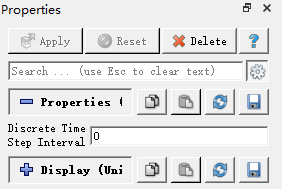
And I even didn’t find it in paraview online help(the “ **?** ” button), but it should has this property, right? I checked the class `vtkTemporalInterpolator` and was indeed puzzled.
Could you do that on your machine and does it behave correctly? I use paraview 5.7. Thanks again for your help.
---
### Author:  [@Kenneth\_Moreland](https://discourse.paraview.org/u/Kenneth_Moreland)
#### Post date: [June 8, 2020, 4:29pm UTC](https://discourse.paraview.org/t/combine-two-temporal-filter-extract-time-step-and-interpolator/4506/4 "2020-06-08T16:29:19Z")
It looks like that feature of `vtkTemporalInterpolator` is not exposed in ParaView. I raised an issue to address that: [https://gitlab.kitware.com/paraview/paraview/-/issues/19979](https://gitlab.kitware.com/paraview/paraview/-/issues/19979).