# Combine two .vti and output a new .vti
**URL:** https://discourse.paraview.org/t/combine-two-vti-and-output-a-new-vti/15439
**Category:** ParaView Support
**Created:** [September 25, 2024, 2:41pm UTC](https://discourse.paraview.org/t/combine-two-vti-and-output-a-new-vti/15439 "2024-09-25T14:41:52Z")
**Posts on this page:** 5
**Page:** 1
### Author:  [@Hanyu\_Xu](https://discourse.paraview.org/u/Hanyu_Xu)
#### Post date: [September 25, 2024, 2:41pm UTC](https://discourse.paraview.org/t/combine-two-vti-and-output-a-new-vti/15439/1 "2024-09-25T14:41:52Z")
Hello everyone:
I have two .vti, as the figure shown (.vti1 and .vti2):
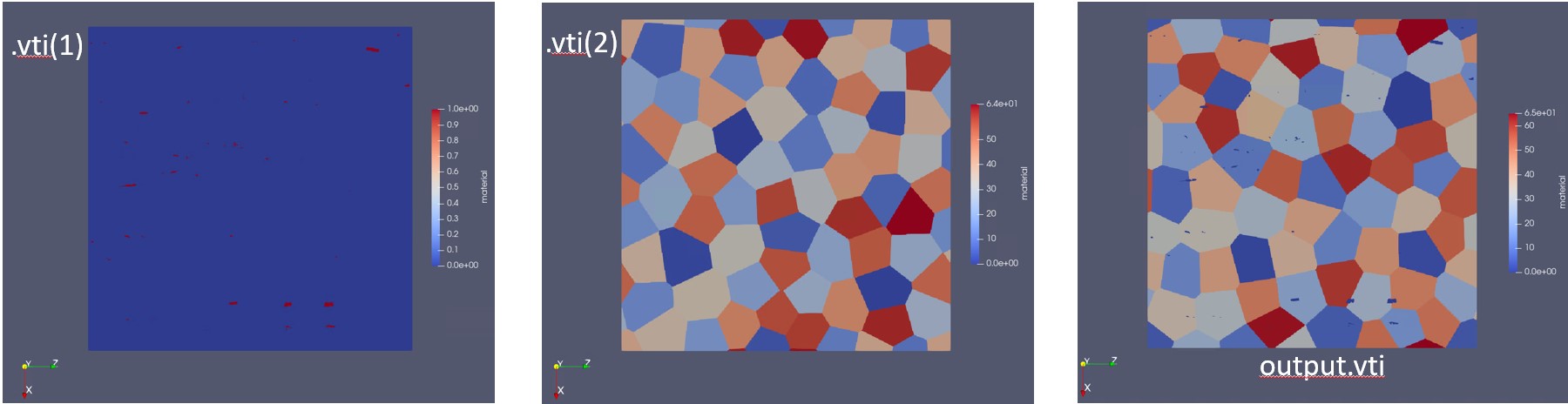
I want to extract material 1 (red particles) in the first .vti, use it as a new material type and add it to the second .vti (vti2 has material 0 to 64). Finally I want to export the output .vti(material 0 to 65). I cannot export output.vti successfully. Could anyone tell me if ParaView is able to do this?
Best Regards,
Hanyu
---
### Author:  [@Kenneth\_Moreland](https://discourse.paraview.org/u/Kenneth_Moreland)
#### Post date: [September 25, 2024, 3:17pm UTC](https://discourse.paraview.org/t/combine-two-vti-and-output-a-new-vti/15439/2 "2024-09-25T15:17:36Z")
Two things would be helpful in answering this question:
1. Please share your data.
2. What do you mean by extracting a material from one image and adding it to another. Do you mean that any point in the first .vti with a material value of 1 should have the corresponding point in the output set to 65, and all other points in the output set to the material value of .vti 2?
---
### Author:  [@Hanyu\_Xu](https://discourse.paraview.org/u/Hanyu_Xu)
#### Post date: [September 25, 2024, 4:22pm UTC](https://discourse.paraview.org/t/combine-two-vti-and-output-a-new-vti/15439/3 "2024-09-25T16:22:28Z")
[Al.vti](https://discourse.paraview.org/uploads/short-url/bACh6j7l8qdLZfFHpmNUsDsKHoC.vti) (26.5 KB)
[particles.vti](https://discourse.paraview.org/uploads/short-url/1HCUPDzwNF5cDkGv9YmtQDQDIMo.vti) (6.9 KB)
1. Here’s the two .vti, first figure shows particles.vti(containing 2 kinds of materials), second figure shows Al.vti (containing 65 kinds of materials).
2. Sorry for my unclear description. I want to extract all the red points in the first image, treat them as a new material, record their positions, and use these points to replace the points in the corresponding positions in the second image. In the end, I wanna get a .vti as shown as the third image, with 66 materials (the original 65 plus the newly added one). BTW, I image 1 and image 2 have the same size and grid size.
Thank you so much for your reply!!!
Best Regards,
Hanyu
---
### Author:  [@Kenneth\_Moreland](https://discourse.paraview.org/u/Kenneth_Moreland)
#### Post date: [September 25, 2024, 7:48pm UTC](https://discourse.paraview.org/t/combine-two-vti-and-output-a-new-vti/15439/4 "2024-09-25T19:48:39Z")
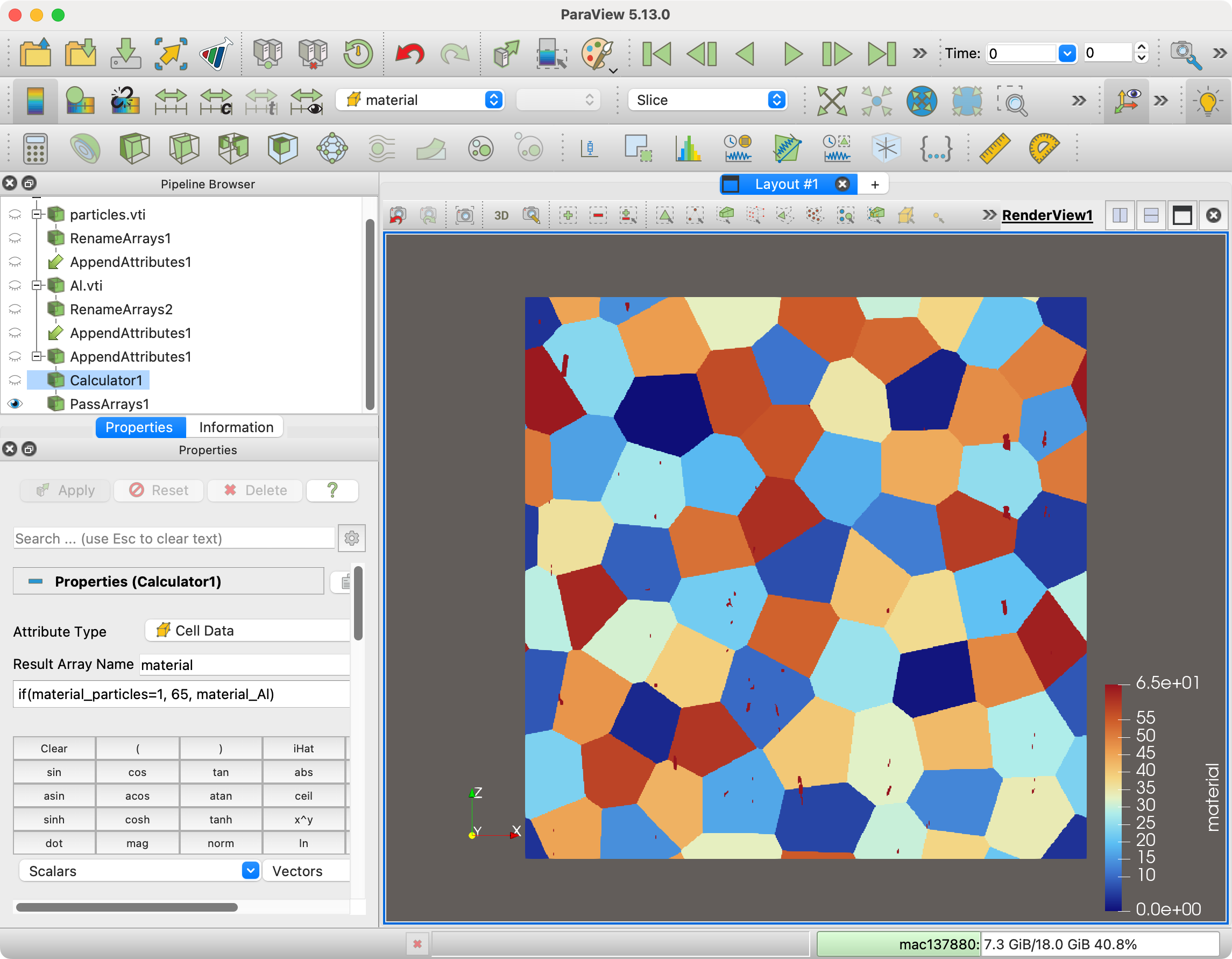
There are a few steps to do this, but you can get this working by combining the attributes together and using a calculator to conditionally select one value or the other. The steps are as follows:
1. Open `particles.vti` and `Apply`.
2. Add the `Rename Arrays` filter to `particles.vti` and rename the `material` array to `material_particles`.
3. Open `Al.vti` and `Apply`.
4. Add the `Rename Arrays` filter to `Al.vti` and rename the `material` array to `material_Al`.
5. Select both the `Rename Arrays` filters in the pipeline browser (using alt-click) and add the `Append Attributes` filter. `Apply`. This will combine the material arrays from both inputs into a single dataset so that they can be operated on together.
6. Add the `Calculator` filter.
- Set the `Attribute Type` to `Cell Data`.
- Set the `Result Array Name` to `material` (or whatever other name you want).
- Set the expression (right below the result array name) to `if(material_particles=1, 65, material_Al)` This will set the material to 65 if the material from `particles.vti` is 1, otherwise it will use the material from `Al.vti`.
- `Apply`.
7. (optional) Add the `Pass Arrays` filter to remove the `material_Al` and `material_particles` fields as they are no longer needed.
At this point you can write out the data as a .vti file if you wish.
Here is a state file and screenshot.
[combine-materials.pvsm](https://discourse.paraview.org/uploads/short-url/8fRfvJtpMkpzQtOg8auPX31WIgp.pvsm) (866.8 KB)
---
### Author:  [@Hanyu\_Xu](https://discourse.paraview.org/u/Hanyu_Xu)
#### Post date: [September 25, 2024, 8:40pm UTC](https://discourse.paraview.org/t/combine-two-vti-and-output-a-new-vti/15439/5 "2024-09-25T20:40:37Z")
The problem is solved now, thank you sooooo much!!! So kind of you 🙏 🙏 🙏
Wish you all the best!
Best Regards,
Hanyu