# Combining close times from multiple readers
**URL:** https://discourse.paraview.org/t/combining-close-times-from-multiple-readers/1482
**Category:** ParaView Support
**Created:** [March 15, 2019, 11:16pm UTC](https://discourse.paraview.org/t/combining-close-times-from-multiple-readers/1482 "2019-03-15T23:16:20Z")
**Posts on this page:** 3
**Page:** 1
### Author:  [@Aandreyev](https://discourse.paraview.org/u/Aandreyev)
#### Post date: [March 15, 2019, 11:16pm UTC](https://discourse.paraview.org/t/combining-close-times-from-multiple-readers/1482/1 "2019-03-15T23:16:20Z")
Hi,
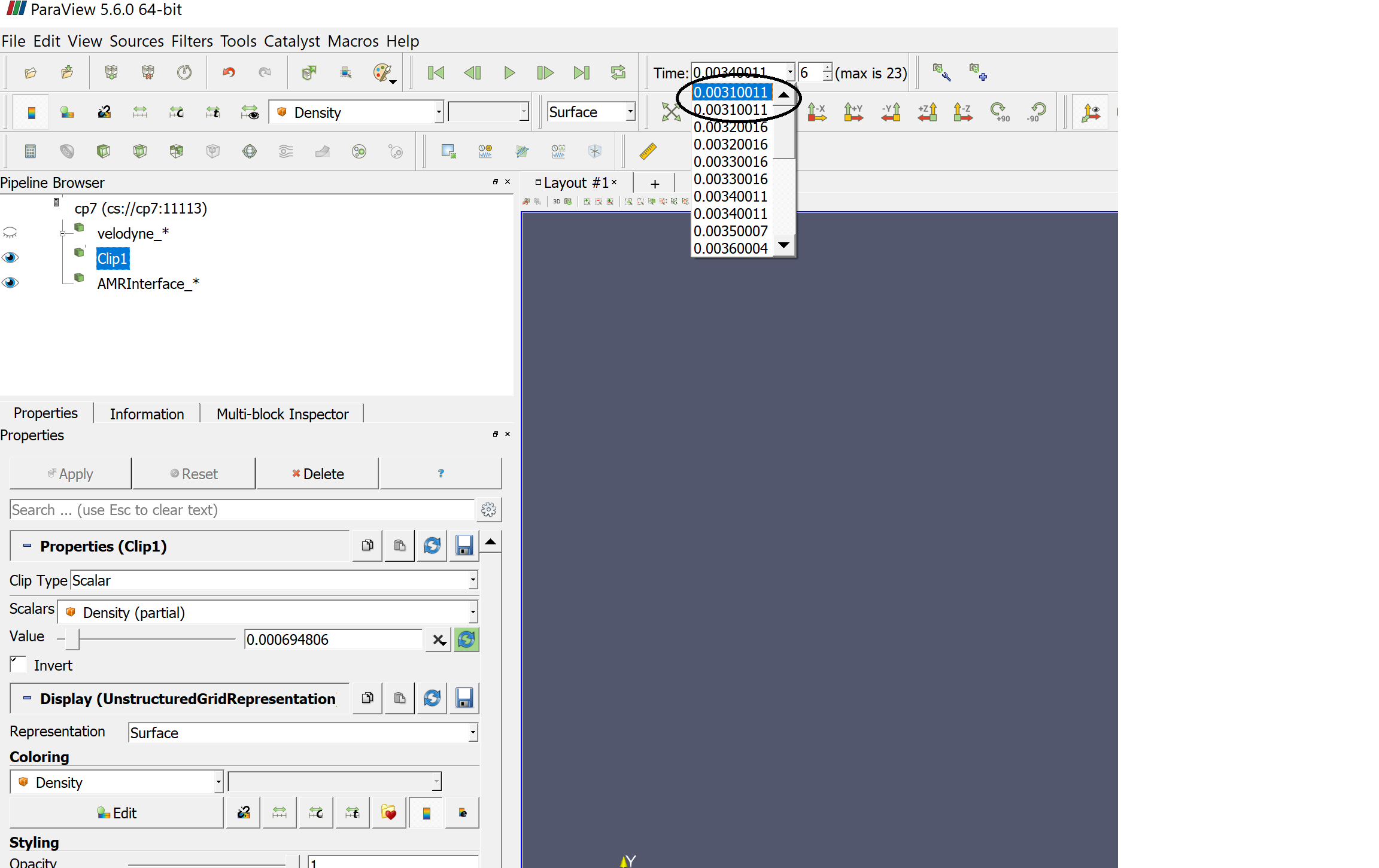
I have simulation where multiple solvers are outputting data at the same simulation rate. The problem is that, time being a floating double, the timesteps are not exactly the same. In the attached picture, you can see that I am effectively doubling the amount of timesteps that I have by having two of each. Is there a way I can combine them based on some “closeness” criteria?
---
### Author:  [@Kenneth\_Moreland](https://discourse.paraview.org/u/Kenneth_Moreland)
#### Post date: [March 17, 2019, 4:24pm UTC](https://discourse.paraview.org/t/combining-close-times-from-multiple-readers/1482/2 "2019-03-17T16:24:11Z")
This question has actually come up before. It took me a little while to find it, but here is the original thread on the old email list: [https://markmail.org/message/fvlyan22ni63t34q](https://markmail.org/message/fvlyan22ni63t34q).
In short, as you said ParaView fails to merge like time steps that don’t have the _exact_ same floating point value. This could be fixed in a filter, but to the best of my knowledge, no one has written one. Fortunately, there is a workaround.
The basic idea is to turn on the `Ignore Time` feature of one of your inputs. That means that ParaView will only visit the time steps of one of the data files you are reading and ignore the other repeated values. Unfortunately, that _almost_ works, but not quite. The problem is that if the time step in the file you are following has a time step a little before the other, the other reader is likely to load the previous time step rather than the close one. This issue is corrected with the `Temporal Shift Scale` filter.
So, in summary, here are the steps you can follow that should fix your problem:
1. Load in both data sets (with times that are supposed to be the same but are just a little bit off).
2. Add the `Temporal Shift Scale` filter to one (and only one) of the data sets. Set the `Pre Shift` to some small positive value that is more than the epsilon difference between the times of the two data sets but less than the amount of time between time steps. Based on your screen shot, 0.00005 should work for you. `Apply`.
3. Right click on the `Temporal Shift Scale` filter in the `Pipeline Browser` and select the `Ignore Time` option.
Now when you hit `Play`, ParaView should visit the time steps of only the data set you didn’t add the `Temporal Shift Scale` and the other data should be loaded along side it.
---
### Author:  [@Aandreyev](https://discourse.paraview.org/u/Aandreyev)
#### Post date: [March 20, 2019, 2:17pm UTC](https://discourse.paraview.org/t/combining-close-times-from-multiple-readers/1482/3 "2019-03-20T14:17:46Z")
Thanks @Kenneth_Moreland! I will give that a try today