# Component naming in a multi-component dataset in Programmable Filter
**URL:** https://discourse.paraview.org/t/component-naming-in-a-multi-component-dataset-in-programmable-filter/10770
**Category:** ParaView Support
**Created:** [November 16, 2022, 3:09pm UTC](https://discourse.paraview.org/t/component-naming-in-a-multi-component-dataset-in-programmable-filter/10770 "2022-11-16T15:09:27Z")
**Posts on this page:** 4
**Page:** 1
### Author:  [@Andrei](https://discourse.paraview.org/u/Andrei)
#### Post date: [November 16, 2022, 3:09pm UTC](https://discourse.paraview.org/t/component-naming-in-a-multi-component-dataset-in-programmable-filter/10770/1 "2022-11-16T15:09:27Z")
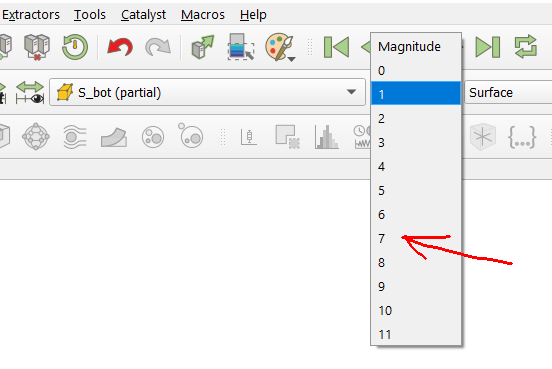
How to rename the dataset components through the Programmable Filter (see figure)?
In this case, access to numerical data is carried out by commands:
```auto
input0 = inputs[0]
data = input0.CellData["S_bot"].Arrays[1]
# This is a 2D array. But how to specify the column title?
```
---
### Author:  [@mwestphal](https://discourse.paraview.org/u/mwestphal)
#### Post date: [November 16, 2022, 3:49pm UTC](https://discourse.paraview.org/t/component-naming-in-a-multi-component-dataset-in-programmable-filter/10770/2 "2022-11-16T15:49:41Z")
Hi,
You have to use vtkDataArray::SetComponentName, but it require to access the underlying VTKObject.
Best,
---
### Author:  [@cory.quammen](https://discourse.paraview.org/u/cory.quammen)
#### Post date: [November 16, 2022, 6:52pm UTC](https://discourse.paraview.org/t/component-naming-in-a-multi-component-dataset-in-programmable-filter/10770/3 "2022-11-16T18:52:12Z")
> [@mwestphal](#):
>
> You have to use vtkDataArray::SetComponentName, but it require to access the underlying VTKObject.
This you can get with `input0.CellData["S_bot"].VTKObject`
---
### Author:  [@Andrei](https://discourse.paraview.org/u/Andrei)
#### Post date: [November 17, 2022, 12:12pm UTC](https://discourse.paraview.org/t/component-naming-in-a-multi-component-dataset-in-programmable-filter/10770/4 "2022-11-17T12:12:15Z")
Dear colleagues! Many thanks for the help!
The final solution looks like this.
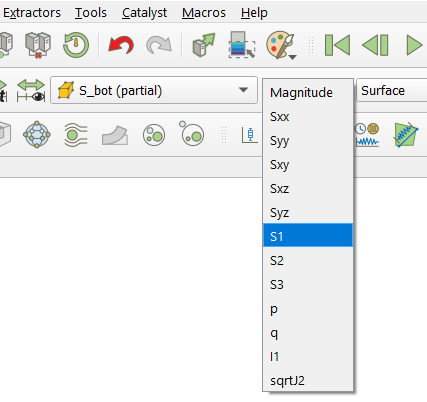
In this code, the name “abc” is defined for component `0` of the dataset `S_bot`. Here the `vtk_index` is the index of the numerical data array in the VTK object `S_bot` (this index may be different in different VTK objects)
```auto
input0 = inputs[0]
vtk_index=1
input0.CellData["S_bot"].Arrays[vtk_index].VTKObject.SetComponentName(0, 'abc')
```
Below is an example of renaming many components using a function in a newly created dataset
```auto
input0 = inputs[0]
vtk_index = 1
# Creating a new dataset from an existing one. Multiplying by zero
# provides a deep copy of the VTK object and initialization with zeros
S_bot = input0.CellData['Mxx,Myy,Mxy,M1,M2'] * 0
pass # Various calculations inside an array S_bot.Arrays[vtk_index]
def SetComponentNames_Stresses(vtk_dataset):
names = ['Sxx', 'Syy', 'Sxy', 'Sxz', 'Syz', 'S1', 'S2', 'S3', 'p', 'q', 'I1', 'sqrtJ2']
for i in range(len(names)):
vtk_dataset.Arrays[vtk_index].VTKObject.SetComponentName(i, names[i])
output.CellData.append(S_bot, "S_bot")
SetComponentNames_Stresses(output.CellData['S_bot'])
```
The result is shown in the figure above