# Compute volume of polygonal mesh (volume enclosed by the surface)
**URL:** https://discourse.paraview.org/t/compute-volume-of-polygonal-mesh-volume-enclosed-by-the-surface/10880
**Category:** ParaView Support
**Tags:** vtk
**Created:** [November 29, 2022, 9:22pm UTC](https://discourse.paraview.org/t/compute-volume-of-polygonal-mesh-volume-enclosed-by-the-surface/10880 "2022-11-29T21:22:53Z")
**Posts on this page:** 5
**Page:** 1
### Author:  [@Resa](https://discourse.paraview.org/u/Resa)
#### Post date: [November 29, 2022, 9:22pm UTC](https://discourse.paraview.org/t/compute-volume-of-polygonal-mesh-volume-enclosed-by-the-surface/10880/1 "2022-11-29T21:22:53Z")
How do I compute the volume of a polygonal mesh?
In specific, I need to compute the volume enclosed by the surface.
---
### Author:  [@Christos\_Tsolakis](https://discourse.paraview.org/u/Christos_Tsolakis)
#### Post date: [November 30, 2022, 1:04am UTC](https://discourse.paraview.org/t/compute-volume-of-polygonal-mesh-volume-enclosed-by-the-surface/10880/2 "2022-11-30T01:04:05Z")
As you mentioned in your other [post](https://discourse.paraview.org/t/fill-polygonal-mesh-with-solid-body-surface-to-solid/10881) one way is to create a volume mesh of your domain and evaluate the volume of each element. If your domain is convex and has no holes you can use the 3D Delaunay filter otherwise you will need some external meshing tool capable of filling the volume of your surface.
Assuming a triangulated surface (if not use `Triangulate` filter) a different way is the following:
- Pick an arbitrary point P in space (barycenter of the surface mesh works the best).
- Sum the signed volumes of the tetrahedra formed by each face triangle and P. [1]
Example:
1. Open: `disk_out_ref.ex2` available in the examples directory
2. Apply `MergeBlocks` ( no need if you don’t have multiblock data)
3. Apply `Extract Surface` ( no need in your case but here the mesh has volume elements already)
4. Apply `Triangulate`
5. Apply `Programmable Filter` using this as a script
```python
import numpy as np
input0 = inputs[0]
numTriangles = input0.GetNumberOfCells()
volumeArray = np.empty(numTriangles , dtype=np.float64)
for i in range(numTriangles):
cell = input0.GetCell(i)
p1 = input0.GetPoint(cell.GetPointId(0))
p2 = input0.GetPoint(cell.GetPointId(1))
p3 = input0.GetPoint(cell.GetPointId(2))
p4 = [0,0,0] # use barycenter of surface for better results.
volumeArray[i] = vtk.vtkTetra.ComputeVolume(p1,p2,p4,p3)
output.CellData.append(volumeArray, "Volume")
```
1. Now we just need to sum these values:
i. one way is to run `PythonCalculator` with `sum(Volume)` as expression it. It will add the value as cell data to all elements
ii. OR you can run `Descriptive Statistics` and select “Volume” as variable of interest.
these steps with ParaView 5.11 on Linux give me `1629.6572304587103` `IntegrateVariables` applied on the original data returns `1629.73`
[1] It works because of Divergence Theorem ! See [A symbolic method for calculating the integral properties of arbitrary nonconvex polyhedra | IEEE Journals & Magazine | IEEE Xplore](https://ieeexplore.ieee.org/document/6429334) if you do not have access check this [math - How to calculate the volume of a 3D mesh object the surface of which is made up triangles - Stack Overflow](https://stackoverflow.com/questions/1406029/how-to-calculate-the-volume-of-a-3d-mesh-object-the-surface-of-which-is-made-up)
---
### Author:  [@Resa](https://discourse.paraview.org/u/Resa)
#### Post date: [December 2, 2022, 12:01am UTC](https://discourse.paraview.org/t/compute-volume-of-polygonal-mesh-volume-enclosed-by-the-surface/10880/3 "2022-12-02T00:01:16Z")
Thank you very much!
In the case of my data I just need the programmable filter and the PythonCalculator. Very nice 🙂
---
### Author:  [@Resa](https://discourse.paraview.org/u/Resa)
#### Post date: [December 2, 2022, 12:05am UTC](https://discourse.paraview.org/t/compute-volume-of-polygonal-mesh-volume-enclosed-by-the-surface/10880/4 "2022-12-02T00:05:18Z")
Now, in another case I have a mesh with holes.
For example it can look like this:
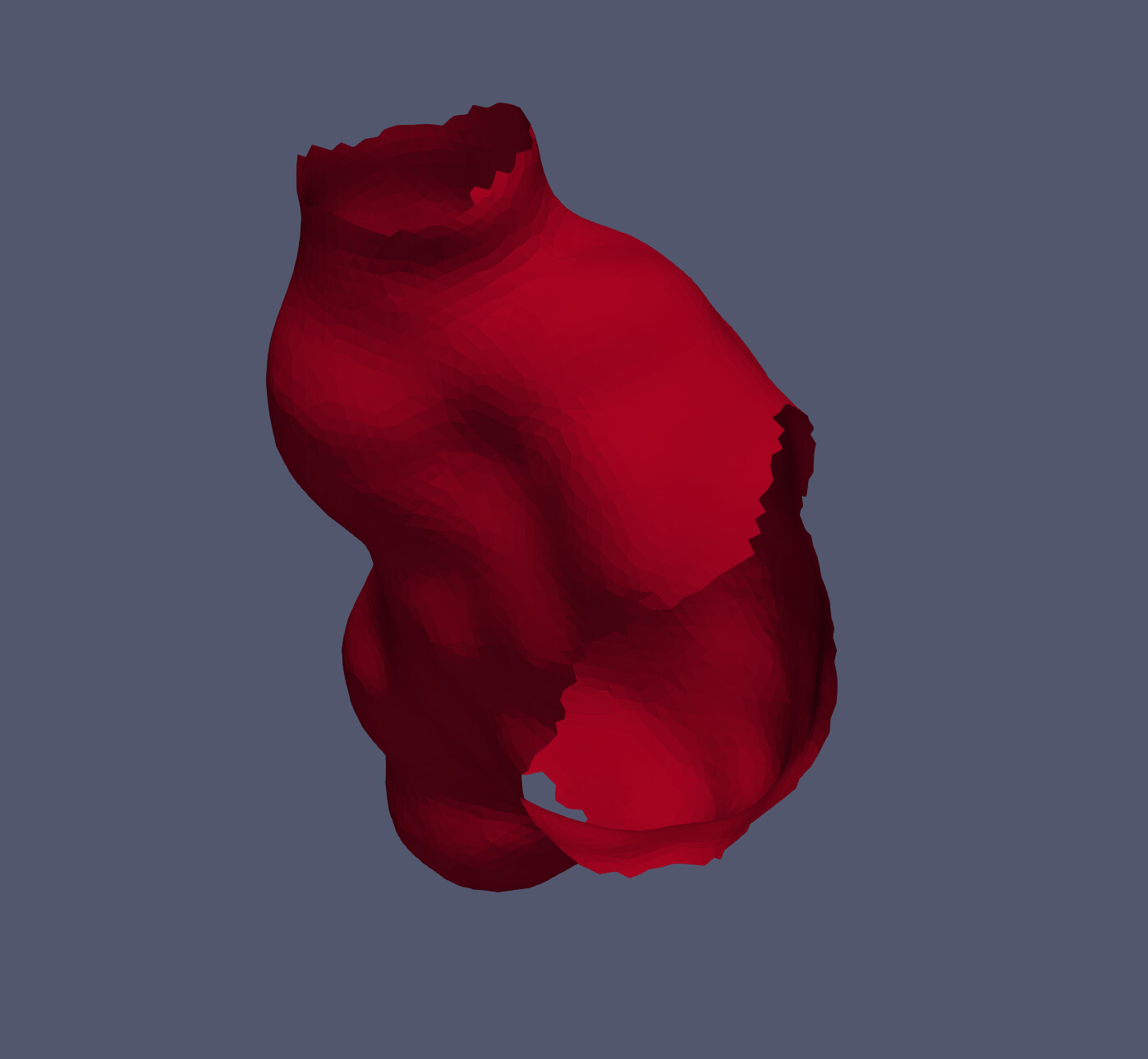
What can I do then?
I found the vtkFillHolesFilter, but so far it does not change anything.
[https://vtk.org/doc/nightly/html/classvtkFillHolesFilter.html](https://vtk.org/doc/nightly/html/classvtkFillHolesFilter.html)
I am using the ExtractSurface Filter to convert the vtkUnstructuredGrid to vtkPolyData and then I apply a programmableFilter with this script:
```auto
import vtk
from paraview import servermanager as sm
input0 = inputs[0]
input0 = sm.Fetch(input0)
filler = vtk.vtkFillHolesFilter()
filler.SetInputData(input0)
filler.Update()
return filler.GetOutput()
```
---
### Author:  [@caladoa](https://discourse.paraview.org/u/caladoa)
#### Post date: [April 3, 2023, 6:44pm UTC](https://discourse.paraview.org/t/compute-volume-of-polygonal-mesh-volume-enclosed-by-the-surface/10880/5 "2023-04-03T18:44:12Z")
Great tip!
I wanted to automate this since I have a bunch of volumes (bubbles) to compute the volume.
I found that if I use the ‘Connectivity’ filter I can split each bubble with a different ‘RegionId’. Now I would like to make a ‘for’ loop, where I threshold based on RegionId, and then compute the volume of each region separately.
Any ideas on how to do this??
Thanks!!