# Cone Glyph with varying radius but constant height?
**URL:** https://discourse.paraview.org/t/cone-glyph-with-varying-radius-but-constant-height/17268
**Category:** ParaView Support
**Created:** [October 28, 2025, 5:04pm UTC](https://discourse.paraview.org/t/cone-glyph-with-varying-radius-but-constant-height/17268 "2025-10-28T17:04:55Z")
**Posts on this page:** 3
**Page:** 1
### Author:  [@reox](https://discourse.paraview.org/u/reox)
#### Post date: [October 28, 2025, 5:04pm UTC](https://discourse.paraview.org/t/cone-glyph-with-varying-radius-but-constant-height/17268/1 "2025-10-28T17:04:55Z")
I have some vector data, where I want to visualize direction and magnitude by a cone. Basically, the direction shall be the direction of the cone and the radius of the cone shall be reflected by the magnitude.
However, when I apply a glyph filter, set it to cone and use Direction and Magnitude, the cone itself is scaled by the magnitude, not just the radius.
Here is an example: [demo.vtk](https://discourse.paraview.org/uploads/short-url/xBYbSMd7FWed2ZGgQv7Y8cYwzg1.vtk) (265 Bytes)
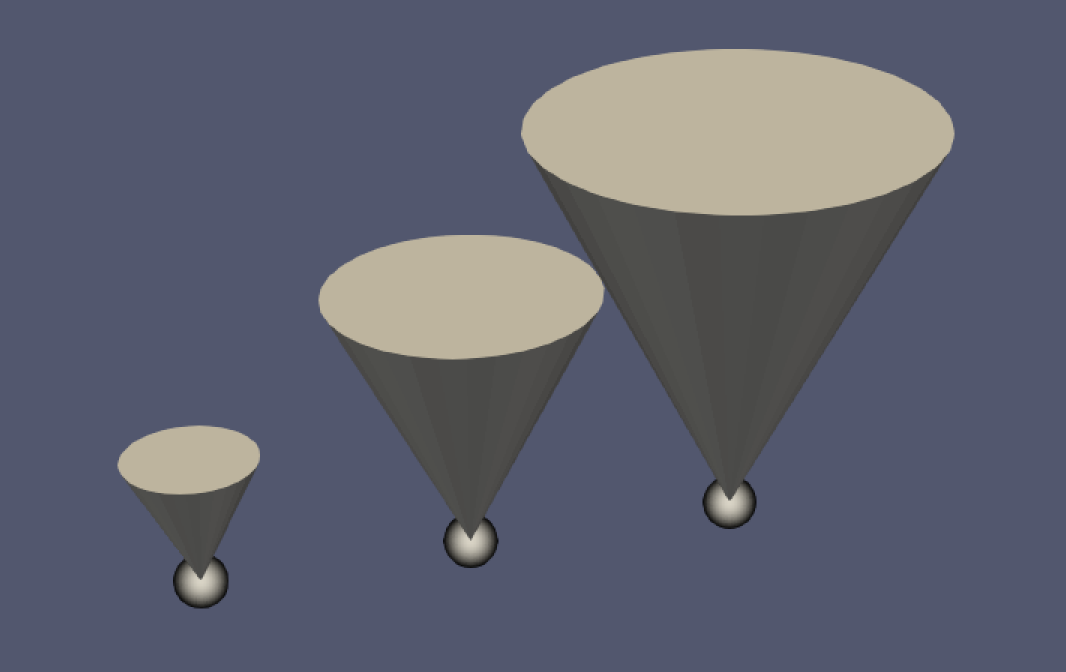
The cone center is set to [-0.5, 0, 0], height is 1 and radius is 0.5. As you can see, the shape stays the same (with aspect ratio 1:1) and the cones are scaled by the given scalar.
Is there any quick way to simply scale the radius?
---
### Author:  [@mwestphal](https://discourse.paraview.org/u/mwestphal)
#### Post date: [October 29, 2025, 8:36am UTC](https://discourse.paraview.org/t/cone-glyph-with-varying-radius-but-constant-height/17268/2 "2025-10-29T08:36:30Z")
Indeed, you cant scale “just” the radius using either Glyph filter or 3D Glyph representation.
This should be implementable using a ProgrammableFilter though.
---
### Author:  [@reox](https://discourse.paraview.org/u/reox)
#### Post date: [October 30, 2025, 2:41pm UTC](https://discourse.paraview.org/t/cone-glyph-with-varying-radius-but-constant-height/17268/3 "2025-10-30T14:41:36Z")
Alright thanks! With the help of GLM4.6 I came up with some ugly solution - but it ain’t ugly if it works, right?
If someone is interested:
```python
# This Programmable Filter creates a cone glyph at each input point.
# - Cone radius is from a scalar array named 'Magnitude'.
# - Cone orientation is from a vector array named 'Direction'.
import vtk
import math
# --- User-defined parameters ---
magnitude_array_name = 'Magnitude'
direction_array_name = 'Direction'
cone_height = 5.0
cone_res = 32
# --- User-defined parameters ---
pdi = self.GetInputDataObject(0, 0)
output = self.GetOutput()
points = pdi.GetPoints()
num_points = pdi.GetNumberOfPoints()
magnitude_array = pdi.GetPointData().GetArray(magnitude_array_name)
direction_array = pdi.GetPointData().GetArray(direction_array_name)
append_filter = vtk.vtkAppendPolyData()
# The cone's default orientation axis is along the X-axis
# But as we want to have the cone opening point into the direction, we invert here
initial_axis = (-1.0, 0.0, 0.0)
for i in range(num_points):
point = points.GetPoint(i)
radius = magnitude_array.GetValue(i)
dir_vec = direction_array.GetTuple(i)
vtk.vtkMath.Normalize(dir_vec)
cone_source = vtk.vtkConeSource()
# Shift so the tip of the cone is at the point
cone_source.SetCenter(-cone_height/2, 0, 0)
cone_source.SetHeight(cone_height)
cone_source.SetRadius(radius)
cone_source.SetResolution(cone_res)
transform = vtk.vtkTransform()
transform.PostMultiply()
dot_product = vtk.vtkMath.Dot(initial_axis, dir_vec)
# Clamp for numerical stability
if dot_product < -1.0:
dot_product = -1.0
elif dot_product > 1.0:
dot_product = 1.0
angle_rad = math.acos(dot_product)
if angle_rad > 1e-6:
rotation_axis = [0.0, 0.0, 0.0]
vtk.vtkMath.Cross(initial_axis, dir_vec, rotation_axis)
transform.RotateWXYZ(math.degrees(angle_rad), rotation_axis[0], rotation_axis[1], rotation_axis[2])
transform.Translate(point)
transform_filter = vtk.vtkTransformPolyDataFilter()
transform_filter.SetTransform(transform)
transform_filter.SetInputConnection(cone_source.GetOutputPort())
transform_filter.Update()
append_filter.AddInputConnection(transform_filter.GetOutputPort())
append_filter.Update()
output.ShallowCopy(append_filter.GetOutput())
```