# Confused about ParaView GPU/Smart Volume Rendering Modes
**URL:** https://discourse.paraview.org/t/confused-about-paraview-gpu-smart-volume-rendering-modes/10157
**Category:** ParaView Support
**Created:** [August 17, 2022, 1:39pm UTC](https://discourse.paraview.org/t/confused-about-paraview-gpu-smart-volume-rendering-modes/10157 "2022-08-17T13:39:16Z")
**Posts on this page:** 13
**Page:** 1
### Author:  [@Dosmi](https://discourse.paraview.org/u/Dosmi)
#### Post date: [August 17, 2022, 1:39pm UTC](https://discourse.paraview.org/t/confused-about-paraview-gpu-smart-volume-rendering-modes/10157/1 "2022-08-17T13:39:16Z")
Hello all,
While using a cluster which is **not** advertised to have a GPU (and upon confirming with support that indeed no GPUs are available, not even integrated), I have noticed that for data which fits under 4GB in memory, Smart and GPU modes work, and, in fact, provide massive speedup! (orders of 10 on large 1000^3 datasets, going from 0.3 fps to 3fps etc.)
_How can that be, for clusters without GPUs?_
Note, for data larger in memory than 4GB, I get this error:
_“vtkVolumeTexture (0x510ed80): Capabilities check via proxy texture 3D allocation failed!”_
The best thing is, I can get around this error by running the pvserver on more processes with MPI (`srun --oversubscribe -n 4 pvserver --mpi --force-offscreen-rendering`, where n=num of processes). As soon as memory usage for each processes involved goes under 4GB, I can use the GPU/Smart modes, even though no GPUs are present.
**TL;DR:**
Could someone clear it up for me, what special magic GPU/Smart modes do, that in fact, they provide faster rendering even when GPU is not present?
---
### Author:  [@mwestphal](https://discourse.paraview.org/u/mwestphal)
#### Post date: [August 29, 2022, 4:36am UTC](https://discourse.paraview.org/t/confused-about-paraview-gpu-smart-volume-rendering-modes/10157/2 "2022-08-29T04:36:02Z")
Are you actually sure that the rendering is done on the server ?
You can check by enabling the “Annotations” in the render view settings
---
### Author:  [@Dosmi](https://discourse.paraview.org/u/Dosmi)
#### Post date: [August 29, 2022, 7:45pm UTC](https://discourse.paraview.org/t/confused-about-paraview-gpu-smart-volume-rendering-modes/10157/3 "2022-08-29T19:45:50Z")
Yes, absolutely sure - I have been using it for a month like that, remotely. Every time the Smart and GPU modes work much faster than CPU mode, on a supercomputing cluster system, without a GPU.
Out of curiosity, I have asked the IT, but they also do not know how this is possible, as ParaView is just one of many applications used on that system. We just assumed that GPU mode does not explicitly use the GPU, but does something fancy, if the data per processor is less than 4GB. If data (per process) is larger than 4GB, it GPU/Smart modes do not work, as mentioned before.
You can see the specification here:
[https://www.archer2.ac.uk/about/hardware.html](https://www.archer2.ac.uk/about/hardware.html)
---
### Author:  [@mwestphal](https://discourse.paraview.org/u/mwestphal)
#### Post date: [August 30, 2022, 12:43am UTC](https://discourse.paraview.org/t/confused-about-paraview-gpu-smart-volume-rendering-modes/10157/4 "2022-08-30T00:43:03Z")
Did you check with the annotation setting ?
---
### Author:  [@Dosmi](https://discourse.paraview.org/u/Dosmi)
#### Post date: [August 30, 2022, 10:23am UTC](https://discourse.paraview.org/t/confused-about-paraview-gpu-smart-volume-rendering-modes/10157/5 "2022-08-30T10:23:54Z")
Yes, of course, I always use ParaView with annotations on, and it says: Remote/parallel rendering: yes
We are working with large data, up to 64GB in size, and if at any point remote rendering did not work, I could never fit that data on my laptop memory in the first place…
So as I have mentioned, when we have enough MPI processes such that it is less than 4GB of data per process, the GPU mode starts to work. I have sent you the hardware that the cluster has in the previous comment.
So my question remains, whether GPU/Smart modes do something else other than just use GPU - maybe it can use the huge amount of memory in supercomputing nodes in a more efficient way?
---
### Author:  [@mwestphal](https://discourse.paraview.org/u/mwestphal)
#### Post date: [August 30, 2022, 10:50am UTC](https://discourse.paraview.org/t/confused-about-paraview-gpu-smart-volume-rendering-modes/10157/6 "2022-08-30T10:50:45Z")
> [@Dosmi](#):
>
> So my question remains, whether GPU/Smart modes do something else other than just use GPU - maybe it can use the huge amount of memory in supercomputing nodes in a more efficient way?
This is completely unexepcted. Which rendering method are you using server side ? OpenGL/EGL/OSMesa ?
---
### Author:  [@Dosmi](https://discourse.paraview.org/u/Dosmi)
#### Post date: [August 30, 2022, 11:31am UTC](https://discourse.paraview.org/t/confused-about-paraview-gpu-smart-volume-rendering-modes/10157/7 "2022-08-30T11:31:58Z")
OSMesa for Headless support.
Since this is unexpected, I am attaching all Connection Information that could possibly help you figure out why GPU mode works on here:
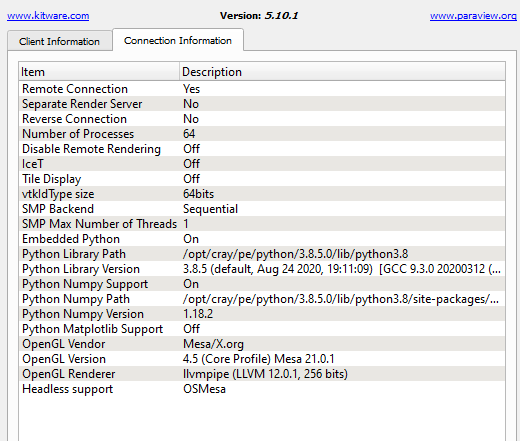
**NOTE:** it says 64 processes because I ran it with:
`srun --oversubscribe -n 64 pvserver --mpi --force-offscreen-rendering`
---
### Author:  [@mwestphal](https://discourse.paraview.org/u/mwestphal)
#### Post date: [August 30, 2022, 11:36am UTC](https://discourse.paraview.org/t/confused-about-paraview-gpu-smart-volume-rendering-modes/10157/8 "2022-08-30T11:36:31Z")
Maybe @martink or @Sankhesh_Jhaveri have an idea
---
### Author:  [@Dosmi](https://discourse.paraview.org/u/Dosmi)
#### Post date: [August 30, 2022, 11:58am UTC](https://discourse.paraview.org/t/confused-about-paraview-gpu-smart-volume-rendering-modes/10157/9 "2022-08-30T11:58:48Z")
Also, worth noting is that GPU/Smart modes provided speedup when tested on three separate clusters _(two of those three do have GPUs, but you have to request nodes with GPUs to use video cards for rendering, and I tested them on CPU nodes, and got same results, that Smart/GPU modes were much faster at volume rendering)_
If any of your colleagues have a similar possibility to test on a cluster node without GPUs, which could explain what is happening. Just make sure to test with big datasets (strictly bigger than 4GB, in Image Data format, a.k.a. Uniform Rectilinear Grid, a.k.a. vtkImageData), and then first run tests with 1 MPI process, where GPU mode should fail with error _“vtkVolumeTexture (0x510ed80): Capabilities check via proxy texture 3D allocation failed!”_, and then run tests with enough MPI processes to workaround this error, and let me know if you also experience massive speedup in comparison when you run in “Raycast only” mode - **for the same amount of MPI processes** , _of course_, to make sure it is not the MPI processes that cause the speedup, but rather the GPU rendering mode.
---
### Author:  [@Sankhesh\_Jhaveri](https://discourse.paraview.org/u/Sankhesh_Jhaveri)
#### Post date: [August 30, 2022, 12:57pm UTC](https://discourse.paraview.org/t/confused-about-paraview-gpu-smart-volume-rendering-modes/10157/10 "2022-08-30T12:57:18Z")
@Dosmi This is expected. You are using [Mesa 3D graphics](https://www.mesa3d.org/) which provides a valid OpenGL core context and hardware acceleration using the cluster’s CPU resources. When you use the GPU mapper with OSMesa, the mapper sees a valid OpenGL context and valid graphics resources and continues to do what it is supposed to do.
You see better performance with _GPU ray cast mapper_ with mesa than the _fixed point ray cast mapper_ because the GPU mapper leverages the parallel distributed processing for setting pixels on screens (using mesa) while the fixed point mapper does multi-threaded processing on the CPU to create the final rendering with some underlying assumptions and trade-offs.
---
### Author:  [@Dosmi](https://discourse.paraview.org/u/Dosmi)
#### Post date: [August 30, 2022, 1:09pm UTC](https://discourse.paraview.org/t/confused-about-paraview-gpu-smart-volume-rendering-modes/10157/11 "2022-08-30T13:09:07Z")
Thanks, that is really helpful! Could you explain a bit more about the 4GB limit that I have encountered for this as well? Namely, the _“vtkVolumeTexture (0x510ed80): Capabilities check via proxy texture 3D allocation failed!”_ error if data per processor is more than 4GB.
Is this related at all to the 32-bit addressable space limit?
---
### Author:  [@Sankhesh\_Jhaveri](https://discourse.paraview.org/u/Sankhesh_Jhaveri)
#### Post date: [August 30, 2022, 3:02pm UTC](https://discourse.paraview.org/t/confused-about-paraview-gpu-smart-volume-rendering-modes/10157/12 "2022-08-30T15:02:34Z")
That error indicates that you’re trying to allocate a texture that is larger than the maximum supported texture size limit. For your case, I am not sure if that is a hardware limit or a Mesa set limit. It could also be a limit imposed by the specific backend driver you’re using.
---
### Author:  [@mwestphal](https://discourse.paraview.org/u/mwestphal)
#### Post date: [August 31, 2022, 1:49am UTC](https://discourse.paraview.org/t/confused-about-paraview-gpu-smart-volume-rendering-modes/10157/13 "2022-08-31T01:49:21Z")
Thanks for clarifying @Sankhesh_Jhaveri