# controlling slices in Slice View
**URL:** https://discourse.paraview.org/t/controlling-slices-in-slice-view/8799
**Category:** ParaView Support
**Created:** [January 19, 2022, 7:50pm UTC](https://discourse.paraview.org/t/controlling-slices-in-slice-view/8799 "2022-01-19T19:50:58Z")
**Posts on this page:** 6
**Page:** 1
### Author:  [@BikerJoe](https://discourse.paraview.org/u/BikerJoe)
#### Post date: [January 19, 2022, 7:50pm UTC](https://discourse.paraview.org/t/controlling-slices-in-slice-view/8799/1 "2022-01-19T19:50:58Z")
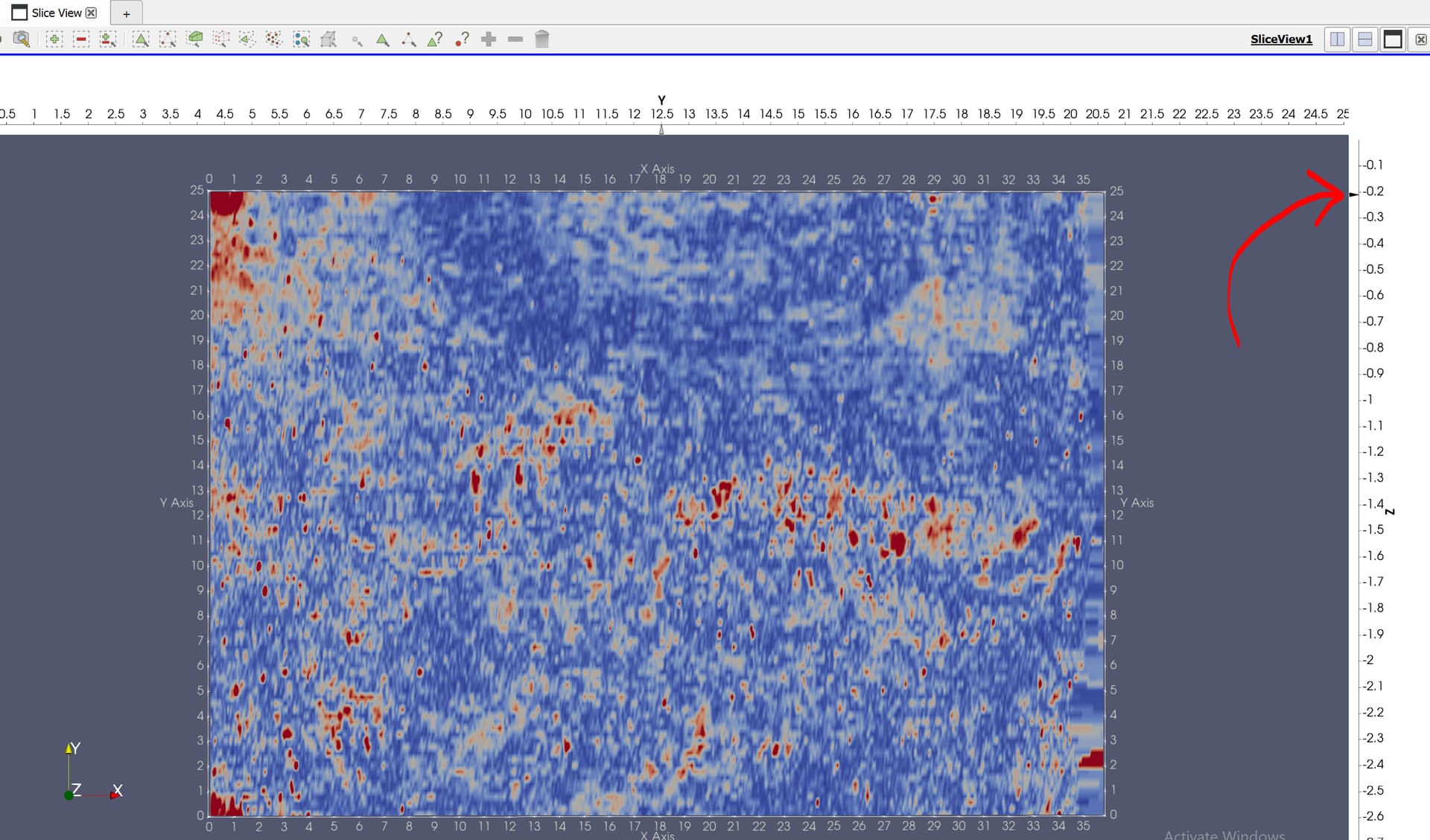
Is it possible to control the Z slice with better control than dragging the mouse? Such as controlling the Z steps in a defined increment. I want to scan through my Z steps looking for anomalies, and sometimes the anomalies are smaller than what I can control with the mouse. Thank you
---
### Author:  [@jourdain](https://discourse.paraview.org/u/jourdain)
#### Post date: [January 19, 2022, 8:02pm UTC](https://discourse.paraview.org/t/controlling-slices-in-slice-view/8799/2 "2022-01-19T20:02:58Z")
I would create a macro and click on the button associated to that macro to “scroll” through your slices.
```auto
from paraview import simple
def next_slice(delta=-1):
view = simple.GetActiveView()
before = view.GetProperty("ZSlicesValues").GetData()
view.ZSlicesValues = before + delta
next_slice()
```
---
### Author:  [@BikerJoe](https://discourse.paraview.org/u/BikerJoe)
#### Post date: [January 19, 2022, 8:20pm UTC](https://discourse.paraview.org/t/controlling-slices-in-slice-view/8799/3 "2022-01-19T20:20:32Z")
> [@jourdain](#):
>
> ```auto
> def next_slice(delta=-1):
> view = simple.GetActiveView()
> before = view.GetProperty("ZSlicesValues").GetData()
> view.ZSlicesValues = before + delta
>
> next_slice()
>
> ```
My data is in a volume called “GridICube.vts”
The slice view is called “slice”
how would I modify the macro to get it to run?
---
### Author:  [@jourdain](https://discourse.paraview.org/u/jourdain)
#### Post date: [January 19, 2022, 10:31pm UTC](https://discourse.paraview.org/t/controlling-slices-in-slice-view/8799/4 "2022-01-19T22:31:43Z")
No need to modify anything. Just need to make sure the view is the active one when running the macro.
Since your data is structured, it might be much better to use the Slice Representation and update its property to pick the right index value. You can also use the animation panel to bind this property to time so you can use the VCR controls for moving along your data.
---
### Author:  [@BikerJoe](https://discourse.paraview.org/u/BikerJoe)
#### Post date: [January 20, 2022, 3:47pm UTC](https://discourse.paraview.org/t/controlling-slices-in-slice-view/8799/5 "2022-01-20T15:47:38Z")
Sebastien, thank you for the reply,
I run the macro as is and get this error message
Traceback (most recent call last):
File “”, line 6, in
File “”, line 2, in next\_slice
NameError: name ‘simple’ is not defined
Traceback (most recent call last):
File “”, line 6, in
File “”, line 2, in next\_slice
NameError: name ‘simple’ is not defined
---
### Author:  [@pavel](https://discourse.paraview.org/u/pavel)
#### Post date: [January 25, 2022, 2:57pm UTC](https://discourse.paraview.org/t/controlling-slices-in-slice-view/8799/6 "2022-01-25T14:57:21Z")
Hi JoeR,
Sebastien’s macro works for me without any changes. How do you run that macro? I put the code in an empty .py file, use “Import new macro…” and then click on the macro’s name from the list below in the same menu panel (or press button with the macro’s name on the toolbar). Does it help you?
Best Regards,
Pavel